


Search Console’s generative AI report counts one thing: how often Google’s AI Overviews and AI Mode showed a link to your site. That count is useful. It is also narrower than the line looks on a dashboard, and the gap is the part a board asks about.
This page is for the marketing leader whose organic sessions have slid for half a year, with penalties, technical faults and tired content already cleared, and whose board reads the rising AI impressions line as proof the brand shows up in AI search. Here is how to read each number, what to stop reporting, what to export, and what to put beside it.
Empact Partners runs go-to-market work from inside B2B software teams, and every week we report AI visibility to more than a dozen partners. We do it as SEO in its widest sense, Search Everywhere Optimization: buyers search in AI engines and communities as well as on Google, so the measurement follows them.
The Report Counts Your Links Shown, Not Your Brand Named
Google’s help page for the report defines its one metric: impressions are “how many times links to your site were shown to a user in a generative AI feature on Google Search.” Today that means AI Overviews and AI Mode. The count can be sliced four ways, and there is no second metric: no clicks, no click-through rate, no position and no queries.
| What the report gives you | What it proves | What it cannot tell you |
|---|---|---|
| Impressions | Google’s AI features showed a link to one of your pages | Whether the answer said your name, or chose you |
| Pages | Which of your URLs the answers linked, after redirects | Which question produced the answer |
| Countries and devices | Where, and on what, those answers were seen | Anything about ChatGPT, Claude or any engine outside Google |
| Dates | When the linking rose or fell | Whether a rise came from more questions or from more of them linking you |
One counting rule changes the totals. When two of your pages appear in the same AI answer, the chart counts one impression and the Pages table counts both, so the table’s rows add up to more than the chart. Read the chart for the trend and the table for which pages carry it.
Two numbers are missing from that list, and most readers fill both in by guessing: clicks and position.
The Clicks Are in Your Totals, Without a Label
The AI report shows no clicks, and that is not because there were none. Google’s definitions page says that clicking a link to an external page in an AI Overview counts as a click, and the same goes for AI Mode. Those clicks land in the Performance report’s Web totals beside every ordinary result, and nothing in either report separates them.
So an AI click-through rate cannot be built from these two reports. Dividing the Performance report’s clicks by the AI report’s impressions divides one population by another, and the answer looks like a rate while measuring nothing. The honest line on a dashboard is AI impressions by page, with clicks written as not reported.
Write it in words, because the export will not. Google’s help pages say that values shown as “~” or “-” in a report download as zeros, and a zero in a spreadsheet becomes “AI sends us no clicks” somewhere around the second forward.
What people on Reddit say about the missing clicks
In r/SEO the empty click column drew three reactions, from the gap itself to a reach for something else to judge pages by:
“The report displays impressions normally, but there are no clicks or CTR metrics yet.” — r/SEO, Aug 2026
“I’m still thinking of use cases for this, do anyone have any?” — r/SEO, Aug 2026
“For the informational pages, I would judge them on citations and assisted conversions instead of clicks.” — r/SEO, Oct 2026
The use case is the Pages table. It lists the pages Google’s AI answers lean on, and that list is where the work starts. What it cannot do is tell you whether those answers named you, and the last comment is reaching for the measurement that can.
Every Link in an AI Overview Shares the Block’s Position
Position looks complete, which makes it the more misleading of the two. Google’s rule for the Performance report is that an AI Overview occupies a single position in the results, and every link inside it is assigned that same position. When the overview sits at the top, a page linked as its fifth source is reported at position one.
The common reading, that every AI Overview link gets position one, is the usual case and not the rule. The consequence it draws is right, though. On queries that show an AI Overview, average position improves while the clicks it used to predict stay away, so a blended average flatters exactly the queries where traffic is leaking.
If you track which of your queries show an AI Overview, split average position on that line. If you do not, take average position out of the AI section of the report altogether. AI Mode follows ordinary rules: Google says its position uses the same method as a results page, and a follow-up question counts as a new query.
Sixteen Months, and the Export Button Is the Only Way Out
Search Console keeps sixteen months of performance data. The longest option in the date filter is “Last 16 months”, and Google’s advice for going further is to pull the data through the Search Analytics API or bulk data export and store it yourself.
The AI report’s help page states no window of its own. It says the report draws on the Web search type of the Performance report, so plan on the same ceiling.
And the API route is closed for this report. Google’s API reference lists six search types, from web to Google News, and none for generative AI, so nothing pulls this data on a schedule. The export button is the only way to keep it, and once the window fills, a month you did not export is gone. The routine, once a month:
None of this needs a tool or a budget, and it is the one part of the method that cannot be done later. A year of exports will show how often Google linked you. It will not show whether the answers said your name, and in Google AI Mode those are different events close to half the time.
In Google AI Mode, Close to Half the Answers That Name a Brand Never Link It
An answer can do two things with a brand, and Search Console sees one of them. It can link one of your pages, which the report counts as an impression. It can say your name in its text, which the report has no field for. The two come apart in both directions:
| What the answer did | What Search Console records | What it means |
|---|---|---|
| Linked your page and named you | An impression | The case the line implies |
| Linked your page without naming you | An impression | Your page informed an answer that never said who you are |
| Named you and linked someone else’s page | Nothing | A mention the report cannot see, usually from a list or thread that includes you |
| Neither | Nothing | Absent, and the report agrees |
We measure how often each happens. The Empact Panel asks every partner’s tracked buyer questions each week, with no partner’s name in any of them, and records whether each answer named the partner and whether it linked a page on the partner’s own domain.
In the latest wave of twelve partner panels, 3,255 of the 6,161 Google AI Mode answers that named the partner linked none of its pages, just over half. Over the month to 31 October the share was 45%. In ChatGPT, on the same questions, it was 7% in the wave and 11% over the month.
.png)
The other direction is smaller and still large. Of the 3,936 AI Mode answers that linked a partner’s own page, 1,030 did not name the partner, about one in four. Each is the kind of answer the report counts as an impression: the partner’s page informed the answer, and the buyer never read the partner’s name.
A pooled figure leans on the larger panels, so the chart puts each panel on its own row, anonymous, with ChatGPT and Google AI Mode side by side.
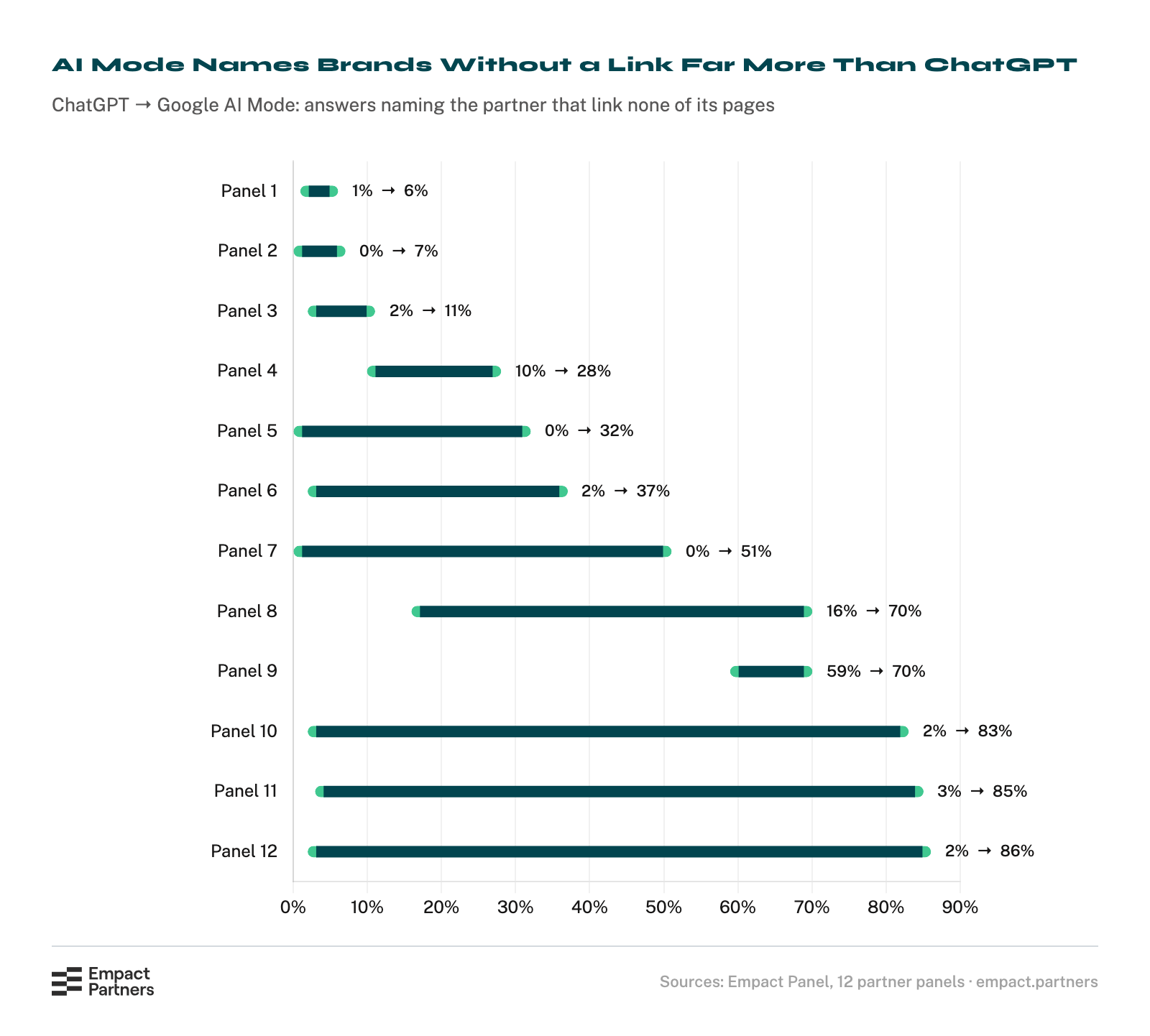
The median panel sits at 44%, and six of the twelve are above half. In all twelve, Google AI Mode named the partner without linking it more often than ChatGPT did, so the gap sits in the engine Search Console reports on.
Our read of the mechanism is the source list. ChatGPT mostly names a brand when it has linked the brand’s own page. Google AI Mode names brands it found on the comparison lists, reviews and threads it links, and the impression goes to the owner of the list.
Two limits belong beside that read. These are answers to the questions we track rather than the ones your buyers typed, so your own split is unknown until you measure it. And our panels measure AI Mode, not AI Overviews, so whether overviews name brands without linking them as often is something our own record cannot settle yet.
What We Put Beside the Report Every Week
The measurement that closes the gap is answer-level, and it is how we report AI visibility to partners every week. Each wave of the Empact Panel ends in a two-page report per partner, and the Search Console line is read against it rather than on its own:
| What the weekly report carries | The question it answers that the AI report cannot |
|---|---|
| Visibility, the share of answers that name the brand | Did the answers say your name at all? |
| Share of voice, your slice of every brand mention in those answers | When an answer named someone, how often was it you? |
| Your own pages the engines cited | Which pages the answers rely on, in every engine and not only Google |
| Third-party pages cited that do not list you | Where the answers took someone else’s name from |
| Reddit threads the answers cite | Which community discussions shape the answer |
| The change against the last wave | Whether any of it moved |
We run the same report on ourselves. In the wave of 23 October, Google AI Mode named Empact Partners in none of the 500 answers it gave about our own category, and no Search Console export could have told us that. (We sell this work, so the zero is the least flattering number on the page, and it is ours.)

.png)
The third-party rows carry the work. A page cited across many answers that lists your competitors and not you is the most direct fix the weekly report points to, and it is invisible in Search Console, because the impression belongs to whoever owns the page.
Ten Questions This Afternoon, a Tracked Set Every Week
The pairing can start today with nothing but the report and a browser, and it gives you a rough read of your own split:
Ten questions will not give you a percentage to report. They will tell you which way your split leans, and that decides what kind of work comes next.
What an afternoon cannot do is the weekly version. Two runs of one question in Google AI Mode share about four in ten of the brands they name, so a reading you can act on takes hundreds of questions per category, every week, read by somebody whose job it is. That is a standing job measured in quarters, and most teams stop there.
That standing job is how Empact Partners opens a partnership on AI visibility: an audit, a tracked question set with nobody’s name in it, and a panel that asks it every week. A named senior consultant owns the reading, with the partner’s Search Console beside it, and the first weeks produce a map of the two kinds of gap:
If your board is reading an AI impressions line as proof the brand shows up in AI answers, and you would rather report what the answers say, book a call with me, and together we will see whether it is work we should run for you.


