


The HubSpot workflows a marketing team already runs are usually the part of its stack nobody can explain. Each was built for a reason by someone who knew it. A few hires later, nobody can say which still matter, what each one writes to, or who would notice if one stopped.
An automation audit answers those three questions, and it has to come before the two fixes everybody reaches for. Deleting old workflows risks the one that quietly feeds somebody’s report. Building on top, with more automation or an agent, puts new work on a foundation nobody can describe.
Empact Partners is a consultancy that has worked inside software companies’ own marketing teams since 2020. Our RevOps work, the routing, data and workflows between a signup and a signed deal, starts in a partner’s marketing automation with this audit and the one register it produces. HubSpot is the worked example.
HubSpot’s Export Lists Every Workflow and Explains None of Them
Start with the inventory HubSpot already keeps. On the workflows dashboard, Export view in the Table actions menu downloads a spreadsheet of every workflow. Each row carries the name, whether it is on, total and current enrollments, goal conversions, and who created it and who last changed it, with dates.
Two details catch people on the first pass. Each folder exports separately from inside it, so a portal that files workflows in folders needs one export per folder. And simple workflows built inside the forms, email and ads tools appear in the list but can only be deleted from their own editors.
What the spreadsheet leaves out matters more than what it holds:
That last gap is the one that misleads. The person who built a workflow in 2023 may have left, and the person who last edited it may have fixed a typo in an email. Neither is the person who would notice the workflow stopping, which is the only kind of owner an audit can use.
Five Columns Make a Workflow Explainable
The export is a list of names, and the register is what turns each name into something you can decide about. It is one row per workflow and five columns.
Four are what any inventory like this records: what the workflow does, who owns it, what it writes to, and when it was last reviewed. We add the outcome, how you would know it worked, because that is the thing you check during the switch-off test.
| Column | What goes in it | Where it comes from |
|---|---|---|
| What it does | One sentence a new hire could follow: the trigger, the action, and the reason. “When a demo form comes in, assign the contact to the territory owner and alert them, so every demo gets a call the same day.” | The workflow itself, read in the editor. The name is a hint, never the answer. |
| Who owns it | The person who would notice if it stopped, by name. | A person, asked. Never the creator or last-modified column. |
| What it writes to | Every property it sets or clears, every list it adds to, every email it sends, every person it notifies, every webhook it calls. | The workflow’s actions and its Connections panel. |
| The outcome: how you would know it worked | Something a person can look at: the task in the rep’s queue, the field filled on the record, the count on the report. | The owner, in their own words. |
| Last reviewed | A date and the name of whoever reviewed it. | The audit, then the monthly check. |
When we run this with a partner, the owner column is filled by asking, never from the export. The consultant takes the list to the people who run demand generation and sales operations and asks one question per row: would you notice if this stopped tomorrow?
A workflow nobody claims is not unfinished business. It is the first candidate for the switch-off test, because a workflow nobody would miss is either dead or doing something nobody knows about, and the test is how you find out which.
The outcome is hardest to write for nurture emails, where success feels too soft to pin down. Write the nearest thing a person could check: the right list got the email, the score moved, the task appeared. If nothing can be written, that blank is the finding.
Two Workflows Writing One Field Is a Finding Before Anything Breaks
A full register still reads one row at a time, and the breakage the audit exists to find sits between the rows. The first thing we do with one is sort it by the writes-to column and read across instead of down.
Somebody has to answer for every field that appears twice: two workflows setting lifecycle stage, a lead-status update feeding a routing workflow that reads lead status, three workflows alerting the same rep about the same contact.
Most of that column comes from each workflow’s Connections panel in the editor. It lists what the workflow relies on, from lists and emails to properties, users and integrations, and below that the workflows, lists and criteria that rely on it.
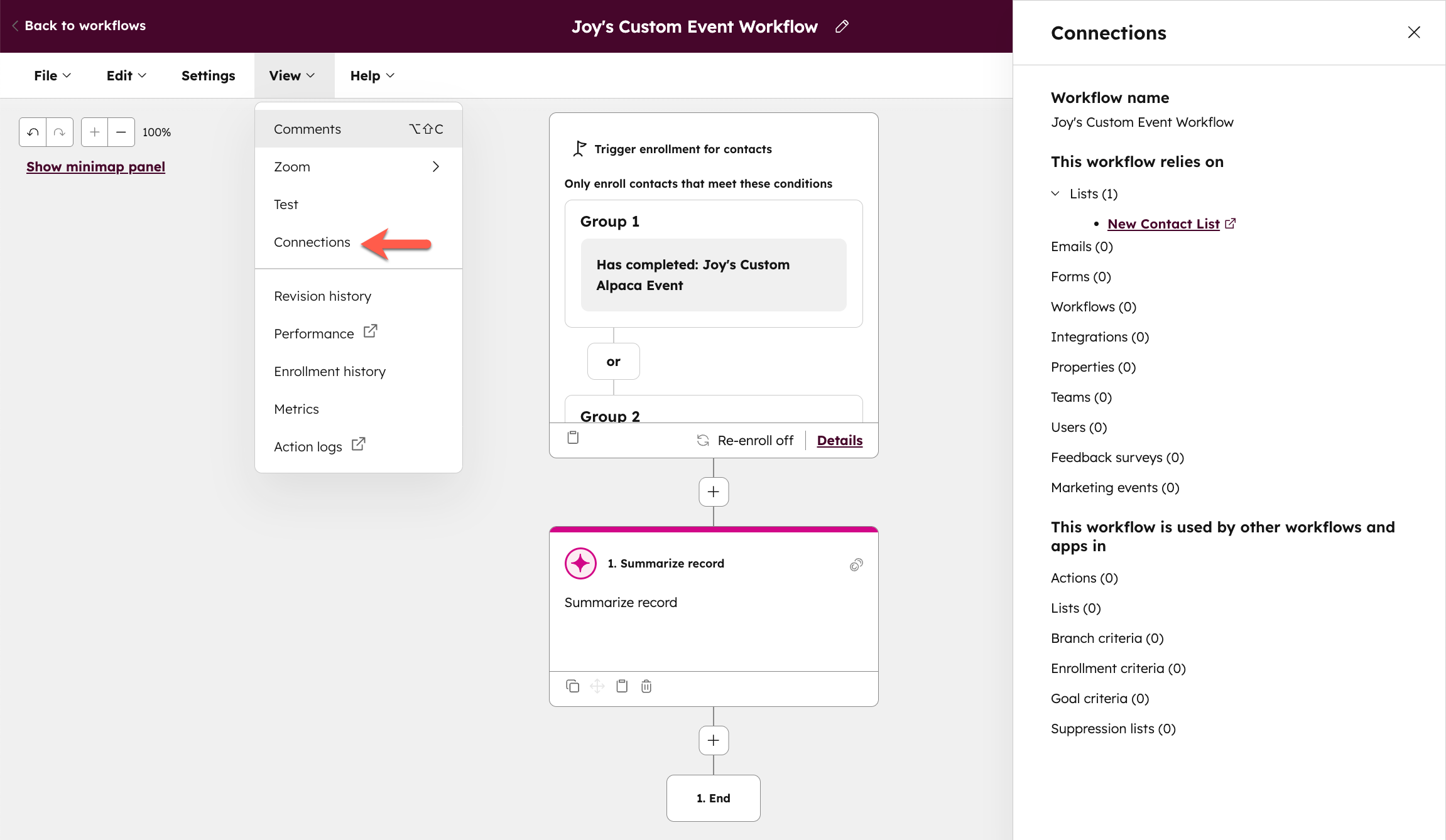
HubSpot records each action as it completes and does not warn anyone when a second workflow changes the same property a minute later. The overlap surfaces as a sales team saying the lifecycle stages are wrong and a marketing team saying its workflow ran fine. Both are right.
Workflows are not the only things that change fields. A sync with the sales CRM, an import, a form and a person editing a record do too, and on Data Hub Professional or Enterprise a property’s Data sources tab lists them all. Any field with two writers goes to its owner for a ruling.
HubSpot’s own cleanup view cannot see that far. Its Unused tab lists workflows that are off or have run no action for 90 days, unless a list or another workflow references them. It cannot see a webhook’s destination or the rep expecting an alert, so we treat everything on it as a candidate to test, never as a deletion.
A Workflow Can Succeed on Every Action and Still Miss Its Outcome
The dependencies tell you where to look. Neither they nor a workflow’s history tell you whether it worked: the history records what the workflow did, not whether the person or the report downstream got what they needed from it.
Take the alert. When a user is deactivated, HubSpot stops sending them notifications and advises removing them by hand from the workflows that reference them, because deactivation does not. A demo alert to a rep who left in spring is still an action the workflow takes, and a notification nobody reads.
.png)
This gap is why the register asks each owner for the outcome. Once the owner has said what they would see if the workflow worked, somebody can go and look, and the register becomes something an audit can test. Practitioners describe failures both ways: workflows that look fine and are not, and workflows that look dead and are not.
What people on Reddit say about silent workflows
“The workflow fires, every action technically succeeds, and the end result is still wrong because another workflow changed the field later, an upstream assumption changed, or the thing you expected to happen just… didn’t.” — r/hubspot, Aug 2026
“the amount of times i’ve seen a “dead” workflow silently feeding a webhook that another team built their whole reporting around...” — r/hubspot, Sep 2026
The register would have flagged both before anything broke: the field with two writers, and the workflow writing to something outside the portal. Whether it is safe to switch either one off is a question only a test can answer.
Pause for a Week Before You Delete Anything
Once the register is filled, pick out the workflows with no owner, no outcome anyone could write, or a collision with another workflow on the same field. None of them is deleted first. Each gets the test our RevOps audits run on every candidate, in this order:
- Read the enrolled count, then turn it off. Turning a HubSpot workflow off stops new enrollment, but records already inside it stay enrolled and skip every action except delays, and those actions are not replayed when it comes back on. A candidate with nobody enrolled can go off at once. Leave a nurture with people part-way through it for last, unless you accept on purpose that they miss the rest of it.
- Tell the owner and everyone its writes-to column names. Say the date it went off and who to tell if something they rely on goes quiet. A complaint is the cheapest evidence an audit ever gets.
- Watch the outcome for a week. Look at the thing a person said they would see, not at the workflow’s history.
- Check that the trigger happened. Silence counts only if the workflow would have done something that week. If it fires on a demo request, were there demo requests? A workflow that fires on a quarterly renewal stays off until one full cycle has passed, with the date in its row.
- On a complaint, turn it back on. The person who complained becomes the owner, and the row gets the dependency the register missed.
- If the week stays quiet and the trigger happened, delete it. Export it first from the workflow’s File menu as a PNG and keep its row. HubSpot can restore a deleted workflow for 90 days, but it comes back as a new, inactive copy with no history, so the image and the row are the record of what it did.
Our consultants never skip two checks in that list, the trigger and the complaint, because they stop the two mistakes audits make: deleting after a week that proved nothing, and keeping forever a workflow nobody would miss.

.png)
A Monthly Check Keeps the Register True
A one-time cleanup goes stale the month somebody adds a workflow without its row. The portal keeps changing underneath the register: a campaign gets a new workflow, a rep leaves, a form gets rebuilt. Keeping up takes a short monthly check, with an owner of its own.
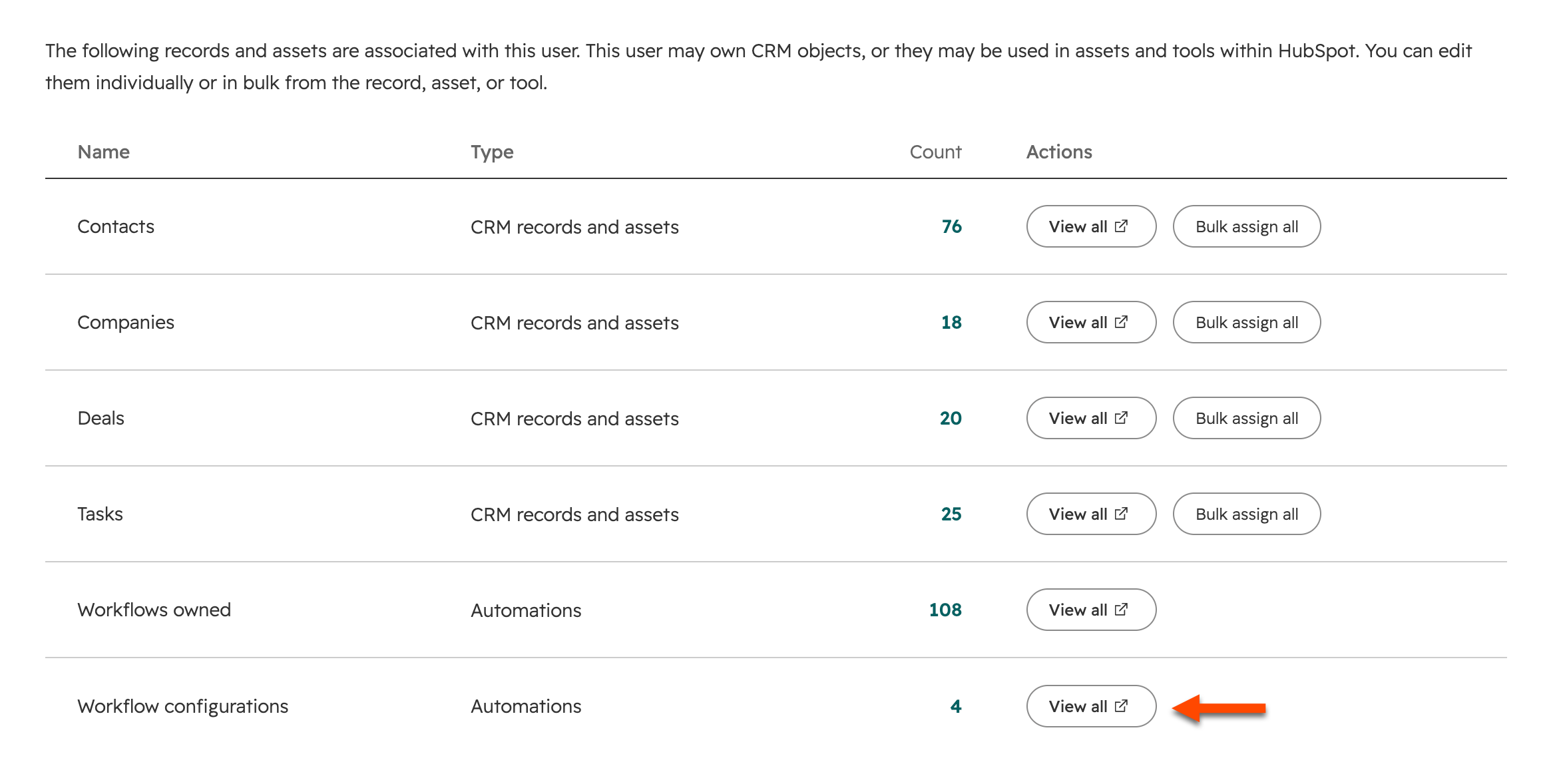
HubSpot keeps the list for people who left at the bottom of a user’s Overview tab, under Workflow configurations, and the same panel replaces the departed user with someone else across every workflow at once.
Your team can run all of this itself. The export takes minutes, the first register takes as long as finding the owners does, and the switch-off tests run side by side for a week.
What comes after needs somebody whose job it is, for quarters: keeping the register true across marketing and sales, and fixing what it surfaces, like the routing that sends demo requests to the wrong territory or a lifecycle stage two teams define differently.
Keeping it true is where our RevOps work goes after the audit. A named senior consultant from Empact Partners works inside the partner’s own HubSpot, runs this audit first, and turns its findings into a roadmap where every recommendation carries its first step. The horizon is quarters.
An Audited Stack Is the Only Safe Place to Add an Agent
The register outlives the cleanup because anything new gets added against it, an agent included. An agent that scores leads or routes inbound is one more writer on fields the register already lists, so it gets the same row, all five columns, before it is built.
Empact Partners also builds the agents go-to-market teams run on, which we call marketing engineering. A build starts by auditing the work a team already repeats, and gives each agent one job, one accountable consultant and a measure fixed in advance. An agent dropped into an unexplained portal inherits its collisions.
If your workflow list has grown past what anyone on your team can explain, book a call with me, and let’s see whether we could work together.


