Empact News

How We Use Claude Code for Content Without Letting It Write

Your blog sounds like four companies and you fix every draft yourself. The research and checking desk we run, set up step by step.

Author:
Vlad Shvets
Contributors
Vlad Shvets
Date:
September 18, 2026

It is eleven at night and you are on the fourth draft of the week, rewriting a writer’s paragraphs so they sound like the other three writers’ paragraphs. You hired them to publish more. You are publishing more, and you are also the only person on the team whose sentences survive to the live page. Somebody in the leadership meeting has already suggested the obvious fix, which is to let a model write the drafts.

Split the work along a different line. Everything on a content team that is reading can go to Claude Code: the pages that already rank for a topic, the search data behind it, your own back catalog, and the check of a draft against your house rules. Everything that is writing stays with a person, because the thing your reader gives you attention for is experience, and a model has never had any.

By the last step you will have one folder your whole team opens. In it: a house standard built from your own best and worst published paragraphs, two research tools wired in so one command turns a topic into a research pack, a check that flags the always-wrong before your editor reads a draft, and a rule that keeps Claude Code out of the prose. You will watch it obey that last rule twice.

Empact Partners is a B2B SaaS go-to-market consultancy, and Content Marketing is one of the six workstreams we run with partners: building a publication rather than a blog, with original insight, named experts and product tutorials a competitor cannot copy, and none of it written by a model. We use AI heavily, as infrastructure, and this desk is the shape of it. We rebuilt it from scratch in an empty folder, and every screen in the steps came out of that run.

What You Need Before Step One

Claude Code on a paid Claude plan, or with an Anthropic API key. We built this on an API key, and the session that made the research pack and ran the check cost $0.91.
A Firecrawl account and its API key. Firecrawl bills in credits for each page it reads.
A DataForSEO account with a prepaid balance, and its API login and password. It bills per request, and one research pack makes three.
Node.js installed, because both tools run through npx, and a terminal. We ran everything on a Mac.
From somebody else: if IT manages your laptop, permission to install command-line tools. Ask before you start, because it is the one thing that stops step one.
Time: an afternoon. The slow part is you, choosing paragraphs in step six.

The steps stop before the writing and before your CMS. Your published articles need to be public, because the desk reads them from your live site.

Three Tools, and the One Job Each Gets

Claude Code talks to the other two through MCP, the Model Context Protocol: each tool ships a small server, and Claude Code lists what that server can do and calls it when a job needs it.

Tool What it is Its one job on the desk
Claude Code An AI agent that runs in your terminal, inside one folder. It reads and writes files there, runs commands, and reads a file called CLAUDE.md every time it starts. Fetching, researching and checking. Never writing the article.
Firecrawl A service that opens a web page and hands back its text, without the menus, cookie banners and footers. Reading the pages you want read: your own published articles, and the pages that rank for a topic.
DataForSEO A paid data service for search: how often a phrase is searched, how hard it is to reach the first page for it, and what Google shows for it today. The numbers and the results page behind a topic.

Step 1: Put the Keys in Your Shell, Not in the Folder

Open a terminal. Paste these four lines with your own keys between the quotation marks, and press Enter.

echo 'export FIRECRAWL_API_KEY="paste-your-firecrawl-key"' >> ~/.zshrc
echo 'export DATAFORSEO_USERNAME="paste-your-dataforseo-login"' >> ~/.zshrc
echo 'export DATAFORSEO_PASSWORD="paste-your-dataforseo-password"' >> ~/.zshrc
source ~/.zshrc

They add the keys to your shell’s startup file, so every terminal you open from now on has them and none of them ever sits in the folder your team shares. If your terminal runs bash rather than zsh, write ~/.bashrc wherever these lines say ~/.zshrc.

Step 2: Make the Folder and Connect the Two Tools

In the same terminal, paste this block and press Enter. It makes a folder called content-desk, moves into it, registers Firecrawl and DataForSEO for this folder only, and prints the file it wrote.

mkdir content-desk && cd content-desk
claude mcp add firecrawl --scope project -e FIRECRAWL_API_KEY='${FIRECRAWL_API_KEY}' -- npx -y firecrawl-mcp
claude mcp add dataforseo --scope project -e DATAFORSEO_USERNAME='${DATAFORSEO_USERNAME}' -e DATAFORSEO_PASSWORD='${DATAFORSEO_PASSWORD}' -- npx -y dataforseo-mcp-server
cat .mcp.json

The file is .mcp.json, and the part to check is each env block. It holds the names of your keys and not the keys, and this is what it printed for us:

A terminal after two claude mcp add commands, printing the shared .mcp.json file, whose env blocks hold variable names instead of keys.

Claude Code fills those names in from your shell when it starts, so the file can go into version control and every writer uses it with their own keys.

Step 3: Decide What Claude Code May Do Without Asking

Paste this block and press Enter. It creates the three folders the desk works in and a settings file with two lists.

mkdir -p .claude published research drafts && cat > .claude/settings.json <<'JSON'
{
  "permissions": {
    "allow": [
      "mcp__firecrawl__firecrawl_scrape",
      "mcp__firecrawl__firecrawl_search",
      "mcp__dataforseo__api_request",
      "Edit(published/**)",
      "Edit(research/**)",
      "Bash(python3 check.py:*)"
    ],
    "deny": [
      "Edit(drafts/**)"
    ]
  }
}
JSON

The allow list lets Claude Code read pages through Firecrawl, request search data, save into published/ and research/, and run the check without stopping to ask. Anything missing from that list, it asks about first.

The deny list has one line, and everything else on the desk depends on it: Claude Code may not create or change anything in the drafts folder, which is where your writers work. The same rule goes into the house standard in step seven, in words. This line is the one that holds when the words are ignored.

Step 4: Open Claude Code in the Folder

Type claude and press Enter. The first launch asks up to four things before you reach a prompt: a text style, which only changes the colors; a screen of security notes; in some terminals, an offer to change your terminal’s settings, which you can decline; and whether you trust this folder. The trust screen lists every permission the folder pre-approves:

Claude Code’s first-launch trust screen for the content-desk folder, listing the six tool permissions pre-approved in .claude/settings.json.

Whoever owns the desk reads that list once, and every writer who opens the folder later sees the same one. Press the down arrow to highlight Yes, I trust this folder, then press Enter.

Next it asks which of the two new servers to enable, with both already ticked. Press the down arrow until Enable selected is highlighted, then press Enter. Enter on a server’s name unticks that server, which is how we switched Firecrawl off on our first attempt.

Type /mcp and press Enter. Both servers should read connected, and Esc closes the panel:

The Claude Code MCP panel listing two project servers from .mcp.json, dataforseo and firecrawl, both marked connected.

If one reads failed, the terminal you launched from does not have its key. Type /exit, run source ~/.zshrc, and type claude again.

Step 5: Pull Your Published Articles Into the Folder

Paste this into Claude Code with your own article addresses in place of ours, and press Enter. Pick pieces by different writers, including the ones you rewrote hardest.

Use firecrawl_scrape to pull these articles from our blog as markdown, main content only, and save each one as published/<last-part-of-the-url>.md with nothing added, removed or reworded: https://www.empact.partners/empact-zone/deep-and-shallow-gtm-onboarding https://www.empact.partners/empact-zone/saas-seo-budget-allocation https://www.empact.partners/empact-zone/measure-ai-search-visibility https://www.empact.partners/empact-zone/how-to-build-saas-content-publication https://www.empact.partners/empact-zone/saas-blog-200-articles-no-leads https://www.empact.partners/empact-zone/stop-posting-linkedin-like-founder

Firecrawl reads each page, and Claude Code writes each one into published/ as a text file. Six articles took us five minutes and thirty-seven seconds:

Claude Code reporting that six published articles were read with Firecrawl and saved into the published folder after five minutes and thirty-seven seconds.

This is the slow step, because Claude Code writes every article out in full, and it only runs again when your back catalog changes. On the way it may ask to run mkdir or ls, even for a folder that already exists. Press 1 for Yes: those commands create a folder or list one, and nothing else.

Step 6: Name the Fixes You Make Most, Then Let Claude Code Find Them

Before you write a single rule, write down the three corrections you make most often when you rewrite a draft. Last night’s rewrite is the best evidence you have, because every change you made in it was a rule you never wrote down. Ours were a dash holding two claims in one sentence, a staged reveal where a plain claim belonged, and a result given with no starting point and no timeframe.

Paste this into Claude Code with your three in place of ours:

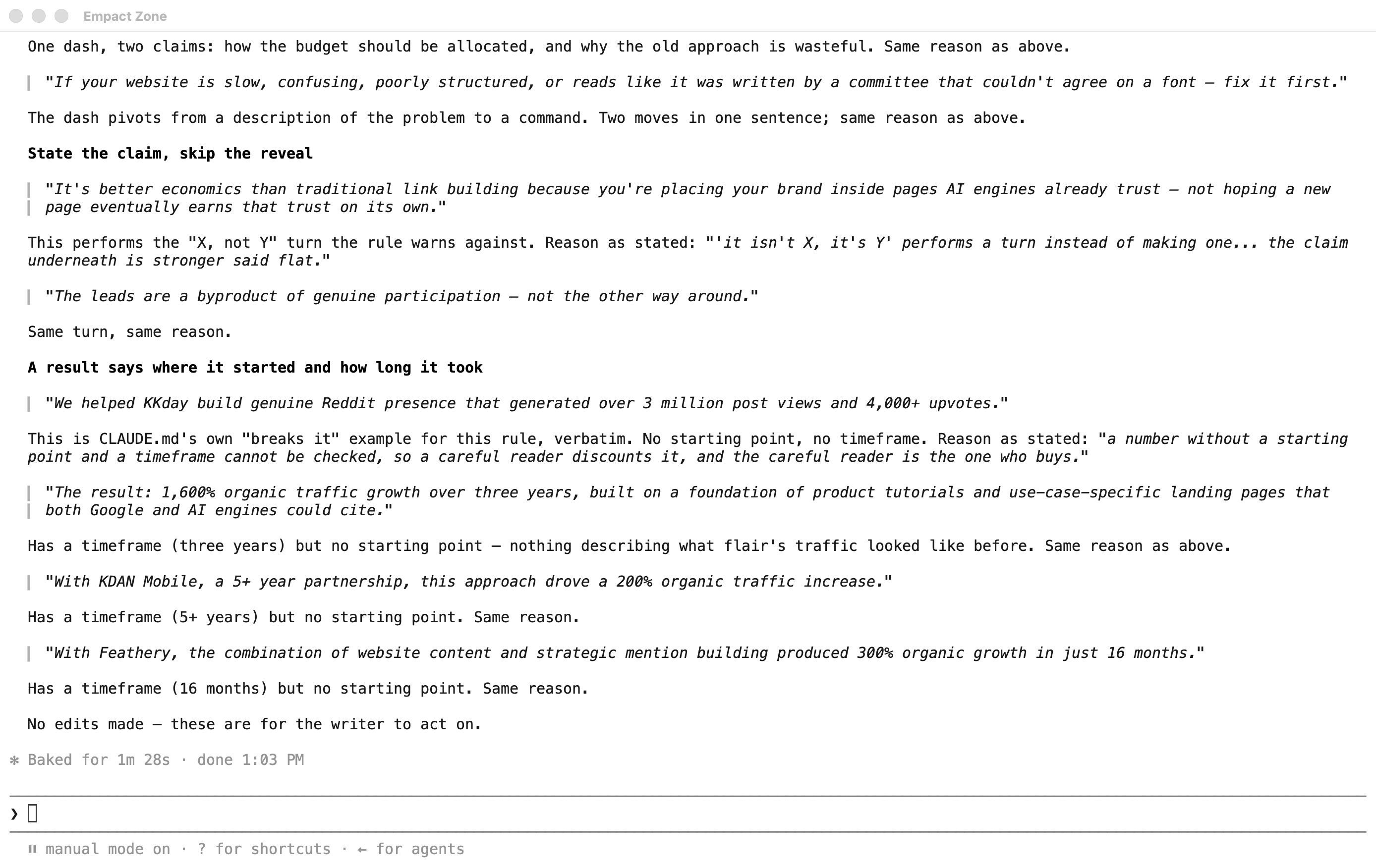
I'm the editor. When I rewrite our writers' drafts, these are the three fixes I make most: 1) a sentence that carries two claims joined by a dash, 2) a sentence that stages a reveal instead of stating the claim, the "isn't X, it's Y" shape, 3) a result given without where it started or how long it took. Read every file in published/. For each fix, list up to three paragraphs that need it and up to three that already get it right. Quote each paragraph exactly and name its file. Do not rewrite anything and do not suggest wording.

It comes back with quoted paragraphs, by file, under each fix:

Claude Code listing quoted paragraphs from the published articles under each of the editor’s three fixes, split into paragraphs that need the fix and paragraphs that already get it right.

Read that list as candidates. Two of its “already gets it right” picks were wrong by our own standard: one was a staged reveal in a different costume, and one was somebody else’s statistic with our sentence wrapped around it. Claude Code is quick at finding the paragraphs and unreliable at judging them, which is the division of labor on this whole desk, shown on one screen. The editor makes the call.

Step 7: Write the House Standard Yourself

Create a file called CLAUDE.md in the folder, in any text editor, and start from this skeleton:

# House standard

Claude Code reads this file every time it opens in this folder. So does every writer, before a first draft.

## The standing rule

Claude Code writes no article prose in this folder. No drafts, no intros, no rewrites, no suggested sentences. It fetches pages, pulls search data, builds research packs and checks drafts against this file. Writers write every sentence that ships.

Why: <your reason, in your own words>

## How this file is written

Every rule has a reason and two real paragraphs from our own published work: one that breaks the rule and one that keeps it. There are no word counts, no length targets and no quotas in here.

## Rules

### <a fix you make on every draft, written as a rule>

Why: <one or two sentences, in your own words>

Breaks it (<file name>): "<the paragraph, pasted exactly>"

Keeps it (<file name>): "<the paragraph, pasted exactly>"

## Always wrong

check.py reads this list. One entry per line: the phrase in backticks, then the reason.

- `<phrase>` <why it is wrong every time>

For each fix from step six, write the rule in one line and the reason in your own words, then paste one paragraph that breaks it and one that keeps it, exactly as they were published. Under Always wrong, list the words and phrases that are wrong every single time, one per line, each with its reason. The check in step ten reads that list and nothing else.

Ours has three rules. The top of the file:

The top of the house standard file, with the standing rule that Claude Code writes no article prose and a note that the file carries no word counts or quotas.

And the rules, with the list the check reads:

The rules section of the house standard, each rule with its reason, one published paragraph that breaks it and one that keeps it, followed by the always-wrong list the check reads.

Every weak example in it is a paragraph of mine. My two older pieces carry twenty-five and twenty-six em dashes between them, so the first rule was not hard to illustrate.

Notice what the file leaves out: no word count, no target length, no number of subheadings, no reading-level score. We struck every one of those from our own standard, because a writer holding a target writes to the target, and four writers writing to one target sound like a template rather than like one company. A rule with a reason gives a writer something to agree with. A number only gives them something to hit, and the paragraphs pasted underneath do the teaching that the adjectives in most style guides never manage.

Claude Code reads this file every time it starts in the folder, which is why the standing rule sits at the top of it.

Step 8: Give the Desk a Research Command

Type /exit to leave Claude Code, paste this block into the terminal, and press Enter. It saves a command called /research that any writer can run from inside Claude Code.

mkdir -p .claude/commands && cat > .claude/commands/research.md <<'MD'
---
description: Build a research pack for one article topic
argument-hint: <topic>
---
Build a research pack for this topic: $ARGUMENTS

You are doing the reading so a writer can do the writing. Write no article prose: no intro, no draft paragraphs, no suggested sentences.

1. Search data. With the dataforseo api_request tool, POST /v3/dataforseo_labs/google/keyword_overview/live for the topic, then POST /v3/dataforseo_labs/google/related_keywords/live with a limit of 20. Use location_code 2840 and language_code "en". Record search volume, keyword difficulty and search intent for each phrase.
2. The results page. POST /v3/serp/google/organic/live/advanced for the topic, same location and language, depth 10. Record the top ten organic results (title and URL) and every People Also Ask question.
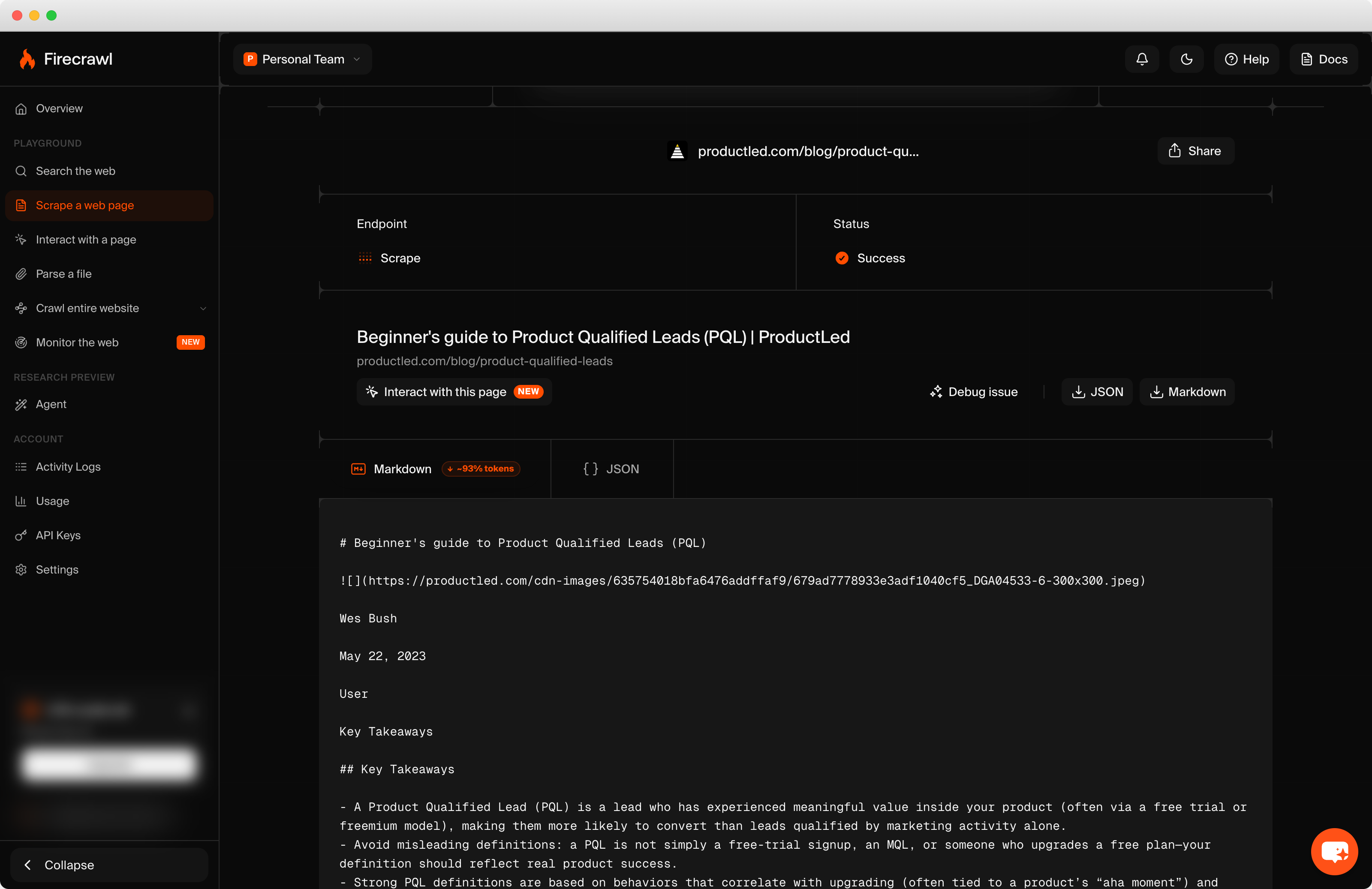
3. The ranking pages. Read the top five organic results with firecrawl_scrape (markdown, main content only). If a page fails, skip it and say which.
4. Write research/<topic-as-a-slug>.md with these sections and nothing else:
   ## The numbers: a table of the topic and its related phrases, with volume, difficulty and intent.
   ## What the searcher wants: two or three sentences, from the intent data and the results page.
   ## What every ranking page already says: the points at least three of the five pages make.
   ## What none of them says: the gaps, the contradictions and the questions left open.
   ## Questions people ask: the People Also Ask list, word for word.
   ## Sources: every URL you read, with today's date.
5. Reply with the file's path and one line per section saying what is in it.
MD

The number 2840 is the United States. Change it if your buyers search from somewhere else.

Type claude to open Claude Code again, then /research followed by the topic of your next article, and press Enter. We used product qualified leads, the subject of an article on our own plan. Our first DataForSEO requests failed on the shape of the request, and Claude Code read the error and retried on its own, so leave it running when that happens. The pack was written in under two minutes.

The top of it is the search data:

The top of the research pack for product qualified leads: a table of search volume, keyword difficulty and intent, with two unrelated meanings of PQL flagged as noise.

Each column means something narrower than it looks:

In the pack What it is What it is not
Search volume An estimate of how often people type that exact phrase in a month Demand for your product, or the number of people with the problem
Keyword difficulty A 0 to 100 estimate of how hard the first page is to reach, based on the links behind the pages already there A verdict on whether to write the piece
Search intent A label for what the searcher seems to want: to learn, to compare, to buy, or to find one site A reading of your buyer’s mind
The results page The ten pages Google shows for the phrase today Permanent, or the only place a buyer looks
People Also Ask The questions Google shows in a box beside the results A full list of what buyers ask

Our run shows three of those limits in one table. The exact phrase came back at twenty searches a month, which tells the writer that buyers rarely type the phrase the category uses about itself. Two related phrases were other meanings of PQL altogether, and the pack flagged them itself. Difficulty never came back for the main phrase, and the pack said “not returned” instead of inventing one, which is the behavior you want from anything doing research for you.

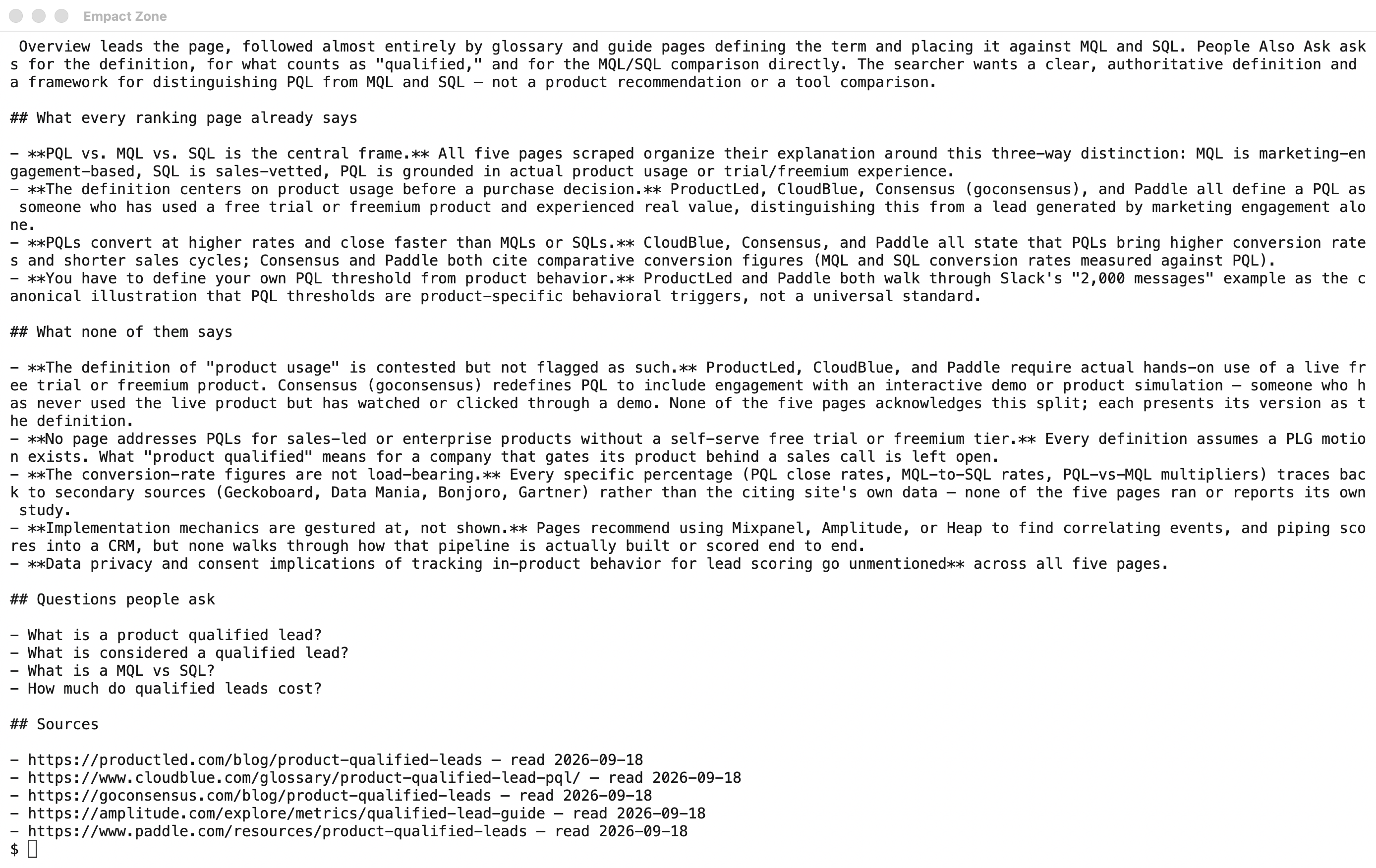
Read the section called What none of them says first:

The lower part of the research pack, listing what every ranking page already says, what none of them says, the questions people ask and the sources read.

Firecrawl read the five pages that rank, and Claude Code listed what all of them say and what none of them do. For our topic the gap was a definition: one ranking page counts watching a demo as using the product, the other four require that somebody used it, and none of the five mentions the conflict. That is an article angle, and the writer did not have to open a single tab to find it.

Everything in the pack is somebody else’s page, though. It reads Google, not what ChatGPT or Google AI Mode answer when a buyer asks the same question, which is a different set of sources. We measure that side in Qvery, our sister company, because our own work on Generative Engine Optimization, getting partners named in AI answers, needed that number and nothing on the market was producing it. Read the recommendation knowing we built it.

Step 9: The Writer Writes, and the Desk Stays Out of It

This is the step with no command. The writer opens the pack, decides what the piece argues, and writes the draft into drafts/ in whatever editor they like.

What the pack cannot give them is anything that happened: the exit call with a customer who left, the number from their own dashboard, the opinion they would defend to their CEO. Those are what a reader stays for, and they belong to the writer. At Empact Partners every Empact Zone article goes out under a named consultant who owns its argument, because that experience is the one thing a reader cannot find on the five pages that already rank.

A model can read every page that ranks for your topic in two minutes. It was not on the call where your customer explained why they switched.

To see the desk hold, we asked Claude Code to write the intro from the pack. It declined and quoted the standing rule back:

Claude Code declining a request to write an article intro into the drafts folder and quoting the standing rule from CLAUDE.md.

Then we asked for something harmless, an empty file in drafts/. It tried to save one, the settings file refused, it tried a second route with a shell command, and the settings file refused that as well:

Claude Code failing to create a file in the drafts folder because the permission settings deny it, then saying the folder belongs to the writers.

A style guide asks politely. On this desk the rule is written down with its reason in CLAUDE.md, and the settings file enforces it even when the request is not prose at all.

Step 10: Check the Draft Before the Editor Reads It

Type /exit, paste this block into the terminal, and press Enter. It saves a short script, check.py, and a command called /check.

cat > check.py <<'PY'
import re
import sys
from pathlib import Path

draft = Path(sys.argv[1]).read_text(encoding="utf-8")
standard = Path("CLAUDE.md").read_text(encoding="utf-8")
section = standard.split("## Always wrong", 1)[1].split("\n## ", 1)[0]
rules = re.findall(r"^- `([^`]+)` (.+)$", section, re.MULTILINE)

found = 0
for number, paragraph in enumerate(draft.split("\n\n"), start=1):
    lowered = paragraph.lower()
    for phrase, reason in rules:
        if phrase.lower() in lowered:
            found += 1
            print(f"Paragraph {number}: '{phrase}' {reason}")
    if paragraph.count("—") > 1:
        found += 1
        print(f"Paragraph {number}: more than one dash. One move per sentence.")

print(f"{found} finding(s). The writer fixes them; nobody else edits the draft.")
sys.exit(1 if found else 0)
PY
mkdir -p .claude/commands && cat > .claude/commands/check.md <<'MD'
---
description: Check a draft against the house standard before the editor reads it
argument-hint: <path to the draft>
---
Run: python3 check.py $ARGUMENTS

Then read the draft against the rules in CLAUDE.md that a script cannot check. For each problem, quote the sentence, name the rule, and give the rule's reason as CLAUDE.md states it.

Do not rewrite anything. Do not suggest replacement sentences. Do not edit the draft. The writer makes every change.
MD

The script reads the Always wrong list from CLAUDE.md and flags every paragraph that uses one of those phrases or carries more than one dash. It needs no AI at all, so a writer can run it alone before anyone else sees the draft, with python3 check.py drafts/ followed by the file name. We ran it on one of my own published pieces, copied into drafts/ to stand in for a draft:

The check script’s output in a terminal: twenty findings on a draft, each with a paragraph number and the reason from the house standard.

Twenty findings, each carrying the reason from the standard, so the writer learns the rule while fixing the sentence.

Then type claude, and inside it /check followed by the draft’s path. It runs the same script, reads the draft against the rules no script can check, quotes each sentence it doubts, and gives that rule’s reason. It changes nothing:

Claude Code’s check of a draft against the house standard, quoting sentences under each rule with the rule’s reason and making no edits.

It also found the house standard’s own example of a broken rule, still sitting in the published piece it was taken from, which says something about the author.

Not every flag is a fault. The script matches words, so an always-wrong word inside a customer’s quotation gets flagged too, and the right fix there is to leave the quote alone. That call is the writer’s first and the editor’s second.

The Desk Needs an Owner

Watch one thing after the first week: how often your editor makes the same fix twice. Each repeat is a rule the standard is missing. It goes into CLAUDE.md that week, with its reason and two paragraphs from your own work, and the check picks it up from there.

That is the whole desk, and you can build it this afternoon. What it cannot do is own itself. The standard goes stale unless somebody adds the rule the editor keeps applying, the pack is only as useful as the person reading it for the angle, and the writers still need something that happened to write about.

Owning it is most of what the Content Marketing workstream does at Empact Partners. A partnership starts with an audit of what you have already published and a roadmap, then a named senior GTM consultant runs the publication with your team, and our writers take the pieces a model cannot write. For PDF Reader Pro that meant reading through hundreds of existing posts first, then two of our writers on product guides. The published case study attributes 15–20% of monthly sales to those guides, in a partnership that began in June 2023.

If your editor is still rewriting every draft at eleven at night, the standard is the part to get right first, and the tools are the easy part. Send me the three fixes you make most, and I will tell you which of them belong in a check and which need a person.

Ready
To Connect?

Let's Partner