Most AI crawlers fetch a page’s HTML and leave without running your analytics script, so a dashboard built on that script shows almost none of them, however many came. The only record is where the request landed: your CDN’s edge, or your server’s logs. Every tool below reads one of the two.
Empact Partners joins a B2B software company’s own marketing team as its go-to-market consultancy, rather than working as a vendor beside it. One of the checks we run in our technical audits is reading these records, part of the workstream we call Search Everywhere Optimization, which is SEO for every place a buyer searches, AI answers included.
We ran that check on every domain on our Cloudflare account. Ten had traffic, most of them retired sites that now redirect, so read the shares as ours. From 29 September to 26 October, Cloudflare’s sampled analytics estimate that 48,615 requests named an AI agent. Checked against each operator’s list as read on 27 October, they sorted like this.
Every request count below is one of these estimates. A tool that takes the name at its word counts all 48,615, so every entry answers three questions.
The category keeps moving. Screaming Frog added AI bot verification in April, and Cloudflare began counting signed agents as verified in July. Six tools made the cut, each best for a different situation. Semrush’s log file analyzer is not one of them: it moved into Semrush Enterprise in February, and no page we could read since names the AI bots it counts.
| Tool | Best for | Checks identity | Price |
|---|---|---|---|
| Cloudflare | Sites on Cloudflare | At the edge | Free |
| Screaming Frog | One-off log audits | If switched on | Free tier |
| Oncrawl | Agents split by purpose | Nine operators | Demo |
| Botify | Large catalogs | Bots that publish IPs | Demo |
| Conductor | Recrawl checks | Not documented | Demo |
| Known Agents | Hosted sites | Claimed | Free tier |
1. Cloudflare AI Crawl Control
Best for: sites already on Cloudflare that want to see and control AI crawlers without buying anything.

AI Crawl Control is the AI section of Cloudflare’s dashboard, available on every plan, the free one included. Cloudflare handles each request before your server does, so it sees crawls that never reach your server logs, including the ones it serves from cache. It can also allow or block each crawler there.
Cloudflare is also where our own numbers came from. It labels a request verified when the bot proves who it is by a signature, a published address list, or reverse DNS. We used that label alongside each operator’s own list to separate the 15,515 genuine requests from the rest, and Apple’s crawler alone accounted for 12,407 of them.
The knock is the free plan’s crawler view. Cloudflare’s docs say it identifies crawlers by their user agent strings, so its counts rely on the name each request gives, and on our domains most of those names were not verified. Read the counts beside the verified label, which the analytics API returns on the free plan too.
Pricing
Pros and cons
What Reddit says
“We already use Cloudflare and I hadn’t even noticed the bot section, which summarizes all bot traffic and can block specific ones. Super easy and useful, and saved me a lot of time.” — r/webdev, Sep 2025
“That metric counts retrievals by AI crawlers and fetchers at the edge, machines reading your pages to answer questions, and they never show in Umami because analytics scripts only fire in browsers.” — r/SEO, Jul 2026
“I saw Meta-ExternalAgent in Cloudflare’s crawler statistics, but some other suspicious requests looked like ordinary browser traffic, and I don’t want to assume they all came from the same source without evidence.” — r/CloudFlare, Oct 2026
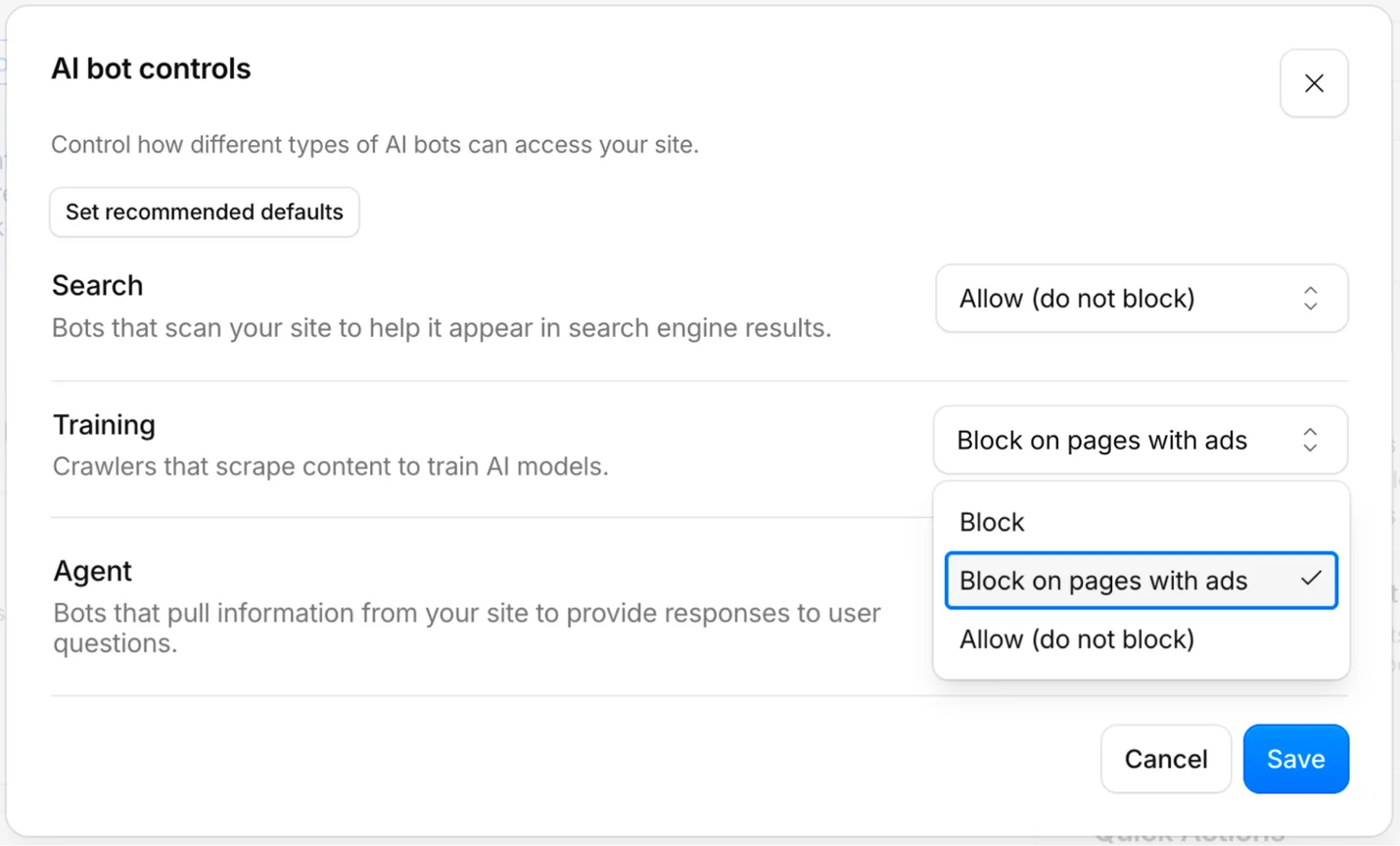
Standout feature: AI bot controls
One dialog sorts AI bots by what they do, Search, Training, and Agent, and sets each to allow, block, or block only on pages with ads. Most allow-or-block arguments come down to letting answer engines in and keeping training crawlers out, and here that is one setting, where it would otherwise mean editing robots.txt for each crawler.
Verdict: on Cloudflare, start here: it costs nothing and sees the most, as long as you read its crawler counts beside the verified label. Off Cloudflare, moving your DNS to watch bots is a large change for a small question, so take Known Agents if your platform has a plugin or your CDN streams logs. A Webflow site still needs a Cloudflare zone first.
2. Screaming Frog Log File Analyzer
Best for: a one-off audit of raw server logs on one computer, with AI bots checked against their operators’ lists.

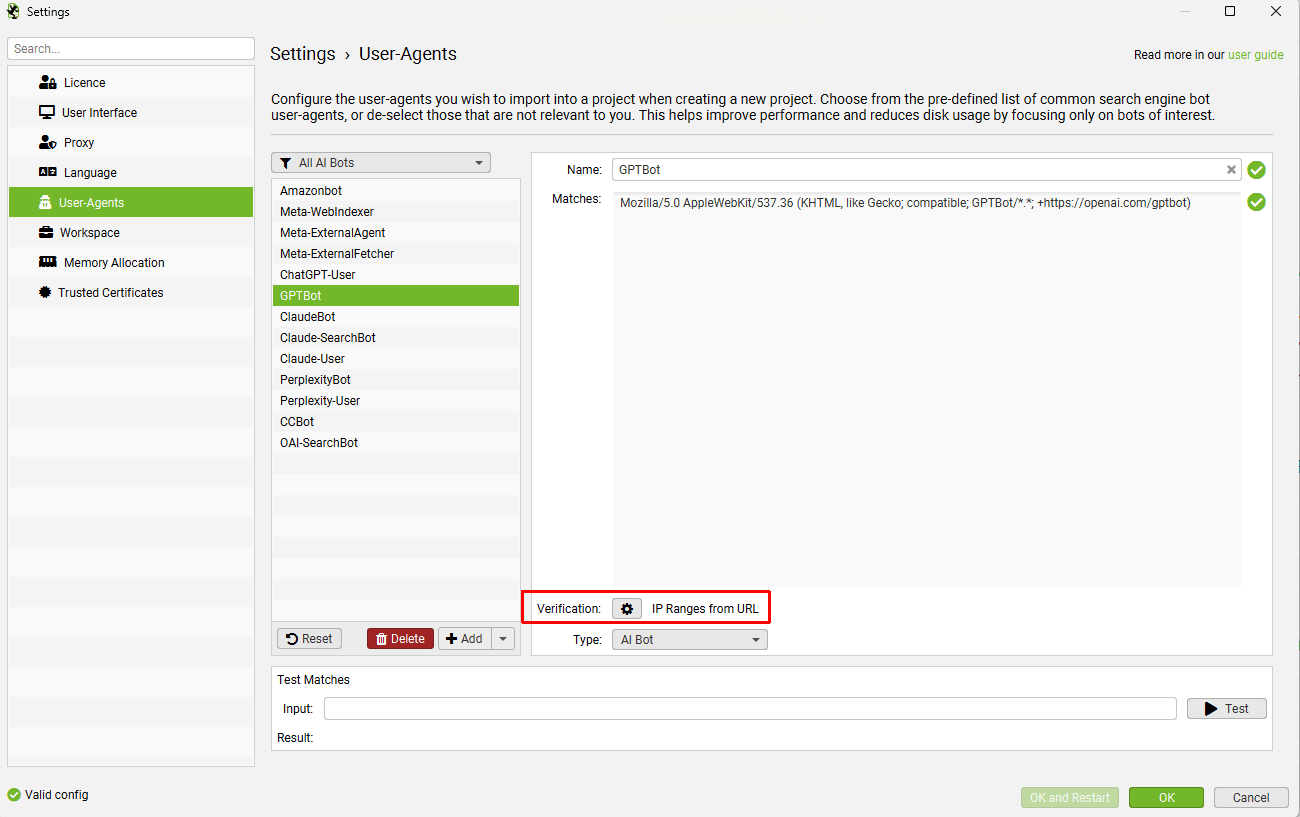
The Screaming Frog Log File Analyzer is a desktop app for Windows, macOS, and Linux, sold separately from the company’s SEO Spider crawler. You give it raw access logs, and it shows which bots requested which URLs, how often, and what status each one got back. Version 7.0, from April 2026, added Bot Verification for AI Bots.
The verification checks each request’s address against a list you point it at, or uses reverse DNS, ASN, or fixed ranges, and files what fails as spoofed. On our Cloudflare check, 14,770 of the 15,515 verified requests came from inside the operator’s own list, the kind of match this tool runs.
The catch is that verification is opt-in and slows the import, and the default import keeps only the user agents you select, dropping requests that look like browsers. Pointed at Anthropic’s list, it would also call each off-list Claude request spoofed, though that list only confirms Anthropic’s own addresses, so our 6,932 unresolved ones would read as fake.
Pricing
Pros and cons
What Reddit says
Reddit talks about Screaming Frog’s crawler far more than its log tool, and the one independent line we found about the log tool predates its AI features. It is about reading Googlebot, the job the tool was built for.
“If you want to digg deeper, learn to use Screaming Frog Log Analyzer. Compare your crawl and Googlebot’s. That’s where the truth comes to light.” — r/SEO, Oct 2020
Standout feature: Bot Verification for AI Bots
Verification is the reason Screaming Frog is on this list. A log tool that counts names repeats the mistake the logs already contain, and this one can tell you which ChatGPT-User lines came from OpenAI and which only said so.
Verdict: the tool for a one-off audit of logs you can export, as long as whoever runs it switches verification on, and treats a failed Anthropic match as unresolved, before reporting a number. Skip it if the team wants a dashboard to watch every week.
3. Oncrawl
Best for: SEO teams that want every AI agent split by purpose and named in detail.

Oncrawl is an SEO crawler and log analyzer sold through a demo. Its log monitoring groups each AI agent by purpose: ai search, ai user, or ai training. That split decides what you allow and what you block.
Its supported-bots list is the most detailed of the log analyzers here, down to agents their own operators do not document. It also says how it checks: for nine operators, OpenAI, Perplexity, Google, and Apple among them, it tests the address against the ranges the operator publishes. Everyone else is matched on the user agent alone.
Anthropic, Amazon, Meta, ByteDance, and Ai2 are on its own list of AI operators but not among the nine, which is where it falls short. On our domains, 2,486 requests named Amazonbot from outside Amazon’s list, and 6,932 named an Anthropic agent from addresses Anthropic’s list neither confirms nor rules out. The documented method counts them all as genuine.
Pricing
Pros and cons
What Reddit says
Reddit’s record on Oncrawl is older than its AI reports, and it is mostly about price.
“You should try onCrawl, it’s slightly cheaper and the UI is way faster which is one of the main reason why I switched.” — r/bigseo, Oct 2019
“OnCrawl isn’t really entry. They’re owned by BrightEdge so you’re looking at like 4 figures minimum. Try Screaming Frog instead.” — r/TechSEO, Oct 2023
Standout feature: AI bot hits by bot kind
The overview splits AI hits into user, training, and search, for pages and for resources separately. Before anyone opens a log, it answers the question the allow-or-block meeting gets stuck on: how much of this traffic is an assistant fetching a page to answer somebody’s prompt?

Verdict: the pick for a team that already runs log analysis and wants the purpose split done for it. Skip it if most of your AI requests claim to be Claude or Amazonbot, because those are exactly the ones it takes on trust.
4. Botify
Best for: large catalog sites that want AI bot crawls joined to the pages that earn search traffic.
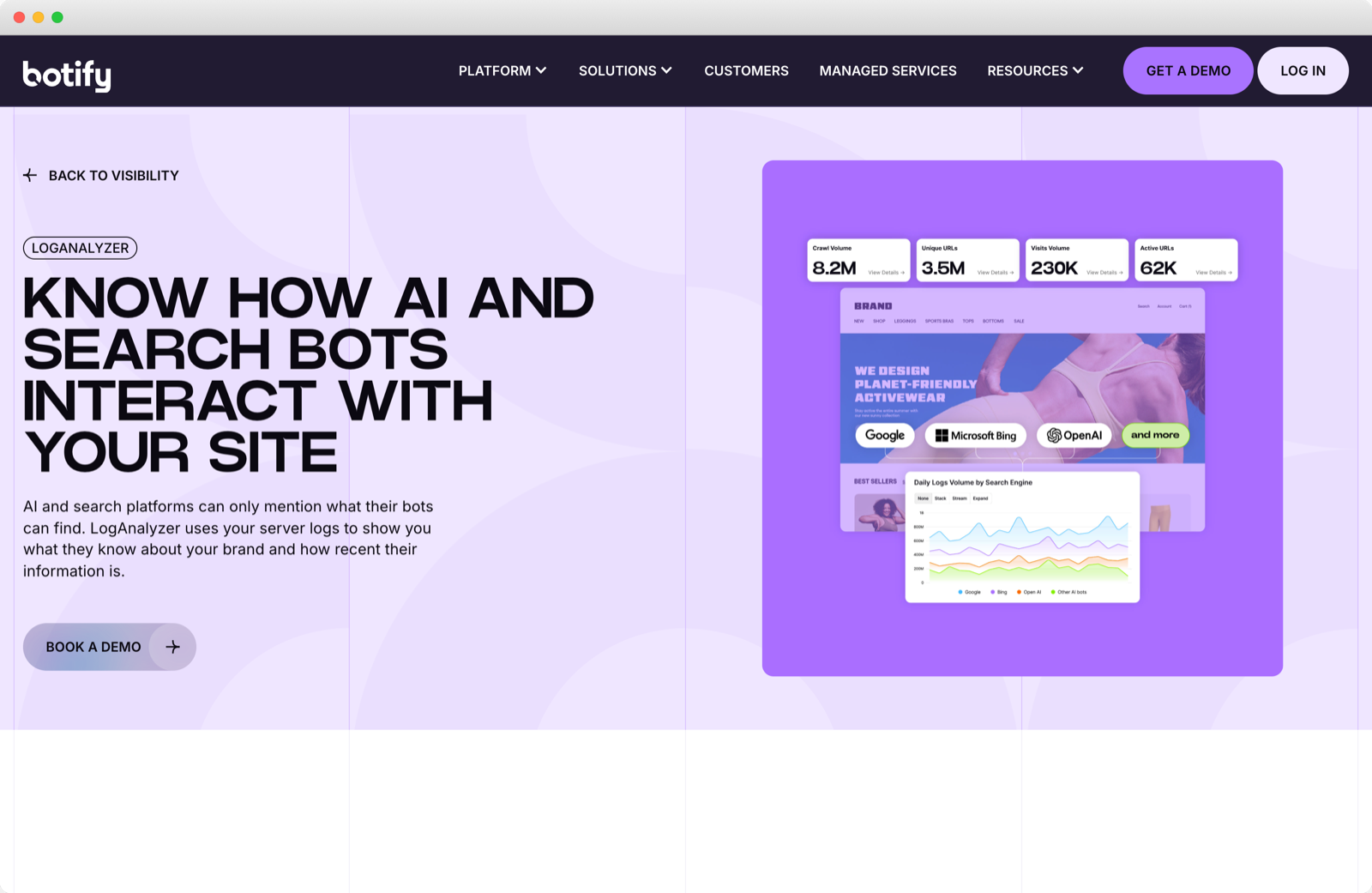
Botify is an enterprise SEO platform, and LogAnalyzer is the part that reads your server logs, refreshed daily. It names GPTBot, ChatGPT-User, OAI-SearchBot, PerplexityBot, ClaudeBot, and Meta-ExternalAgent among the AI bots it monitors beside the search crawlers.
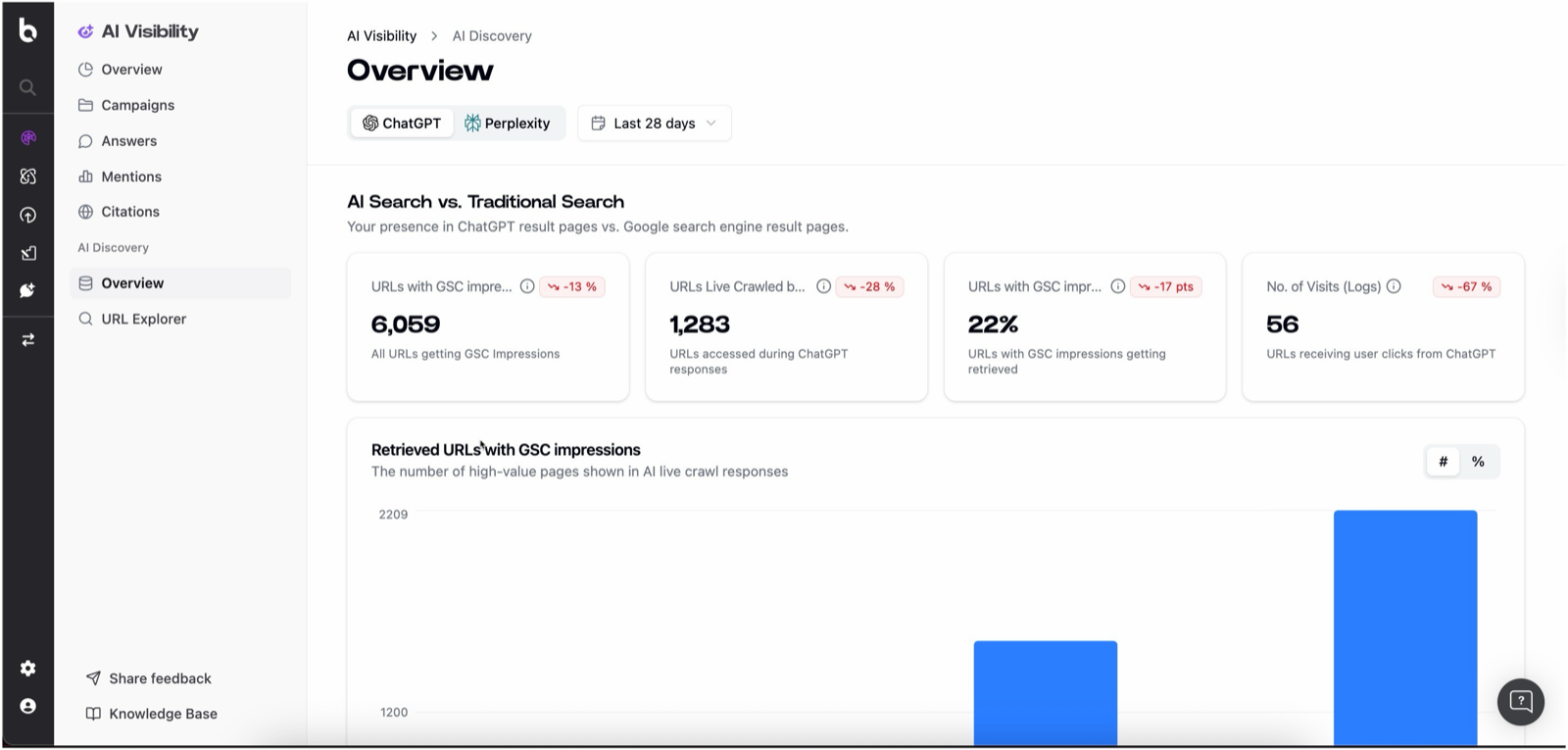
Botify pulls ahead by joining two data sets. Its AI Discovery overview compares the URLs that earn Google Search Console impressions with the URLs ChatGPT fetched while answering, so a catalog team can see which impression-earning pages ChatGPT did not fetch in the period you select.
Botify’s own help center names its weak spot. It can only authenticate bots that share their addresses, and it names Bytespider, CCBot, ClaudeBot, and Claude-Web as bots it cannot validate. Common Crawl and Anthropic now publish address lists, and on our domains 2,468 of 2,544 requests naming CCBot came from outside Common Crawl’s list.
Pricing
Pros and cons
What Reddit says
As with Oncrawl, the Reddit record on Botify comes from before AI bots were in it.
“Personally love Botify. We have found enormous value in the log file analyzer. I understand they are releasing some more in depth self directed learning/certification as well. As people have noted, it’s technical and takes some getting used to but definitely worth it.” — r/bigseo, Oct 2019
“Botify is more advanced (log analysis, advanced segmentation, content analysis) but is also really expensive (we can’t talk of Botify without mentioning the price).” — r/bigseo, Dec 2017
Standout feature: AI Discovery
For a catalog, the number to watch is the share of pages with Search Console impressions that ChatGPT also fetched while answering. The overview shows it beside three counts: URLs with Search Console impressions, URLs ChatGPT fetched while answering, and URLs that got clicks from ChatGPT.
Verdict: the one to buy if you run a catalog of hundreds of thousands of URLs and already pay for enterprise SEO. Skip it if all you need is which bots came, because that question is free at the edge.
5. Conductor Monitoring
Best for: content teams checking whether crawlers naming AI agents requested a page again after it changed.

Conductor Monitoring watches a site around the clock for changes, and its Log File Analysis adds which bots requested each page. It takes logs only from a CDN stream: a Cloudflare Worker or Logpush, Akamai, CloudFront, or Fastly.
What it does better than the rest is the page view. Each URL’s record shows how often each crawler visits and when it last came, with OpenAI and Perplexity beside Google and Bing. After a rewrite, that record tells you whether a crawler naming an AI agent has requested the page since.
Where it falls short is identity. Its FAQ lists each operator’s published addresses, but nothing we read says it checks incoming requests against them. On our domains, 2,502 requests named ChatGPT-User but came from addresses outside OpenAI’s lists. Before you buy, ask whether those would have shown up as ChatGPT visits.
Pricing
Pros and cons
We found no Reddit discussion of Conductor’s log file analysis or its AI crawler data, so this entry has no user voices.

.png)
Standout feature: Search Engine Activity
On each page’s record, the panel shows crawl frequency and the last visit for OpenAI, Perplexity, Google, and Bing, with a visits-per-day chart beside it. Rewrite a page on Monday and you can watch for requests naming AI crawlers to come back.

Verdict: the right tool if your team rewrites pages and wants to know when a crawler naming an AI agent last requested a page, and your CDN can stream logs. Confirm the plan carries the AI crawler view before you count on it, and skip it if you need to prove which bots were genuine, because nothing in its documentation says it can.
6. Known Agents
Best for: small teams on hosted platforms that want the widest list of agents, free to start.

Known Agents used to be Dark Visitors, and the old address redirects to it. It began as a public list of AI agents, now sells analytics on top, and tracks more than 2,000 crawlers, scrapers, and agents. It connects through a platform integration, such as its WordPress plugin, or a CDN log stream from Fastly or Akamai.
Known Agents is the only tool here besides Cloudflare that says anything about agents that browse like people. Its directory has an AI Agent category for agents that use an actual web browser to complete tasks for a user. Its Agent Identification API reports whether a request comes from the agent it claims to be, with a result such as verified.
What is missing is the method. The pages we read promise spoof verification and say the API proves an agent is not spoofed, without saying how. Test that claim on your own traffic before you rely on it. The free tier is large enough to try.
Pricing
Pros and cons
Reddit posts about Known Agents or Dark Visitors share its list and say nothing about the product, so this entry has no user voices either.
Standout feature: Agent Directory
The directory is public and free, and lists every agent it tracks with its operator, its category, and what it is for. It is the quickest way to find out what an unfamiliar name in your logs is before you decide whether to block it.

Verdict: the start for a hosted site with a plugin or a log stream and no Cloudflare. Skip it as the source of a number you report until its verified results have matched a few requests you checked yourself.
Start Where Your Requests Already Land
These six do not compete for one job, so there is no winner here. Find your situation and start there.
Whichever you pick, ask what it does with a request that names an AI agent and comes from somewhere else. On our domains, 176 addresses were not verified for two or more operators, and they sent 32,509 of the 48,615 requests that named an AI agent, two thirds of them. 111 of those addresses each cycled through 14 different agent names.
No person browses like that, and a report that trusts names files every one of those requests as AI crawling.
When Empact Partners runs this check in a technical audit, you give us read access to your CDN’s analytics or a month of server logs, and we read the records. You get four findings back.
One limit holds for every report here. A logged request means something asked for the page, whatever it got back, redirect and block included, and it says nothing about whether any answer quoted the page or linked it.
Whether the answers then recommend you is a different question, and it belongs to our Generative Engine Optimization workstream. There we measure AI search visibility every week, asking ChatGPT, Google AI Mode, and Claude the questions a buyer asks and recording which brands they name.
If you want to know which AI agents really reach your site and what to do about them, pick a time on my calendar, and we can work out together whether we are the right people for it.