
When a Shared Marketing Spreadsheet Should Become an App
Six questions show whether your team’s shared marketing spreadsheet should become an app, and what the app must keep that the sheet can’t.
 Eulene du PlessisWith
 Vlad Shvets
On this page
Empact Newsletter
One email a month on what is working in AI search and SaaS go-to-market.
A shared spreadsheet that plans campaigns, moves budget and hands off leads is easy to start and hard to trust. When the paid-social number in the leadership deck stops matching it, the sheet can’t tell you who changed the cell or why.
If you are the marketing ops lead or head of marketing responsible for that sheet, you have to decide whether to keep patching it or rebuild it as an app. This page gives you a test for that decision, the cases where the spreadsheet should stay, and what the app has to do before your team switches.
Empact Partners builds custom apps that SaaS marketing teams own, in place of the spreadsheets they work around, and calls that work Marketing Engineering. Before anyone builds, I would run the test below on your sheet, because it also tells you when not to.
What Turns a Shared Spreadsheet Into Software
A sheet like yours already does the job of software. It holds logic other people rely on: the budget formulas, the lookups, the column that decides which rep gets a lead. It takes input from several people and from exports of three or four tools. And what comes out of it decides things, like where next month’s budget goes or whether a campaign gets paused.
What the sheet lacks is what software comes with. An app saves each change with a name and a reason, runs checks that fail when a number goes wrong, and has an owner. Google Sheets and Excel do keep version history, but it records the file, not the decisions made from it.
The extreme case is public. In 2020 Public Health England loaded lab results into Excel templates in an older file format that held only about 65,000 rows. Between September 25 and October 2, 15,841 positive coronavirus cases were left out of its reporting 1. A national process depended on the shape of a file nobody had decided was software.
Run This Test on the Sheet Your Team Depends On
If your sheet already does the job of software, ask what it lacks and which decision that puts at risk. The test is six questions about the sheet you have today. Answer each with a yes or a no, and next to every yes write down the meeting or the person it affects:
- Two writers, one row. More than one person edits the same rows, and someone has asked which copy is the real one.
- Something reads its columns. A dashboard, an import or a sync depends on the sheet’s layout, so renaming a column breaks it.
- Changes need a reason. A budget move or a lead reassignment should carry who approved it and why.
- Not everyone should see everything. Regions, channels or outside contractors should see or edit only their own part.
- A decision reads from it. A number from the sheet goes into the leadership deck, the pipeline review or the budget meeting.
- One person keeps the formulas. Everyone else avoids touching them, and the sheet waits when that person is away.
If your only yes is the first one, you don’t need an app yet. Protect the ranges that hold formulas, name one owner and keep the sheet. The rebuild case starts when a decision reads from the sheet and at least one other answer is a yes. Then a mistake reaches money or a board slide before anyone sees it.
Each yes costs something different while the work stays in a sheet, and each one turns into a requirement for the app:
Scroll horizontally to see all columns when the table is wider than this page.
| Yes on | What it costs while it stays a sheet | What the app has to do instead |
|---|---|---|
| Two writers, one row | Silent overwrites, and two files both named Final | One place to write, every change saved with a name and a time |
| Something reads its columns | A renamed column breaks a report nobody is watching | A fixed structure that only its owner changes |
| Changes need a reason | The budget moved and nobody can say why | A reason and an approver on every change that needs one |
| Not everyone should see everything | Everyone sees every row, or the sheet splits into private copies | Access by role, so each team edits its own rows |
| A decision reads from it | The deck and the sheet disagree a week later | A record of what was approved, kept apart from the working view |
| One person keeps the formulas | Every fix waits for one person | Rules written down, with an owner and checks anyone can run |
People who maintain these sheets for a living put the same moment in fewer words on r/excel:
Tips from Reddit
When r/excel says a spreadsheet has outgrown itself
When you start to refer to it as a database
When maintaining the spreadsheet becomes an entire person’s job and a software solution costs less than that person.
I took a work-log sheet that we had and turned into a ticket system in sharepoint with power automate to automatically send email alerts. Before, someone was manually updating things.
The fifth question is the one to slow down on. It is easy to say yes, the deck reads from the sheet, and assume the sheet’s history has you covered.
The Numbers You Approved Have to Survive Next Month’s Edits
A shared sheet holds one version of each number, and it is today’s. In March the budget meeting approves a split by channel from it. In April people keep editing the same cells, and by May nobody can show which figures the meeting approved without hunting through version history for the right afternoon.
Version history is built to undo mistakes. It brings back the whole file as it was at a moment, and it has no idea that one of those moments was a meeting. A team that decides from a sheet needs two records. One is the working view people edit every day. The other holds what was approved for each period, and only its owner can reopen it.
Version history can bring back last month’s file. It cannot tell you which of its numbers the budget meeting approved.
Try it on yours. Could you reproduce the exact numbers from last month’s meeting today, after this month’s edits? If the honest answer is a morning of digging, the sheet already fails the check that matters most. Keeping the approved record apart from the working one becomes the app’s first job.
The difference between the sheet and the app is where that approved number lives:
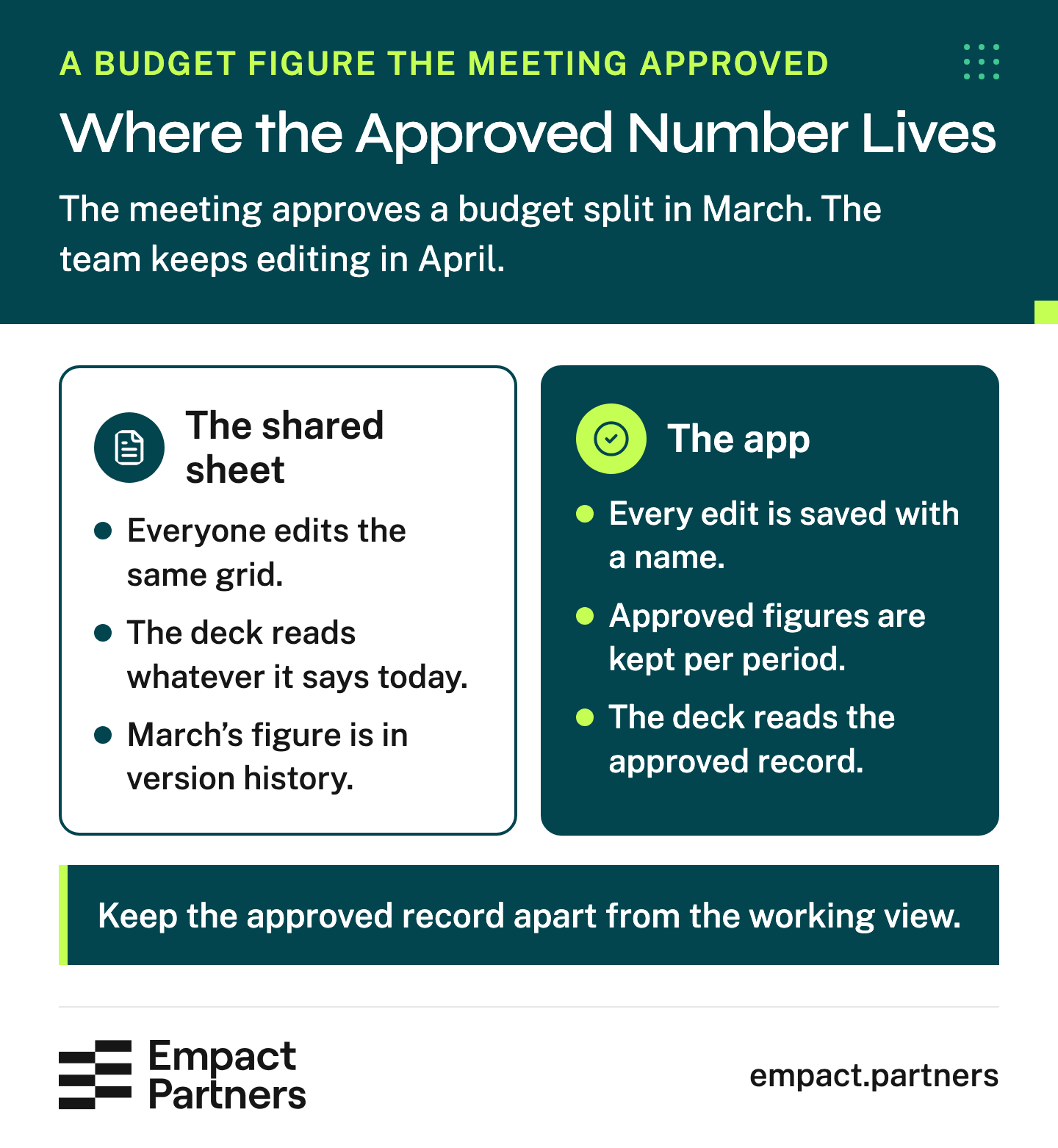
The app can still look like a grid on screen. What changes is that the approved number has a record of its own, and every edit after it carries a name.
The first thing I would ask of any replacement is whether it can answer one question in a minute: which number did the meeting approve? A shared sheet answers it with a morning in version history. An app built around that question fixes the overwrites and the copies named Final along the way, because it has to know who changed what to answer it.

What the App Has to Do That the Sheet Never Did
Your yes answers are the requirements. Every formula, lookup and hand fix in the sheet becomes a written rule that says what goes in, what comes out and who may change it. A rule nobody can explain goes back to the sheet’s owner first, because an app that copies it only hides it better.
The app saves each edit with a name and a time. Where your test said changes need a reason, it saves the reason too. Access follows roles, so a region edits its own rows and reads the rest. Before the switch, the app runs on the same inputs as the sheet until the outputs match. That way you find the first difference before anyone else does.
LeadGenius, a company that finds lead data for B2B companies, went through that kind of rebuild, and Retool published how it went 2. Two of its people built a monthly contractor-cost report in a spreadsheet from timesheets. It took five days, so nobody saw the month’s costs until five days after payouts.
Its senior director of business operations replaced the report with an app that read the timesheets as they came in. Cost spikes, and where they came from, showed up as they happened. The report stopped being a monthly project for two people and became rules an app ran on data the company already had.
To see your own sheet as an app before anyone writes a rule, give it to our Spreadsheet to App Blueprint. It sends back a proposal for the app, a clickable prototype of its screens on sample records, and the integrations and build estimate behind it. It costs nothing, and it is a cut-down version of the agent we run for partners:
Keep the Speed People Got From the Sheet
A correct app still fails if people keep typing into the sheet. They drift back the moment the app is slower at the edits they make every day, such as pasting a block of rows, filling a column down or fixing fifty cells in one go. Build those in, and test the app on an ordinary week’s work with the people who do the editing.
Then switch in an order where people only ever write in one place:
Pick one team.
Choose the team whose numbers you can check fastest.
Run its inputs through both.
The team keeps writing in the sheet while the app gets the same inputs. Fix the rule behind every difference until the outputs agree.
Switch the team and lock its part of the sheet.
From that day the team writes only in the app, and its part of the sheet becomes read-only history.
Move the next team.
Repeat until the whole sheet is history.
Keeping both open can look like the careful option. While the sheet and the app both take edits, every sync between them has to pick which number wins, and the team is back to arguing over copies.
Our four-page playbook on replacing a team’s spreadsheet with an app is written for whoever will run that switch:
Which Spreadsheet to Rebuild First
The tempting sheet to start with is the messiest one, because it annoys the most people. I would start with the one a decision runs through. Leon Claassen, one of our senior GTM consultants, puts the order in two sentences:
The sheet we replace first is the one money or a board number runs through, and among those, the one whose last mistake cost the most. Sheets one person uses to think, like next year’s planning model, can stay.
 Leon Claassen on LinkedInOpens in a new tab
Building that app got cheap. One public example replaced a subscription rather than a spreadsheet, and its build time is what matters here. On the Modern Cyber podcast in September, Richard Stiennon of the analyst company IT-Harvest said his team built its own expense tool in a day and a half 3. His monthly expense report dropped from an hour and a half to five minutes.
Owning the app did not get cheaper. Someone has to know why each rule exists, change it when the business changes and notice when a check fails. So the owner goes into the requirements by name. Without one, even a well-built app inherits every problem the sheet had.
When Empact Partners takes on a sheet like yours, we start where your test points. The sheet a budget or board number runs through goes first on the roadmap, because its next mistake is the expensive one. If the test points at your sheet, rebuilding it with us includes:
Rebuilding a shared sheet with Empact Partners
- An audit of the work your team does by hand around the sheet, and a roadmap for what to build first
- A named senior GTM consultant who owns the rebuild and joins your calls
- The app, built in a repository your company owns
- Documentation, and a handover with training
Frequently Asked Questions
Isn’t version history in Google Sheets or Excel enough?
Version history covers part of the job. It lets you restore an earlier copy of the file and see who edited a cell. It doesn’t mark which numbers a meeting approved, ask for a reason when someone moves budget, or stop a renamed column from breaking the report that reads it.
If none of that matters for your sheet, version history plus protected ranges is enough. If your deck reads from the sheet, you need an approved record kept apart from the working view.
When should we keep the spreadsheet?
Keep it when one person uses it to think, as with next year’s planning model. Keep it too when several people edit it but no decision reads from it and nothing downstream depends on its columns. In those cases, protect the ranges that hold formulas and name one owner. A sheet earns a rebuild when a mistake in it would reach money or a board slide before anyone noticed.
Should we buy a tool or build our own app?
Buy when a product already fits the process with little bending, because you also buy its upkeep. Build when the process is yours: your budget rules, your lead routing, the exceptions your team handles by hand.
Whether you buy or build, ask who owns the rules, whether every change is recorded, and whether you can reproduce last month’s approved numbers. A bought tool nobody owns fails the same test the sheet failed.
How long does a rebuild like this take?
The build is the fast part now. Retool’s write-up of LeadGenius says a business operations lead with no engineering training built its internal apps in less than a month 2.
Writing down the rules nobody has explained, and checking the app against the sheet, still take time. Run both on the same inputs until their numbers agree, over as many reporting cycles as that takes. Plan the switch around those cycles rather than a fixed number of days.
How do we know the app’s numbers are right before we switch?
Run the sheet and the app on the same inputs for at least one full reporting cycle. Compare the totals your deck shows, such as spend by channel or leads by owner. Every difference has a cause, usually a hand fix in the sheet that nobody wrote down.
Fix the rule and rerun the comparison. Switch only when the numbers agree, then keep that comparison as a check the app runs after every change.
Who should own the app once it’s built?
The person who owned the sheet’s logic, with a named backup. Owning it means deciding when a rule changes, approving changes to its structure and watching the checks. If nobody on your team can take that on, settle who will before you build, or the app will drift the way the sheet did.
Do we have to replace the whole spreadsheet at once?
No. Start with the tab people use to make a decision, often the budget or the pipeline tab, and leave the rest in the sheet until that part works. A sheet that runs campaigns, budgets and lead handoffs holds three processes, and each can move on its own schedule.
Moving one process at a time also makes the comparison easier. Give the sheet and the app the same inputs, then reconcile that process’s numbers.
What happens to the old spreadsheet after the switch?
The old sheet stays, read-only, as history. Lock each team’s part on the day that team moves, keep the file where people can still look things up, and stop any sync that writes back into it. Deleting it on day one removes the record people use to check the app. Leaving it editable gives the team a second place to type.
How do we stop people going back to private copies?
Make the app at least as quick as the sheet for the edits people make most often. That means pasting a block of rows, filling a column or correcting many cells at once. Test it on an ordinary week with the people who do the editing. Then remove the alternative. Once a team moves, make its part of the sheet read-only, so edits in a private copy have nowhere to go.
Can an AI coding tool build the app for us?
An AI coding tool can build the screens and much of the code quickly, which is a large part of why rebuilding got cheap. What it can’t decide is which rules are right, who approves a budget move or which version of a number the meeting signed off. Write those answers down first. A quick build on top of rules nobody owns repeats every problem the sheet had.
Is a shared database table a good middle step?
A shared table can be the right middle step. One with row-level history and permissions stops overwrites and file locks, and there’s no codebase to maintain. On its own it keeps no approved record per period and runs no checks on the logic, so put it through the same six questions.
If your only yes was two writers on one row, a table is enough. If a decision reads from it, the table still needs an owner, written rules and an approved record.
Sources (3)
- BBC News, "Excel: Why using Microsoft’s tool caused Covid-19 results to be lost" (2020)↩1
- Retool, "How LeadGenius saved $1M with better internal tooling" (2020)↩1↩2
- Modern Cyber with Jeremy Snyder, "Richard Stiennon of IT-Harvest" (2026)↩1
Keep reading
Marketing Engineering How to Judge a Marketing Engineering Partner Before You Sign
Judge a marketing engineering partner by who else can change what they build, where it runs, whose rules it reads and how it stops.
Marketing Engineering Put Your Ops Lead in Charge of Your First AI Agent
Before you hire a marketing engineer, give your ops lead the hours, one job and a builder for your first AI agent.
Marketing Engineering Marketing Ops, GTM Engineer, Or Marketing Engineer: Which To Hire
Choose your next technical hire by the work that fails, the systems it depends on and who owns the output after launch.