


Pasting an old blog post into Claude Code and asking for a refresh gets you a smoother version of the same post. It cannot know what the page is shown for in search today, which of your pages it should link to, or what your brand stopped saying two years ago. Those decisions are the refresh, and none of them is in the post.
A refresh used to be one person, one checklist and an afternoon a post, each done a little differently. The fix is a folder Claude Code opens first. It holds your posts, your Search Console data and your voice, plus a procedure written as separate passes and a list of decisions the model may not make. One skill then runs that procedure on any post.
Empact Partners plans and runs go-to-market for B2B software companies from inside their own teams, and this is how its Content Marketing work refreshes a library. We ran it on one of our oldest posts: Claude Code did the mechanical passes in minutes and returned the part worth publishing as fourteen questions. Before you start, you need:
This builds the workflow and runs it on one post. It does not decide which of your posts deserve to exist, write the evidence only your team holds, or publish anything, and the files you are about to write say so.
Build the Folder Claude Code Opens Before It Touches a Post
Claude Code works inside the folder you start it in, and what it knows about your blog is whatever that folder holds. The first half of the job is filling it. We ran every step in a clean Claude Code profile, headless, approving up front what an interactive session asks about as it goes.
Step 1: Make an empty folder a git repository
Open a terminal, create the folder, and turn it into a repository:
mkdir content-refresh
cd content-refresh
git init
Every change Claude makes from here becomes a commit you can read or undo, and the first commit will be your posts exactly as they are live. We keep a plain-text copy like this in version control before any agent edits content we look after, because it is how a page gets put back in minutes when an automated edit goes wrong.
Step 2: Export every post to markdown, once
Start Claude Code in the folder by typing claude, and paste this. Ours names Webflow, our collection and our blog’s address. Change those three to your CMS and your own blog.
This folder is going to hold our blog so we can refresh old posts. Write a Python script at scripts/export_posts.py that exports every published post from our Webflow blog into posts/, one markdown file per post, named <slug>.md.

Use the Webflow Data API v2 with the token in the WEBFLOW_TOKEN environment variable, and only ever send GET requests. The blog is the CMS collection called "Empact Zone". Read the live (published) items, not drafts.

Each file starts with front matter: title, slug, url, published date, last updated date, and the meta description. The post body follows, converted from HTML to markdown, keeping headings, lists, links, bold and images. Our posts live at https://www.empact.partners/empact-zone/<slug>.

Do not run the script. I will read it and run it myself.
Claude writes the script and stops, because the prompt says so. Open scripts/export_posts.py and read it before it runs: every request it sends should be a GET. Ours sent all of them through one function, and found our collection and its fields on its own.
Then run it yourself, with the token in your own terminal, so the model never holds a key to your CMS:
python3 -m venv .venv
.venv/bin/pip install requests markdownify
WEBFLOW_TOKEN=your-read-only-token .venv/bin/python scripts/export_posts.py
The script prints how many posts it wrote, and that number should equal the posts live on your blog. Ours printed 116 posts, the live count that day. If yours is short, ask Claude which items the script skipped and why before anything is built on the export.
Then open one file and check the front matter. Webflow keeps no first-published date, so our script fell back to the last time each post was republished, and on our oldest post the published date came out later than the last-updated one.
Leave it alone. Dates are on the list of things the model may not touch, and this is one reason. Commit the export untouched, because it is your backup:
printf '.venv/\n__pycache__/\n' > .gitignore
git add .gitignore scripts posts
git commit -m "Export 116 live posts from Webflow, untouched"
Step 3: Put your Search Console data in the folder
Make a folder called search-console and save your export into it. The CSV from the Performance report’s Export button works, and so does a pull through Search Console’s API, which is what ours was: every Empact Zone page by day for sixteen months, made by a colleague for another piece.
Ours had page rows and no query rows, and it showed. Claude could say when a page started falling and could not say which searches it lost, so it checked what ranks today with live web searches instead.
If you can, also export the searches your first post is shown for: filter the Performance report to that one page and export its Queries tab. Then commit the folder.
Step 4: Draft the voice file from your best posts, then edit it
The voice pass needs something to check sentences against. Name the three posts that sound most like you, and paste this:
Read posts/saas-blog-200-articles-no-leads.md, posts/stop-posting-linkedin-like-founder.md and posts/link-magnets-for-off-page-seo.md. These three sound most like us.

Draft context/voice.md: how we write, as rules a writer can check a sentence against, with one short example quoted from these posts under each rule. Keep it under 60 lines. Only describe what these three posts do. Do not add rules of your own, and do not change any post.
Claude read the three posts and wrote context/voice.md: seventeen rules, each with a quoted example. It described our posts faithfully, old habits included, and seven of the seventeen rules were habits we have since stopped on purpose:
| Rule Claude wrote | The example it quoted | What we did |
|---|---|---|
| Name the real problem by correcting the obvious one | “This is not a traffic problem. It’s not an SEO problem.” | Struck. Say the real problem. |
| Contrast the weak option with the strong one in a single sentence | “Traditional outreach gives you a link. Link magnets give you a pipeline.” | Struck |
| Close with imperatives, then one plain call to action | “Audit ruthlessly. Refresh strategically. Kill what doesn’t serve you.” | Struck. End on the next thing worth doing. |
| Put jokes and asides in parentheses, and keep them short | “(If a blog post publishes and nobody links to it, does it even exist?)” | Kept |
Edit the file by hand, and commit Claude’s draft and your edit separately, so the history shows what a person changed. We kept ten rules and added five house rules: no em dashes, consultancy and partners rather than agency and clients, American spelling, a paragraph length, and a short list of words we never use.
We also moved the stopped habits into a section that tells the model to list any it finds rather than rewrite the passage around them. In our own content work the voice comes from a person’s own material and a person’s edit, never from a tone instruction typed into a chat.
Write the Rules and the Procedure Into Files, Not the Chat
A chat forgets. Tell Claude in one conversation to leave the dates alone, and the next conversation never heard it. Claude Code reads a file called CLAUDE.md at the start of every session in its folder, so what must hold every time goes there, and the procedure gets a file of its own.
Step 5: Write CLAUDE.md, with the decisions the model may not make
Save this as CLAUDE.md in the folder. It is our file after the one fix the run forced.
# Content refresh workspace

This folder holds our blog so we can refresh old posts.
Nothing in it is live. A person publishes; you never do.

## What is here

- posts/ : every live post as markdown, exported once
  from the CMS. The first commit is the untouched
  backup.
- search-console/ : our Search Console export. Read it
  with a script; never load it whole.
- context/voice.md : how we write. Check every sentence
  you change against it.
- REFRESH.md : the refresh procedure. Follow it, step by
  step, whenever you refresh a post.
- refreshes/<slug>/ : your working notes for each
  refresh.

## Decisions that belong to a person

Stop and ask before any of these. Write down what you
found and what you would do, then wait.

- Retiring a post, merging two posts, or redirecting one
  URL to another.
- Changing a slug, a URL, or any date in the front
  matter.
- Cutting a section, or more than one paragraph anywhere
  in a post.
- Changing what a named person is quoted as saying.
- Adding a statistic, a result, a customer, an example,
  or a quote that is not already in the post or
  somewhere in this folder.

## Always

- One commit per pass, with the pass in the message, so
  a person can read or revert one pass.
- One post at a time. Never edit a post you were not
  asked to refresh.
- Never write to the CMS or publish anything. Reading
  the web is fine; writing outside this folder is not.
  Keep any script you write in scripts/.
The list under “Decisions that belong to a person” is the part to copy whole. Each item is on it because the model would make the call confidently and the cost would land on somebody else:
Our first version of the last line read “never send anything outside this folder.” The procedure asks Claude to check whether every link still resolves, so on its first run it refused to open the call-to-action link, said why, and asked us to check it by hand.
Two of our own instructions disagreed, and it obeyed the stricter one. Fix that kind of clash in the file and not in the session: our line now says reading the web is fine and writing outside the folder is not.
What Reddit says
Asked whether a refreshed post should get a new publish date, r/SEO split, and the most useful answer tied the date to the size of the change. A content lead in the same subreddit described what a model does with a number nobody gave it.
“If the update is substantive, yes. Google will likely ignore minimal updates & adding 50 spaces doesn’t count.” — r/SEO, Jun 2026
“yesterday it confidently quoted a 2026 hubspot state of marketing report with specific percentages that turned out to be totally fabricated when i checked.” — r/SEO, Jun 2026
Step 6: Write REFRESH.md, the procedure as separate passes
Save this as REFRESH.md, and commit both files:
# Refresh procedure

Run these steps in order on the one post you were given.
Each step ends in something written down. Keep
refreshes/<slug>/log.md as you go: one line per change,
naming the pass that made it.

## 1. Diagnose (no edits)

1. Read the post and its front matter.
2. From search-console/, pull this URL's clicks,
   impressions and average position by month for the
   whole export. Say whether it is growing, flat or
   falling, and since when.
3. Name the question the post answers, in the words a
   searcher would type. Search the web for it and read
   the top results: what kind of page ranks now (a
   guide, a list, a tool page, a definition), and what
   they cover that this post does not.
4. List every page in posts/ that answers the same
   question. If one answers it better, say so.
5. Write refreshes/<slug>/diagnosis.md ending in one
   verdict: refresh, leave alone, or a person must
   decide (retire or merge). Then stop and show the
   person the diagnosis. Do not edit the post until they
   say go.

## 2. Health check (no edits)

Add a health check to diagnosis.md, as a list:

- every link, and whether it still resolves; any link to
  a competitor's page on the same question
- headings: a skipped level, or a heading with only one
  subheading under it
- what has aged: years, "this year", tools, prices, job
  titles
- numbers with no source, and numbers more than two
  years old
- images with no alt text
- the call to action, and whether it still points at
  something we offer

## 3. Five passes, one commit each

Run each pass over the whole post, commit it, then start
the next. Do not fix a later pass's problem early: one
pass that tries to do everything does none of it well.

1. Mechanics: spelling, grammar, punctuation, broken
   markdown. Commit "pass 1: mechanics".
2. Readability: split long paragraphs, turn real lists
   into lists, fix the heading ladder. Commit "pass 2:
   readability".
3. Internal links: search posts/ for our pages on what
   this post mentions, and link two to five words
   already in the sentence. Remove links to competitors.
   Commit "pass 3: internal links".
4. Voice: check every sentence against context/voice.md
   and rewrite only the ones that break a rule. Where
   you find a habit we have stopped, list it rather than
   rewrite the passage around it. Commit "pass 4:
   voice".
5. Original content: mark where the post makes a claim
   only we could support, and where it needs an example,
   a result or a quote it does not have. Do not write
   them. Put each one in refreshes/<slug>/questions.md
   for the person, with where it would go. Commit "pass
   5: original content".

## 4. Visuals and calls to action

List the images to replace and the ones missing. Edit
the call to action only if it names something we no
longer offer; otherwise list it. Commit "visuals and
CTAs".

## 5. Hand back

Finish with the verdict, one line per pass saying what
changed, the open questions, and the command that shows
the whole refresh as one diff.
The diagnosis ends in a verdict and a stop, because a post that should be merged gains nothing from five rounds of editing.
The five passes then run one at a time, a commit each, which is the editing drill our content team has run since 2024. A reviewer asking “is this a clean sentence” and “does this sound like us” in the same read answers neither well, and separate commits let you read or undo the voice pass without touching the links.
Run It on One Post and Read Every Pass
The post we ran it on is a 2024 piece of ours on the mistakes that sink a SaaS go-to-market plan: about 1,800 words, eleven images, and two colleagues’ quote cards. It was written two years before the rules in our voice file.
Step 7: Ask for the refresh, then read the diagnosis before you say go
Start a fresh Claude Code session in the folder and give it the post and the file. This was our whole prompt:
Refresh posts/saas-gtm-death-spiral.md. Follow REFRESH.md.
Claude read the procedure, the voice file and the post, summed our Search Console rows by month, and ran two web searches for what ranks today. Then it checked our other posts for the same question, wrote its diagnosis to a file, committed it and stopped.
The post was untouched, and its month-by-month table matched our own count to the row:

What it found, from that diagnosis file:
| What it checked | What it found |
|---|---|
| The trend | Falling since February 2026, from 334 impressions a month to 100 by August, and 13 clicks in 17 months |
| What ranks now | Numbered lists of mistakes with a fix under each, and essays on go-to-market fit. Both cover retention and symptoms a reader can check, such as rising acquisition cost and churn. Ours covers neither. |
| Our other posts | One newer post links to it for its title phrase. None answers the question better. |
| Health | No internal links, no useful alt text on any of its 11 images, two sections making nearly the same point, and two 2024 lines about AI |
| Verdict | Refresh |
Two lines in it were wrong, which is why a person reads the diagnosis before saying go. Its own table summed to 13 clicks while its sentence said 14. And it called September a partial month because only 19 September days had rows, when a day with no impressions has no row at all.
Reply in the same session, corrections first. We fixed both in one message, told it to leave the dates and both quote cards exactly as they were, and said go.
What Reddit says
A content lead at a B2B SaaS company described the refresh that skips this read:
“I went through fourteen of our best performers in April, rewrote the intros, added sections, updated the numbers, and about nine of them slid back within six weeks or so.” — r/content_marketing, Aug 2026
Step 8: Read the passes one commit at a time
Claude ran the five passes and the visuals check, committed after each, and finished with one line per pass saying what changed. Read them in git, one commit at a time, before you read the post whole:
git log --oneline
git show 4b1428a -- posts/saas-gtm-death-spiral.md
git diff 6f5e231 HEAD -- posts/saas-gtm-death-spiral.md
The first lists every commit with its short hash. The second shows one pass, here our pass 1. The third shows the whole refresh as one diff, and it is the command Claude printed when it finished. Your hashes will differ.
One real change from each pass, before and after:
| Pass | Before | After |
|---|---|---|
| 1. Mechanics | Layoffs, can be counter-productive. | Layoffs can be counterproductive. |
| 2. Readability | Three sentences in a row about junior hires | “Junior hires tend to bring three problems:” and a three-item list |
| 3. Internal links | “Both VC-funded and bootstrapped companies need to remember…” | The same words, linked to our post on how the two kinds of company plan go-to-market |
| 4. Voice | “…is crucial—it helps guide decisions…” | “…is crucial. It helps guide decisions…” |
| 5. Original content | No change to the post | Fourteen questions in a separate file |
Counted in lines, the passes look like this:
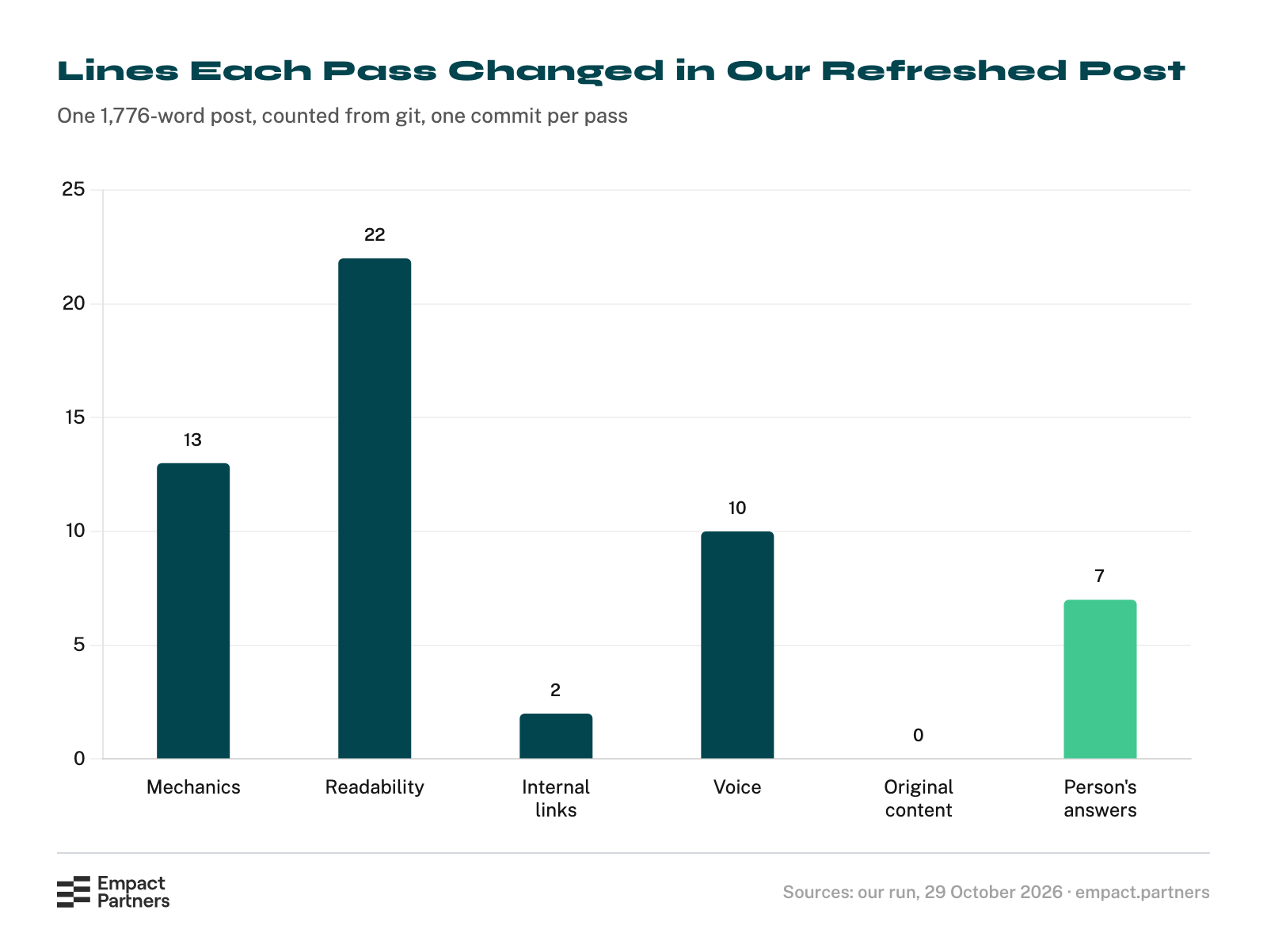
Mechanics and readability took the most edits and the least judgment. Original content took none, by design: what would make the post worth reading again was not in the post or anywhere in the folder, so the model asked for it instead of writing it.
The pass boundary leaked once. Pass 2 split a paragraph and left five in a row. Pass 4 fixed it and wrote in its log that the miss was pass 2’s, which is what the log is for. One voice edit also read worse than the line it replaced, so we undid it.
.png)
Step 9: Answer the questions only you can answer
Pass 5 wrote fourteen questions into a file beside the post, each with the line it belongs on. A sample:
| Question | Where it goes | Status |
|---|---|---|
| How many partners have we seen in this spiral, and at what stage? Claude found a partnership count in a newer post of ours and asked before reusing it. | The paragraph naming the spiral | Open, for the partner record |
| Neither the section on copying competitors nor the one on cross-niche approaches has an example. | After the first paragraph of each | Open |
| The ranking pages list symptoms a reader can check. Do we want that section? | A new section | Open: new content, so a person supplies or approves the numbers |
| Are the 2024 lines about AI still our view? | The opening list | Answered |
Answer them in the same session, the way you answered the diagnosis. We answered the last one, along with four of the habits it had listed and the voice edit we undid. Our view has changed since 2024: our content is drafted with AI now, and a consultant owns the angle, the material nobody else has, and the sign-off.
The mistake in that list is the missing owner, not the tool, a position no file in the folder held. “Get an intern to generate 20 articles with ChatGPT” now reads “Let AI draft it, and leave nobody to own the angle, the material no one else has, or the sign-off.” One more commit, and the refresh stood at 38 lines in and 46 out.
The other questions stay open on purpose. They need what happened across our partnerships, which no export carries, and answering them is where a consultant’s hour goes on a partner’s library: the result that proves a section, the example a partner has cleared, the numbers behind a symptom list.

.png)
If nobody on your team owns that hour, that is the point to book a call with me.
Save It as a Skill So the Next Post Is One Command
Everything so far ran from a prompt that named the procedure. A skill turns that into a command the folder knows, so nobody has to remember which file to point at.
Step 10: Ask Claude to save the procedure as a skill that points at your files
Paste this:
Turn our refresh procedure into a skill, so the next post is one command: /refresh-post posts/<slug>.md

Put it in .claude/skills/refresh-post/SKILL.md. The procedure stays in REFRESH.md and the rules stay in CLAUDE.md. The skill sends you to them and does not copy them, so there is only one copy of each to keep up to date. Keep it short, and commit it.
Claude Code treats .claude/ as its own settings and will not write there without your say-so. In our run it reported “Claude requested permissions to write to … SKILL.md, but you haven’t granted it yet,” wrote nothing, and printed the file instead.
In an interactive session that is a permission prompt: approve it, then commit the file. This is the one it wrote, saved as it came:
---
name: refresh-post
description: Refresh one blog post by following the project's refresh procedure. Use as /refresh-post posts/<slug>.md
argument-hint: posts/<slug>.md
disable-model-invocation: true
---

Refresh the post at `$ARGUMENTS`. If no path was given,
ask for one.

1. Read `CLAUDE.md`. Its rules apply throughout,
   especially the decisions that belong to a person.
2. Read `REFRESH.md` and follow it step by step, in
   order, on this post only. Read it fresh each time; do
   not work from memory.
3. Take the slug from the file name. Keep notes in
   `refreshes/<slug>/`.
4. Stop wherever `REFRESH.md` or `CLAUDE.md` says to
   stop and wait for a person.
The skill stays short because it repeats nothing: the procedure lives in REFRESH.md and the rules in CLAUDE.md, one copy of each to keep current. Claude also chose disable-model-invocation: true on its own, so the skill runs only when somebody types it.
Keep it that way as the rules grow. When every rule lives in one skill file, contradictions pile up before anyone notices, and our run produced one inside the first hour: two of our own files disagreed about the web.
The Empact Zone is written the same way: a short skill opens our documentation, and a consultant signs every piece. Empact Partners builds agents for partners’ content teams on that pattern: one agent for one job the team repeats every week, its rules in files a named consultant owns, and the measure agreed before anything is built.
Step 11: Run the next post with one line
Open a fresh session and type the command and the post. Nothing else:
/refresh-post posts/generative-engine-optimization-geo.md
Our second post was a 2025 explainer on generative engine optimization (GEO), the work of getting a brand named in AI answers. The skill loaded, read both files, ran the diagnosis and health check, committed them, and stopped on a verdict the procedure keeps for a person.
The post overlaps two newer guides of ours and five of our posts link to it, so the choice was to rebuild it as a short definition at the same URL, merge it into a guide with a redirect, or retire it. It recommended the first, said the cuts would need sign-off, and waited. That decision is still open.
Where the loop closes
The refreshed post is a committed file, and getting it into the CMS is a person’s job. On Webflow that matters. An edit saved to a live item without publishing it goes live the next time anyone publishes the site, so a model writing to the CMS can leave a change that ships whenever somebody else happens to publish.
Copy the changed passages into your CMS editor yourself, using the diff as the list of what moved, then publish and read the live page.
What Ten Refreshes Tell You That One Cannot
Run the skill on your next nine posts before you change the files, then read the questions side by side. They repeat, and the repetition is a map of where your library lacks evidence. It makes a better content plan than a list of new topics, because every item on it improves a page that already has links and rankings.
On our longest content partnerships this runs for years rather than weeks. wecantrack’s blog went from roughly 490 monthly visits to more than 12,000 in three years, from new expert articles and from existing ones reworked alongside them.
If your blog has a hundred old posts and nobody to answer the questions they raise, book a call with me, and we’ll see whether it’s a job for us.


