
How a SaaS User’s First Session Decides Retention
Split recent signups by when each first got a result, and you’ll see whether your first session is where your retention is decided.
 Wihan van ZylWith
 Vlad Shvets
On this page
- Why New Users Decide Whether to Stay in Their First Week
- What a First Session Has to Leave in the Account
- How to Tell Whether Your First Session Is the Problem
- What Your First Screen Asks Before It Gives Anything Back
- End the First Session on a Reason to Come Back
- Which Change to Make First
- Frequently Asked Questions
Empact Newsletter
One email a month on what is working in AI search and SaaS go-to-market.
Amplitude studied more than 10,600 digital products for its 2025 benchmark and found that how fast a product added new users said almost nothing about how many it kept. The products growing signups fastest were spread almost evenly from the best retention to the worst. 1 More signups simply send more people into the same first session.
The usual onboarding setup has a product tour, a setup checklist and a welcome sequence. Its dashboard looks healthy because people finish the tour. Then month two arrives, and many of the accounts that finished it have stopped logging in.
I work on Product-Led Growth at Empact Partners, where we help SaaS companies let buyers find a product, try it and pay without waiting on a salesperson. On that path, a new user’s first session is where I look first.
Why New Users Decide Whether to Stay in Their First Week
The same benchmark points at the first days as the place where products win or lose their users. Of the products best at bringing new users back on day seven, 69% were also among the best at keeping them for three months. Amplitude found no other pair of measures in its data that lined up as closely. 1 Three figures from the report show the shape of it:
Divide each pair and the top tenth’s lead is about four times on day one and about five times at month three. Those are two different measures, possibly taken on different sets of products, so they prove no cause. What they do show is a gap nearly as wide on the first day as it is a quarter later.
For your budget, that changes the timing of every later touch. A welcome email on day three, a check-in call in week two and a win-back campaign in month two all arrive after the first session. By then the first session has gone one way or the other, and those touches can only bring some people back.
Whether your own product follows the benchmark is something your signups can tell you, once you decide what a first session is supposed to produce.
What a First Session Has to Leave in the Account
A product tour, a setup checklist and a filled-in profile all count setup. A new user can finish all three, leave with nothing done, and still count as onboarded. What brings someone back is the thing they signed up to get done. That might be a first invoice sent to a real client, a report built from their own numbers or a post scheduled on their own channel.
Sample data and dummy records clear the empty screen, and they can teach the shape of the product. Founders comparing notes on r/SaaS keep running into the same limit, though. A sandbox on made-up data shows the flow, and the moment people decide they want the product comes when they run it on their own data.
Set what most onboarding dashboards count beside what the user has when they close the tab:
Scroll horizontally to see all columns when the table is wider than this page.
| What gets counted | What the user has at the end | A reason to open the product again? |
|---|---|---|
| Tour finished | Knows where the buttons are | No |
| Checklist ticked | A configured, empty workspace | No |
| Sample project explored | A demo of someone else’s work | Rarely |
| First result on their own work | Their invoice, report or campaign, saved in the account | Often, because it is theirs and something will happen to it |
So count a first session as done only when the account holds a result made from the user’s own work. The tour and the checklist can stay if they help people get there, but they stop being the measure.
A new user who leaves the first session with nothing of their own in the account has no reason to open it again.
Counting results that way gives you a measure. It still doesn’t tell you whether the first session is where your users are lost, and your own signups can answer that before anyone redesigns a screen.
How to Tell Whether Your First Session Is the Problem
The check is a split of recent signups by when each one first got that result. You need the result logged as an event in your product analytics, and a group of signups old enough to have had their chance to stay or leave. In B2B, count accounts once teammates join, so a colleague’s activity is credited to the account that invited them.
Run the split in this order
Name the result event.
Pick the one action that means the account got done what it came for, such as an invoice sent or a report shared, and nothing that only counts setup.
Take a cohort that has had time.
Use accounts that signed up two to three months ago, so each one has had the chance to come back and to pay.
Sort them at day seven.
Put each account in one of three groups by when it first reached the result. The groups are the day it signed up, later in the first week, and not by day seven. Signup day stands in for the first session here.
Read the outcome from week four on.
For each group, count the share still active in week four and the share that paid within the days your trial or free plan allows.
Three patterns tend to come out of it, and each suggests a different place to work:
Scroll horizontally to see all columns when the table is wider than this page.
| What the split shows | What it suggests | Where to work |
|---|---|---|
| Accounts that got the result on signup day stayed, and those that got it later mostly left | The first session is the likeliest place retention is decided | What the first session asks for and how it ends |
| Both groups stayed at about the same rate, and better than accounts that never got it | The result is right, and reaching it on a later visit works too | Getting people back for a second session, with reminders tied to the result |
| Neither group stayed much better than accounts that never got it | The result you picked is not what keeps people | The result itself, starting with what people say they signed up to do |
The first row is the one that changes a roadmap most, and it is the reading I’d want before anyone touches the product:
Run this split before you touch the tour or the welcome emails. If the accounts that got a result on the day they signed up are the ones still paying in month two, start the work in the first session, because every later fix reaches people after that day.
 Wihan van Zyl on LinkedInOpens in a new tab
One caution belongs beside the table before you act on it:
Founders on r/SaaS who have been through this check two things before they rebuild anything:
Tips from Reddit
What founders check before rebuilding onboarding
Better way was going back to signups from a few months prior splitting by who’s still around and looking at where the two groups came apart in week one, then pulling everyone who hit the milestone and churned anyway. That second list tells you whether you’ve got a real signal or just a correlate
Ask them what they’re signing up for during signup, not after you’ve lost their interest.
The second tip matters for the third row of the table. If you know what each account signed up to do, you can check whether your result event is the right one before you rebuild around it. Our four-page playbook on activation sets out the full test on payment, with the arithmetic for what a higher activation rate is worth:
If the split points at the first session, the first place to look is what it asks of someone who signed up five minutes ago.
What Your First Screen Asks Before It Gives Anything Back
In B2B software, the person who signs up often doesn’t hold what the setup wants. The first screen asks for a teammate’s email, admin rights, an API key or an export from another system. A newcomer who can’t supply it leaves to find it, and nothing in the product yet would bring them back from that errand.
Move every ask after the result unless the result can’t happen without it. Where it can’t, offer the shortest route with what they have now, such as a file upload in place of a live integration. Ask for the connection once they’ve seen the result on their own data.
Go through your own first screens as someone who has never seen the product, and look for these:
Asks to move after the first result
- An invite to teammates, asked before the user has anything to show them
- An integration or API key the person signing up may not have permission to create
- Profile, company and role fields the first result does not use
- A plan or billing choice before the user has seen what the plan is for
- A blank first screen with no route to the result
That pass can also be run for you. Our free Onboarding Flow Teardown reads two to ten screenshots of your first run, in order, and sends back where a new user may stall on each screen, why, and what to change:
Clearing the asks gets a new user to a result. Whether they come back for a second session depends on how the first one ends.
End the First Session on a Reason to Come Back
A finished result brings someone back only if something about it will be different next time. A report that refreshes on Monday or a reply waiting from a colleague gives the second visit a job. One founder on r/SaaS, whose users built a product catalog once and never returned, said as much in the thread. People got the value, and nothing gave them a reason to come back.
The teammate invite belongs here, after the result and attached to it. Amplitude sees that order in the top tenth of B2B technology products, which keep 15.6% of new users at three months. They help one person get something valuable done alone, then make it easy to bring the team in. 2
A colleague invited to a finished report starts their own first session on a result. A colleague invited in minute two opens an empty workspace, the same mistake as onboarding a new hire with a tour in place of a first task. Followed through, the first session feeds every session after it:
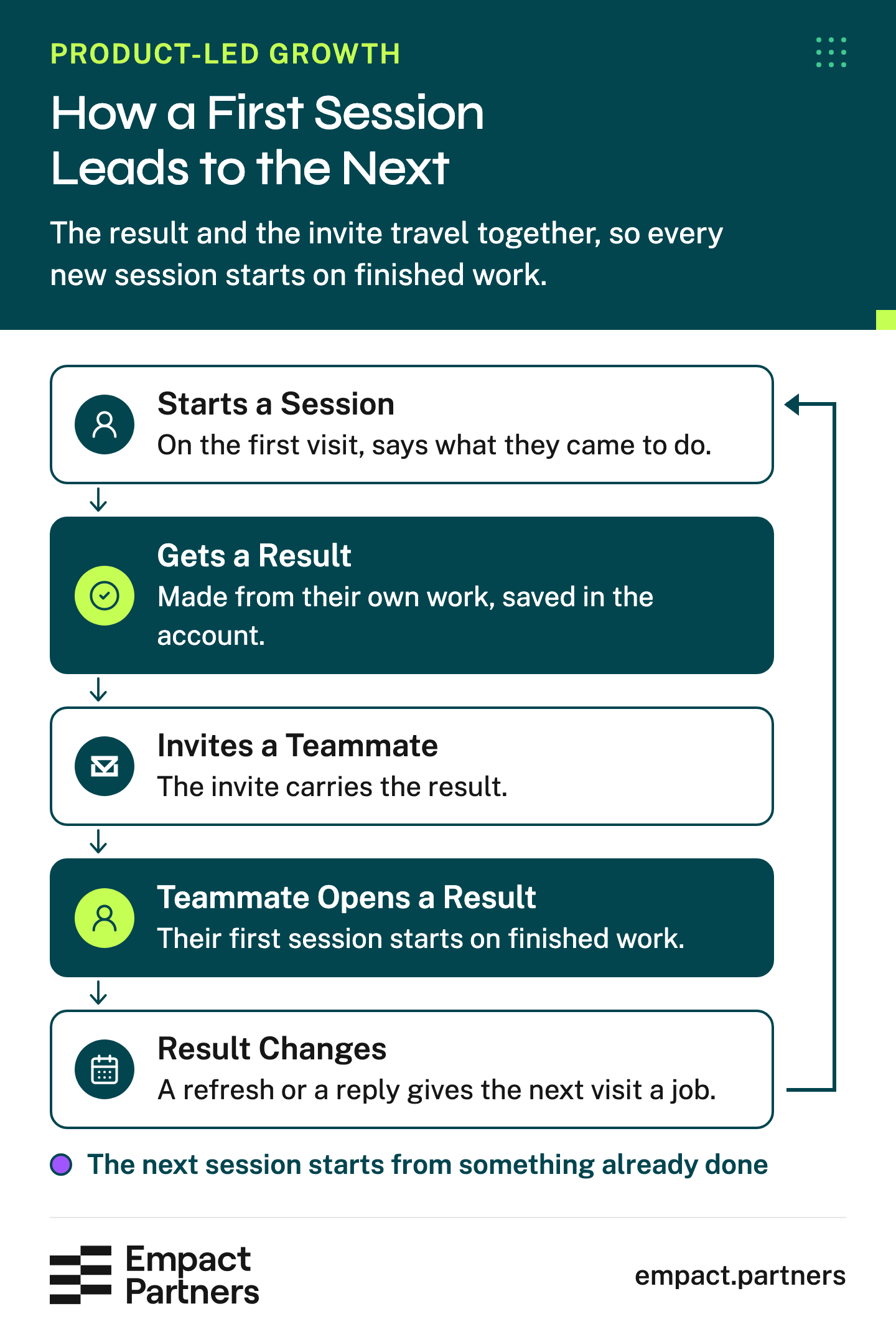
Each turn of that loop starts from something already done, and the welcome emails can point at it. An email saying the report updated this morning sends the user straight back to their own work, which an email about features rarely does. Write the sequence from the result outward, and drop any email that doesn’t point at it.
Which Change to Make First
Pick the order from what the split showed. If accounts that got the result on signup day stayed and the rest left, cut what the first screens ask for before the result, then rebuild how the session ends. Rewrite the emails last, since they can only point at what the session left behind.
If both groups stayed alike, the work is the second visit, with reminders and emails built around the result. If neither group beat the accounts that never got there, ask new signups what they came to do and pick a different result before you change a screen.
Empact Partners would start in the same place, with your recent signups and the result they came for. That shows which of the three paths your product is on before anyone spends a sprint on screens. An audit of the route to the first result then becomes the roadmap:
What working with us on it includes
- An audit of the route from signup to the first result, and a roadmap built from it
- A named senior GTM consultant in charge of it, who is on your calls
- Your recent signups split by when each first got a result, before any screen changes
- The full Onboarding Flow Teardown agent, run on your first-run screens
- The work done in your own tools and channels, at your team’s pace
Whichever path the split puts you on, keep running it each month on the newest cohort old enough to read. It won’t prove what caused a shift, which is the random test’s job, but it shows whether the three groups are moving the way you expected.
Frequently Asked Questions
What counts as activation for a B2B SaaS product?
The first time a new account gets done what it signed up for, using its own work. In an invoicing product that is a first invoice sent to a real client, and in an analytics product a first report on the company’s own numbers. Setup steps such as finishing a tour or connecting an integration don’t count on their own.
If your product has two or three main uses, name one result for each and let the signup answer decide which one the first session aims at. A single result picked for the biggest use case quietly fails everyone who came for the others.
How long should a new user’s first session take?
As long as reaching the result takes, and no longer. No standard number of minutes holds across products, so time your own. Sign up with a fresh, empty account and count every screen and every request before the result appears.
Anything on that route the result doesn’t need is a candidate to move after it. Anything the user must fetch from someone else is the first to go.
Should we remove our product tour?
Not by default. A short tour that points at the route to the result can help, while one that walks through every feature mostly delays it. Judge the tour by whether people who see it reach the result more often than people who skip it. If it makes no difference, cut it down to the steps on the route, and spend the effort on the first screen instead.
Is sample data a good idea for a new account?
As a preview, yes. Sample data shows what the result looks like and takes the fear out of the first click, especially where an action is hard to undo, like sending an invoice. It shouldn’t be where the first session ends. Offer the switch to the user’s own data as early as you can, and count the session as done only once the result exists on that data.
When should we ask new users to invite teammates?
After the first result, and from the screen that shows it. Name the result in the invite and say what the colleague can do with it, such as approve the invoice or comment on the report. Sometimes the person signing up can’t approve a purchase or connect the data. Then the invite is how the person who can arrives, so open their first screen on the result and the one decision you need from them.
What if our product only shows value after an integration is connected?
Give the first session a route that works without it, such as a file upload or an import of one week’s data. The user then sees the result on their own numbers before asking an admin for access.
Ask for the live connection after that, with the result on screen as the reason. If no result is possible without the integration, help the user send the request to the right person from inside the product.
What is a good day-seven return rate?
Amplitude’s 2025 benchmark puts a product in the top quarter for activation once 7% of a new cohort comes back on day seven. 2 That figure mixes every kind of digital product, so treat it as a rough marker for B2B software.
The trend across your own monthly cohorts tells you more. Watch the gap between accounts that reached the result on signup day and those that didn’t.
How do we know an onboarding change worked?
Send half of new accounts through the changed first session and half through the old one, chosen at random. Give both groups the same number of days to pay.
Hold everything else steady while the test runs: the price, the plan on offer and where signups come from. A reverse trial skews the result too, because every account in it has seen the top plan. Activation moves first and makes a useful early read, but decide on who paid.
Should we ask new users what they want to do at signup?
Yes, with one question and a handful of answers to tap, never an open text box. Use the answer to choose which result the first session aims at, so a user who came to send invoices doesn’t start in the reporting screens. Keep the answers in your analytics too, because they tell you whether the result you picked matches what most people came for.
Does a personal setup call help in a self-serve product?
For the first few dozen users, it teaches you more than any dashboard, because you watch exactly where people get stuck. As a permanent fix it hides the problem, since every account the call rescues is one the product couldn’t get to a result by itself. Use the calls to find the stalls, then change the screens so the next user doesn’t need one.
How soon do onboarding changes show up in retention?
The early signal comes within days, because a changed first session changes how many accounts reach a result on signup day. Retention takes at least a month to read, from week four onward, and payment takes your trial or free period plus the days you give accounts to pay. Read the early number weekly and hold the decision until both windows have closed.
Sources (2)
- Amplitude, "What Is Product Analytics? A Data-Backed Guide" (2026)↩1↩2↩3Benchmarks from Amplitude’s Product Benchmark Report: 10,600+ digital products across 2,600+ companies, every industry. Read 15 November 2026.
- Amplitude, "The 7% Retention Rule Explained" (2025)↩1↩2Product Benchmark Report findings, 2,600+ companies. The B2B technology pattern is Amplitude’s reading of its top performers, not a measured effect. Read 15 November 2026.
Keep reading
Product-Led Growth Interactive Demos: What to Let Buyers Try Before a Sales Call
Choose a buyer task, build a focused interactive demo, and test whether it leads to qualified sales conversations.

Statistics 70 Software Listicle Statistics for AI Search
See which software listicles AI answers cite on each engine, what being on one goes with, and where a placement budget goes first.

Statistics 37 Reddit Statistics for SaaS: Search, AI Citations and Spam
37 Reddit statistics for SaaS teams: Google first pages, AI citations and spam bans, each with what it means for a Reddit budget.