Why Cold Email Belongs on a Separate Sending Domain
Cold email belongs on its own domains. What they protect, what still ties them to you, and what four of ours that hit spam showed.
 Garith PriorWith
 Vlad Shvets
On this page
Empact Newsletter
One email a month on what is working in AI search and SaaS go-to-market.
Your founder has asked why outbound needs new domains when the company already owns one that works. Someone may have told them the main domain gets more replies, and it does usually land in the inbox more often. A domain with years of ordinary business mail behind it beats a new one almost every time.
That standing is the reason to keep cold email off the main domain. This page is for the marketing lead who has to answer the question. It covers what a separate sending domain protects, why a new one waits weeks, what still ties it to your company, and what you need to own. The evidence is what happened to our own sending domains this autumn.
Empact Partners runs signal-based outbound for SaaS companies. Every email goes out from separate domains our team sets up and warms, so cold email stays off the domain a partner’s customers write to. On October 2 we started sending ours the same way.
Your Main Domain Carries the Mail Your Business Runs On
Start with what already leaves from your company’s domain, because that is the mail at stake. Most of it never passes through the marketing team, which is why a founder rarely pictures how much there is:
Scroll horizontally to see all columns when the table is wider than this page.
| Who sends it | What it costs in a spam folder | |
|---|---|---|
| Proposals and contracts | Sales, from the CRM or by hand | A deal waiting on a signature nobody saw |
| Invoices and receipts | Billing | Late payments, and finance chasing by phone |
| Help desk replies | Support | A customer who believes nobody answered |
| CRM email to customers | Customer success and marketing | Renewal notices and onboarding that never arrive |
Gmail does not judge those emails one at a time. Its sender guidelines say it tracks volume, feedback and limits per domain, and that spam reports lower a domain’s reputation over time.1 Every email from your domain draws on that one reputation, so the mail people are most likely to report decides how the rest of it lands.
Cold email is that mail. The people receiving it never asked for it, and anyone who minds can mark it as spam in one click. A careful team writing to a few well-chosen companies is still writing to strangers, and a bad week of reports falls on the same domain your invoices leave from.
Our own numbers agree with the founder about the landing. On November 3, each of our sending inboxes sent the first email of its live campaign to a set of Outlook test inboxes. From empact.partners it reached the inbox 60 of 60 times, and from our newer sending domains 6 of 194 times. empact.partners has years of ordinary business mail behind it, and a cold campaign from it would spend that record.
What Separation Protected When Four of Our Domains Hit Spam
We set up twelve separate sending domains, each our name with a short word added, and each forwarding to our site. On October 16, before any campaign ran, our plain test email from four of them reached the inbox at Google 31 of 31 times. The campaigns started on October 21.
By November 3 those four had stopped reaching the inbox at Google. The other eight kept landing, and so did empact.partners, the domain our proposals and invoices go out from:
Scroll horizontally to see all columns when the table is wider than this page.
| Sent from, November 3 | Campaign emails that reached the inbox at Google |
|---|---|
| The four struck domains | 0 of 88 |
| Our other eight sending domains | 101 of 101 |
| empact.partners | 60 of 60 |
What set the four apart was how much cold email each had sent into Google since October 21. Each had written to more than twice as many people at Google-hosted addresses as any of the eight that kept landing. Their registration, content, links, bounces and replies matched the others, and all twelve still passed the authentication checks Google and Microsoft run.
We stopped sending from the four. The other eight kept the program running, and nobody waiting on a proposal or an invoice from empact.partners saw any of it. On November 14, eleven days later, the rested four still reached the inbox at Google 0 of 80 times.
Cold email should leave from a domain your business could lose without losing a single invoice.
Keeping cold email on separate domains decided where that damage landed. Google still shut the four out, and the program needed the other eight to keep going. Twelve domains over one autumn are one company’s numbers, and they show what the rule is for. They also show what a separate domain needs before it can do its job. It needs a reputation of its own, and the buyer has to see it is still you.
Why a New Sending Domain Waits Weeks Before Its First Sequence
A new domain cannot send a sequence on its first day. It needs records that prove the mail is really from you, and a sending history the receiving servers can judge. The records live in the domain’s DNS settings, the public entries that tell the internet where its website and mail are:
Gmail and Outlook.com both write down the minimum:
Scroll horizontally to see all columns when the table is wider than this page.
| Who it applies to | What must be in place |
|---|---|
| Everyone sending to personal Gmail addresses, since February 1, 20241 | SPF or DKIM, and a spam rate under 0.3% |
| Senders of 5,000 or more messages a day to Gmail, counted across the same primary domain, since February 1, 202412 | SPF, DKIM and DMARC |
| Domains sending more than 5,000 emails a day to Outlook.com, since May 5, 20253 | SPF, DKIM and DMARC |
Since November 2025, Gmail has been ramping up enforcement, with temporary and permanent rejections for mail that falls short.2 Those rules are still only the floor. Passing them tells a receiver the mail is yours, and says nothing about whether you deserve the inbox. Google’s own advice to a sender with no history is to start with a low volume to engaged recipients and raise it slowly.1
Our own new domains showed what having no history means. When our first Microsoft-hosted sending domains went live on October 2, Microsoft refused every email our sending tool sent from them. The block lasted two to four days and lifted domain by domain. A month later, Outlook was still filing most of our newer domains’ campaign emails as junk.
Warm-up is how a new domain earns its history. Its mailboxes send small amounts of ordinary email that gets opened and answered, and the amount rises over weeks before any sequence starts. Before a new domain carries its first sequence, all of this should be true:
Before the first sequence
- The records pass. SPF, DKIM and DMARC are published, and a test email shows all three passing.
- Warm-up has run for weeks, rising slowly and never in bursts.
- A test reaches the inbox. A test email sent through the tool and mailbox the campaign will use lands in the inbox at Google and at Microsoft.
- Someone reads the DMARC reports, so a failing domain shows up the day it starts.
The setup behind those checks, from buying the domains to the first test send, is the subject of our playbook:
A domain that passes all four has started a reputation of its own. It still has to read as yours, because the person you wrote to sees only a sender and an address, and a name nobody can place gets deleted or reported.
What Still Ties a Sending Domain to Your Company
A separate domain is separate only to the mail servers. To the buyer it is still your company writing, and it should look that way. Three things carry that tie, and none of them costs much:
What makes a sending domain read as yours
- A named person sends it. A real colleague, with their own name and photo, the way they sign everyday email. Google asks that a display name state the sender’s identity accurately and never pose as a reply.1
- The name is plainly yours. Your brand with a short word added, the pattern ours follow: boostempact.com, sendempact.com, empactgtm.com.
- It forwards to your site. A buyer who types the domain into a browser lands on your home page, never a blank or parked page. Every one of ours forwards to empact.partners.
People who send cold email for a living say the same thing, and one of them names the cost a redirect cannot remove:
Tips from Reddit
What cold emailers say about lookalike domains
I wouldn’t pick some random-looking domain though. Get something very close to your main brand, set up SPF, DKIM and DMARC properly, and make sure the domain redirect to your actual website.
I’m guessing some folks bother to set up profile pictures and names so emails still look the same as from primary domains BUT corresponding with name@microsoft.com (for example) is different from corresponding with name@softwaremicrosoft.info
The second voice is right. A buyer who reads the address sees it is not your main domain, and some will mind. We accept that price, because the alternative puts the domain your customers write to in front of every stranger’s spam button. The named sender and the forwarding site make sure the buyer who checks lands on your real company:
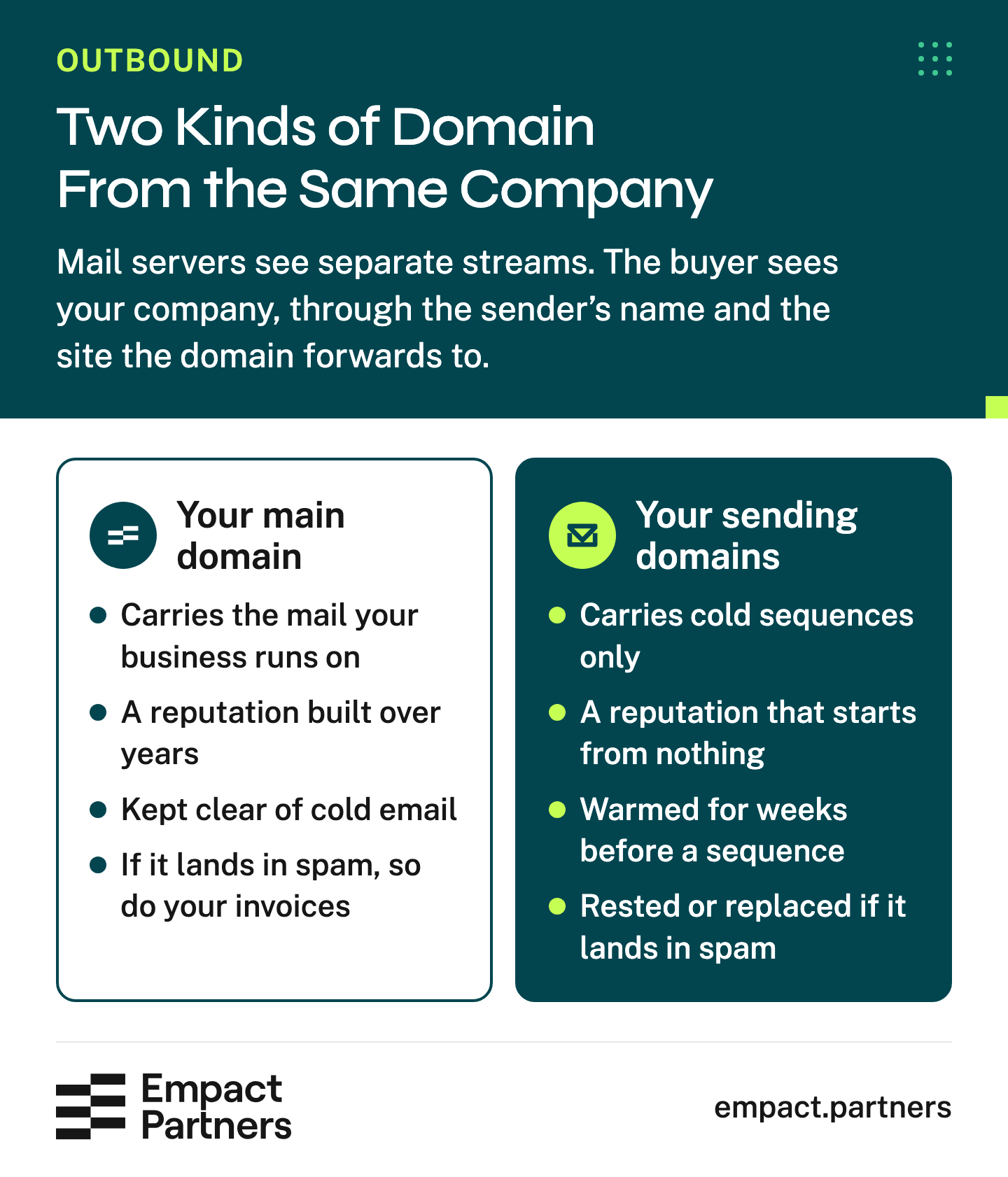
That tie is for the buyer. Whether a spam filter rewards it is a question our own test left open. At Outlook, our newer domains’ plain test email landed 47 of 47 times while their campaign emails did not. The campaign emails carry links and a signature pointing at empact.partners, and we have not yet ruled out that this mismatch is part of what Outlook objects to.
Who Owns the Domains and the Decision to Pause
No setup makes a sending domain safe, which is why the last protection is somebody who can stop one fast. That takes ownership in your company’s name, whoever runs the sending:
What your company should own
- The registrar account. The domains are registered to your company, and you can log in and renew them.
- Admin access to the mailboxes, so you can reset a password or remove a sender without asking anyone.
- The DMARC reports, delivered to a mailbox somebody on your side reads.
- The decision to pause. A named person who can stop a domain the same day, and knows what they will look at to decide.
Our own pause shows why the last item matters. When the four domains stopped reaching Google, we took them off every campaign and the eight others carried on. A team that has to wait on an outside vendor to stop a domain keeps sending into the spam folder while it waits.
The pause runs on evidence, and two kinds of check answer different questions. A record check reads a domain’s public settings: its authentication records, its age and where its website goes. A placement test sends a real email to test inboxes and sees where it lands. Only the second can see the reputation that decides whether a buyer ever reads you.
On November 18 we ran our own Cold Email Domain Health check on five of our sending domains. It reads their authentication records, DKIM keys, age and website destination from public records. It passed all five, including two of the four our placement test had found in spam at Google. Its first page shows the answer and the three fixes it put first:
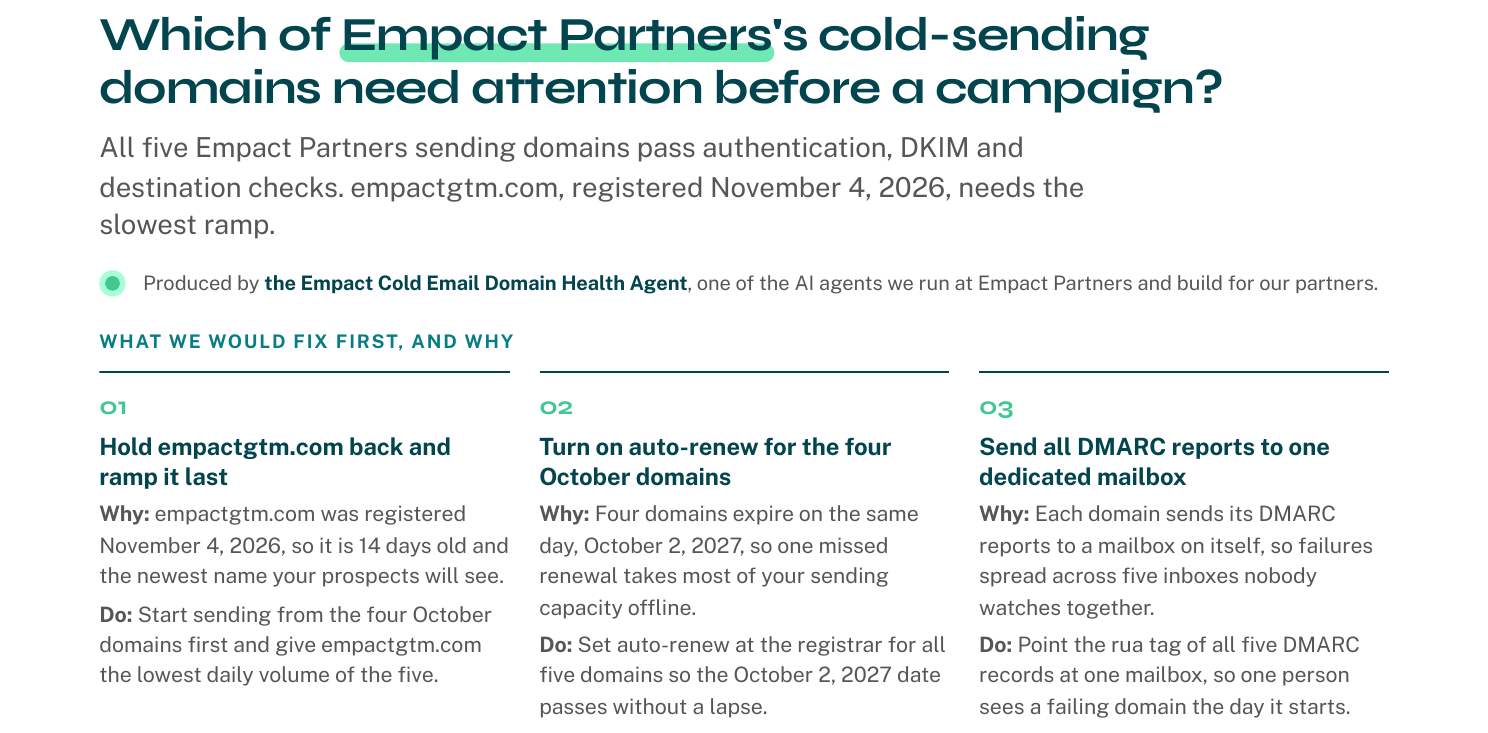
Two of those fixes were real gaps. Each of our domains sent its DMARC reports to a mailbox on itself, so a failure would have been spread across five inboxes nobody reads together. Our newest domain, registered on November 4, was 14 days old and needed the slowest start.
A placement test would have caught neither of those. The record check, for its part, passed two domains that were landing in spam. A team that owns its domains runs both.
You can run the same check on your own sending domains. It is a free preview of the agent that reruns it on our Outbound partners’ domains:
Empact Partners would start with the mail your main domain carries and the person who can stop a sending domain, because those two decide how much the rest can risk. The outbound itself covers:
What our Outbound work covers
- Separate sending domains, set up and warmed by us, none carrying volume until a test email reaches the inbox at Google and Microsoft
- Emails written to companies when something has changed there, such as a new head of sales or a launch
- Every email under the name of the person who sends it
- Sending kept under caps, with a stop your team controls
- Every reply read and answered
- Buyers who want a meeting sent straight to your sales team
- Every timing or subject-line idea tested on our own outreach first
Founders ask how soon the new domains can send. The question that protects the business is who may stop one, and what that person looks at before deciding. Settle it before the first send, because a domain sliding into spam keeps sending until somebody with the right to stop it notices.
 Garith Prior on LinkedInOpens in a new tab
So answer your founder with the inventory of what your main domain carries. If proposals, invoices and support replies leave from your main domain, your outbound should never touch it. The decisions left are who sets up the other domains and who can stop them.
Frequently Asked Questions
Do we need a separate domain if we only send a few cold emails a day?
Yes. The risk comes from spam reports and badly chosen recipients, and a small send can draw both.
A handful of reports in a week costs a new sending domain very little. The same reports cost the domain your invoices leave from a great deal, because they lower the reputation every proposal and support reply draws on. The size of that downside does not shrink with the size of the send.
Can we use a subdomain of our main domain instead?
We use separate domains. Google counts mail sent from the same primary domain together toward its 5,000-a-day bulk-sender line, so a subdomain does not separate you from your main domain in that count. A sender classed as bulk once stays bulk for good.
A subdomain also carries your main domain’s name in every address, which is the name you are trying to keep away from cold email.
How long should a new sending domain warm up before a sequence?
Weeks, rising slowly and never in bursts. The finish line is a test email, sent through the campaign’s own tool and mailbox, that lands in the inbox at Google and at Microsoft. Elapsed time alone proves nothing.
Our first Microsoft-hosted domains could not send at all for their first two to four days. A month after they went live, Outlook was still junking campaign email from our newer domains.
Will buyers trust an email from a domain that is not our main one?
Most will, if the sender is a named person on your team and the domain forwards to your real site. Some will notice the address differs from your main domain and mind.
That is the price of keeping cold email’s spam reports away from the domain your customers write to, and we think it is worth paying. A plain, specific first email does more for trust than any domain name.
Who should the named sender be?
A real person on your team whom the buyer could look up, usually someone in sales or the founder, with their own name and photo. The signature should match the one they use on your main domain, so the email reads as theirs.
Our own sending inboxes carry each person’s signature copied from their main mailbox. Avoid an invented persona, because a buyer who searches for the name and finds nobody stops trusting the email.
How many sending domains do we need?
Enough that losing some of them does not stop your outbound. When four of our twelve went to spam at Google in November, the other eight carried the program while the four sat out. How many emails each domain can carry in a day is a separate question. The answer depends on who you write to, which providers host their mail, and how fast you ramp.
What should we do if we already send cold email from our main domain?
Set up separate domains and start warming them before you stop, so the switch costs weeks of patience rather than a gap in outreach. Then move every cold sequence over and keep the main domain for the mail your business runs on.
Read the main domain’s DMARC reports while you move, because they show every server sending as you, including ones you had forgotten.
Does passing SPF, DKIM and DMARC mean our cold email will land in the inbox?
No. Those records prove the mail is yours, and receivers judge your reputation separately. Every one of our twelve sending domains passed the authentication checks Google and Microsoft run, and four of them still went to spam at Google.
A placement test that sends a real email to test inboxes is the check that shows where your mail lands. Run one before a sequence grows, and again whenever replies drop for no reason you can see.
Can a sending domain that went to spam be brought back?
Not quickly, in our experience. Eleven days after we stopped sending from our four struck domains, their campaign emails still reached the inbox at Google 0 of 80 times. Treat a sending domain as something you may have to replace. Keep enough others warm that replacing one is routine rather than an emergency that stops your outreach.
What does a sending domain cost to keep healthy?
Mostly attention. The records have to survive a change of email tool, and a website rebuild must not break the forward. Renewals must not lapse, and somebody has to read the reports. Our own check found four of our domains renewing on the same day, so one missed renewal would have taken most of them offline at once.
Where should the conversation go once a prospect replies?
To your sales team, as soon as the buyer wants a meeting. The cold email has done its job at that point. Proposals, contracts and invoices then follow from the domain your business already uses. That is one more reason to keep its reputation away from the cold sending that started the conversation.
Sources (3)
- Google, "Email sender guidelines" (2024)↩1↩2↩3↩4Gmail Help. Requirements for everyone sending to personal Gmail accounts from February 1, 2024, and for senders of 5,000 or more messages a day. Read 18 November 2026.
- Google, "Email sender guidelines FAQ" (2025)↩1↩2Gmail Help. Enforcement ramping up from November 2025, and how bulk senders are counted. Read 18 November 2026.
- Microsoft, "Strengthening Email Ecosystem: Outlook’s New Requirements for High‐Volume Senders" (2025)↩1Microsoft Tech Community, 2 April 2025, updated 29 April 2025. Outlook.com requirements for domains sending more than 5,000 emails a day, from May 5, 2025. Read 18 November 2026.
Keep reading
Outbound How To Qualify Companies With AI Before You Buy Contact Data
Check each company’s own pages against written fit rules before you pay for contact data, with the scripts, the review queue and the costs.
Outbound How Long to Give Outbound Before Deciding It Works
When outbound works, kept meetings come within a quarter and revenue a sales cycle later. What to count in month one, at day 90, and after.

Outbound 5 Salesloft Alternatives for B2B Outbound Teams
Five Salesloft alternatives matched to why teams leave after the Clari merger, and what each move rebuilds in your cadences and CRM.