
5 Best Inbox Placement Testing Tools for Cold Email
Five inbox placement testers for cold email, sorted by how often you test and whose inboxes they use, with live prices per test.
 Sinead HovelmeierWith
 Vlad Shvets
On this page
Empact Newsletter
One email a month on what is working in AI search and SaaS go-to-market.
An inbox placement test sends one email to test mailboxes at Gmail, Outlook and other providers and reports whether each copy reached the inbox, the spam folder or nowhere. Your sending tool cannot see that far, since it calls an email delivered once the receiving server accepts it. So when replies fall, teams rewrite emails that may never have reached an inbox.
The score itself moves with how you run the test. On 1 October our 13 inboxes on empact.partners sent the same plain email to the same test mailboxes in two ways. Addressed to all eight mailboxes at once, it reached the Google inbox 26% of the time. Sent one recipient at a time, the way a campaign sends, it reached 88%.
So a useful test copies your real send: the inbox you send from, the email you send and the way you send it. Its results are then read for Google and Microsoft separately. What the test mailboxes should look like depends on whose mail it is:
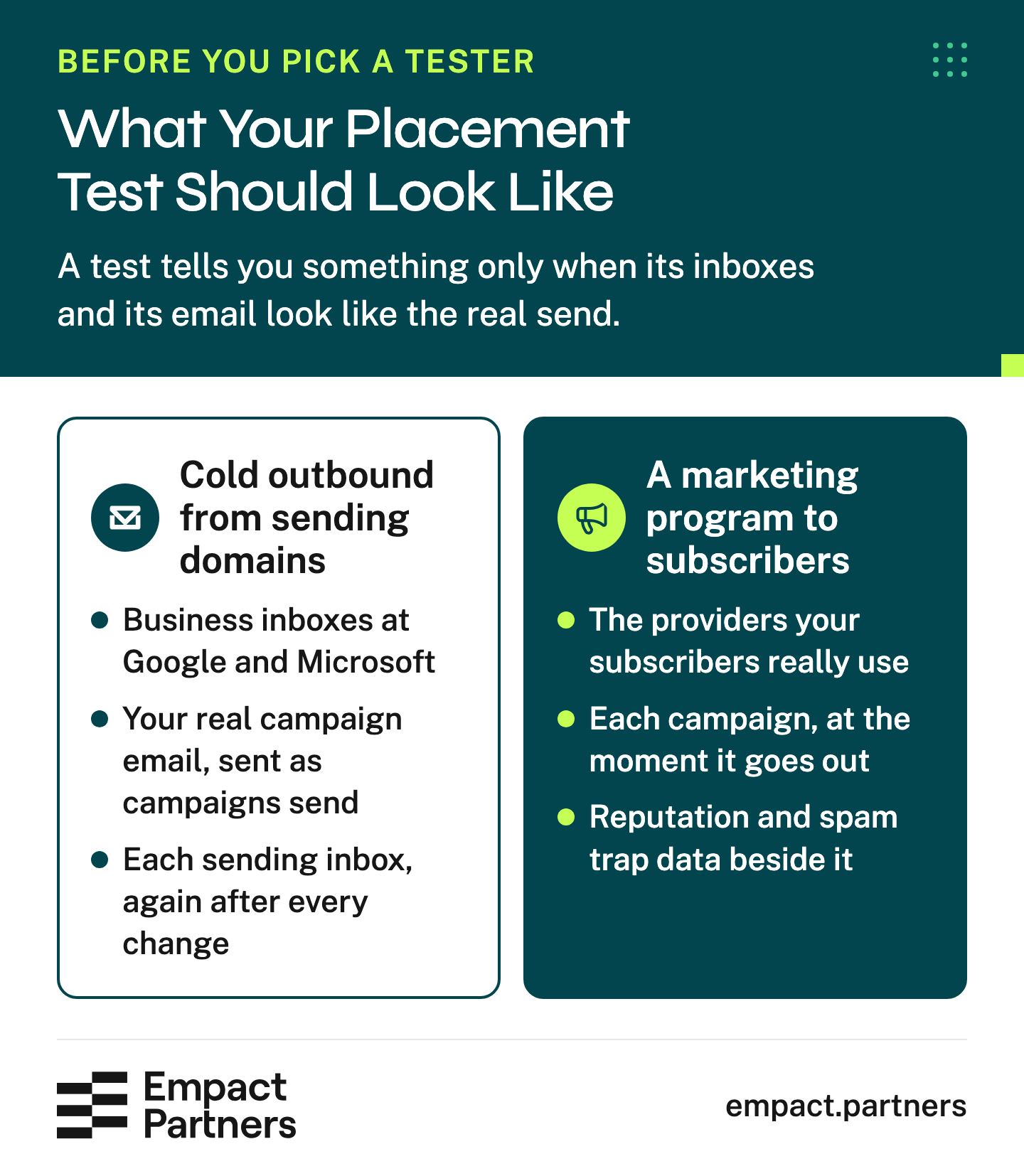
EmailGuard, GlockApps and MailReach test cold sending domains. Inbox Monster and Validity Engage belong to the right-hand column, and searches for a placement tester put them beside the other three. That column changed this year: Validity launched Validity Engage on 11 February 2026 and folded in Everest, the tool most older comparisons still price 1 2.
Empact Partners runs SaaS companies’ signal-based outbound from domains it tests first, so the email reaches the buyers their sales teams want. None of those domains goes to full volume before a test email lands in a Google inbox and a Microsoft one.
We reviewed these five by whose inboxes they test and how often a team can afford to run them. Our own runs use EmailGuard, testing every inbox we send from twice a month. We also built a free Inbox Placement Test that sends your real email to eight business inboxes, and as our own build it stays out of the ranking. Prices were read on each vendor’s page on 23 November 2026.
Scroll horizontally to see all columns when the table is wider than this page.
| Tool | Best for | Test mailboxes | How you buy it | Starting price |
|---|---|---|---|---|
| EmailGuard | Every cold sending inbox, on a schedule | Business inboxes at Google Workspace and Microsoft 365 | Monthly plan | $49 a month for 300 tests |
| GlockApps | One campaign now and then | Consumer and business mail, Gmail to regional providers | Credit pack or plan | 2 free tests, then $16.99 for 3 |
| MailReach | Warmup and tests on one bill | 28 addresses, 16 on company-style domains | Credits or a warmup plan | Free 3 times a day, $15 a month for 20 |
| Inbox Monster | Subscriber programs weighted by audience | 90+ mail systems | Annual contract after a demo | $15,000 a year |
| Validity Engage | Enterprise programs on one platform | 90+ email providers | Quote after a demo | Not published |
EmailGuard
Best for: outbound teams that test every cold sending inbox on a schedule and want business test inboxes only.
EmailGuard bundles placement tests with the rest of a cold sender’s checks: authentication monitoring, blocklist checks, spam filter tests and redirects for extra domains 3. A placement test sends your email to its network of inboxes and reports each one separately 4.
In our runs every test goes to eight business mailboxes, four on Google Workspace and four on Microsoft 365. That mix is the point for cold email, because company buyers read their mail on those two. Pro costs $49 a month for 300 tests, about 16 cents each, so testing every sending inbox twice a month stays cheap at dozens of inboxes 3.
Our own runs found the weak spot. On our first full run, 15 of the 36 Microsoft mailbox domains in its network never reported a result from any sender. A test can come back with fewer Microsoft answers than it sent. The free plan has no placement tests at all.
Pricing
- Free plan: $0, one domain, 3 mailboxes, 10 spam filter tests and no placement tests.
- Pro: $49 a month, 25 domains, 100 mailboxes and 300 placement tests.
- Business: $129 a month, 75 domains, 300 mailboxes and 500 placement tests.
- Top tier: $199 a month, 200 domains, 1,000 mailboxes and 1,500 placement tests.
Pros and cons
EmailGuard is the cheapest way here to test often, and the plainest about whose inboxes it uses:
Pros
- Business test inboxes at Google Workspace and Microsoft 365
- About 16 cents a placement test on Pro
- Authentication and blocklist checks on the same plan
Cons
- No placement tests on the free plan
- Some Microsoft test mailboxes never report
- No independent reviews on G2 yet
Nobody independent has reviewed EmailGuard on G2, and Reddit mentions it only in passing, so the read here comes from our own runs:
EmailGuard earns its place in cold email because every test mailbox is a company inbox, so its Microsoft column means something. Read that column apart from Google’s, and count how many Microsoft mailboxes answered before you trust the percentage.
 Sinead Hovelmeier on LinkedInOpens in a new tab
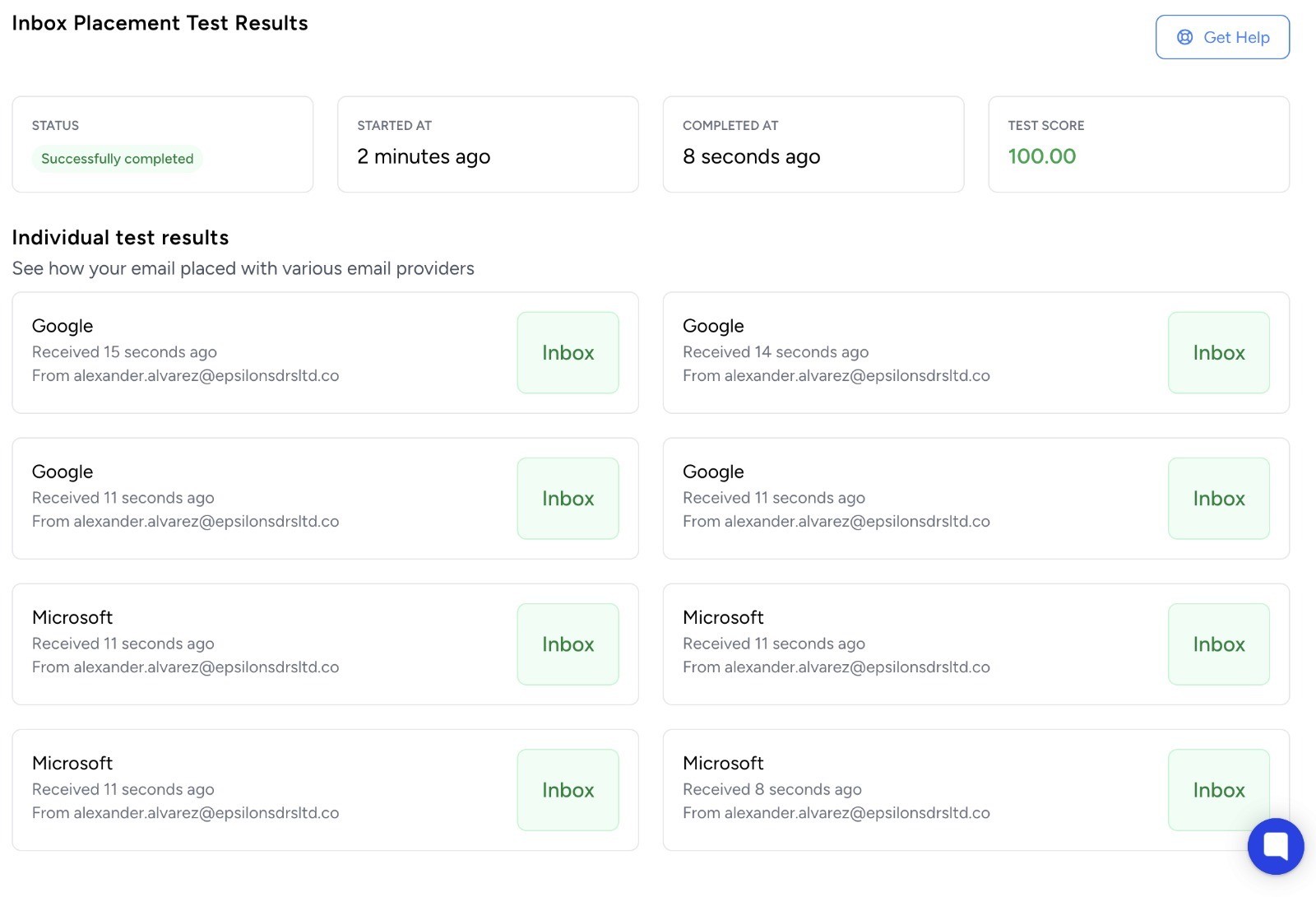
Inbox Placement Tests report every mailbox on its own
Each test mailbox appears as its own card, with its provider, when the email arrived and where it landed. A sender sees at a glance which provider has the problem, instead of one blended score 4.
Verdict: the tester for an outbound team with more than a handful of sending inboxes, because it costs little enough to test all of them after every change. We would set it up before a team’s first campaign goes out. Skip it if your mail goes mostly to personal inboxes rather than company ones.
GlockApps
Best for: checking one campaign across many mailbox providers before it goes out, paid by the test.
GlockApps calls its test Inbox Insight. It sends a campaign to test mailboxes at Gmail, Outlook and Yahoo, through Office 365 and G Suite, out to regional providers such as Seznam and Naver. It also runs the email through five spam filters, Microsoft’s and Proofpoint’s among them 5.
It is the easiest tester here to buy once. New sign-ups get two free tests, and a pack of three costs $16.99, about $5.66 a test 6. Plans cost $59 to $129 a month billed annually, or $85 to $185 billed monthly, which is why G2 shows higher prices than the pricing page’s default view 7.
The test mailboxes lean toward consumer mail, which suits a newsletter and says less about a cold email to a company on Microsoft 365. Two testers can also disagree. One marketer on r/Emailmarketing ran GlockApps and mail-tester and got a pass from one and a fail from the other.
Pricing
- Free plan: $0, 2 spam tests.
- Credit packs: $16.99 for 3 tests valid a month, $47.99 for 10 valid two months, $75.99 for 20 valid three months.
- Essential: $59 a month billed annually for 360 tests a year, or $85 monthly for 30 a month.
- Growth: $99 a month billed annually for 1,080 tests a year, or $142 monthly for 90 a month.
- Enterprise: $129 a month billed annually for 1,800 tests a year, or $185 monthly for 150 a month.
Pros and cons
GlockApps is built for the check before a send, and its credit packs make that check cheap to start:
Pros
- Pay by the test, with no plan
- Five spam filters, Microsoft’s and Proofpoint’s included
- Regional providers from Seznam to Naver included
Cons
- Test mailboxes weighted toward consumer providers
- Monthly billing costs more per test than annual
- An interface reviewers call dated
What G2 reviewers and Reddit say about GlockApps
Users praise the seed test itself and grumble about learning to read it:
The seed list testing is the main reason we keep paying for it.
Founder at a small businessSep 2026 The interface feels a little outdated and some of the reports take time to interpret if you’re new to it.
The same founderSep 2026 r/Emailmarketing
View threadIt’s occasional, I tried both Glockapps and mail tester, one says I’m good while the other shows bad results
Jul 2026
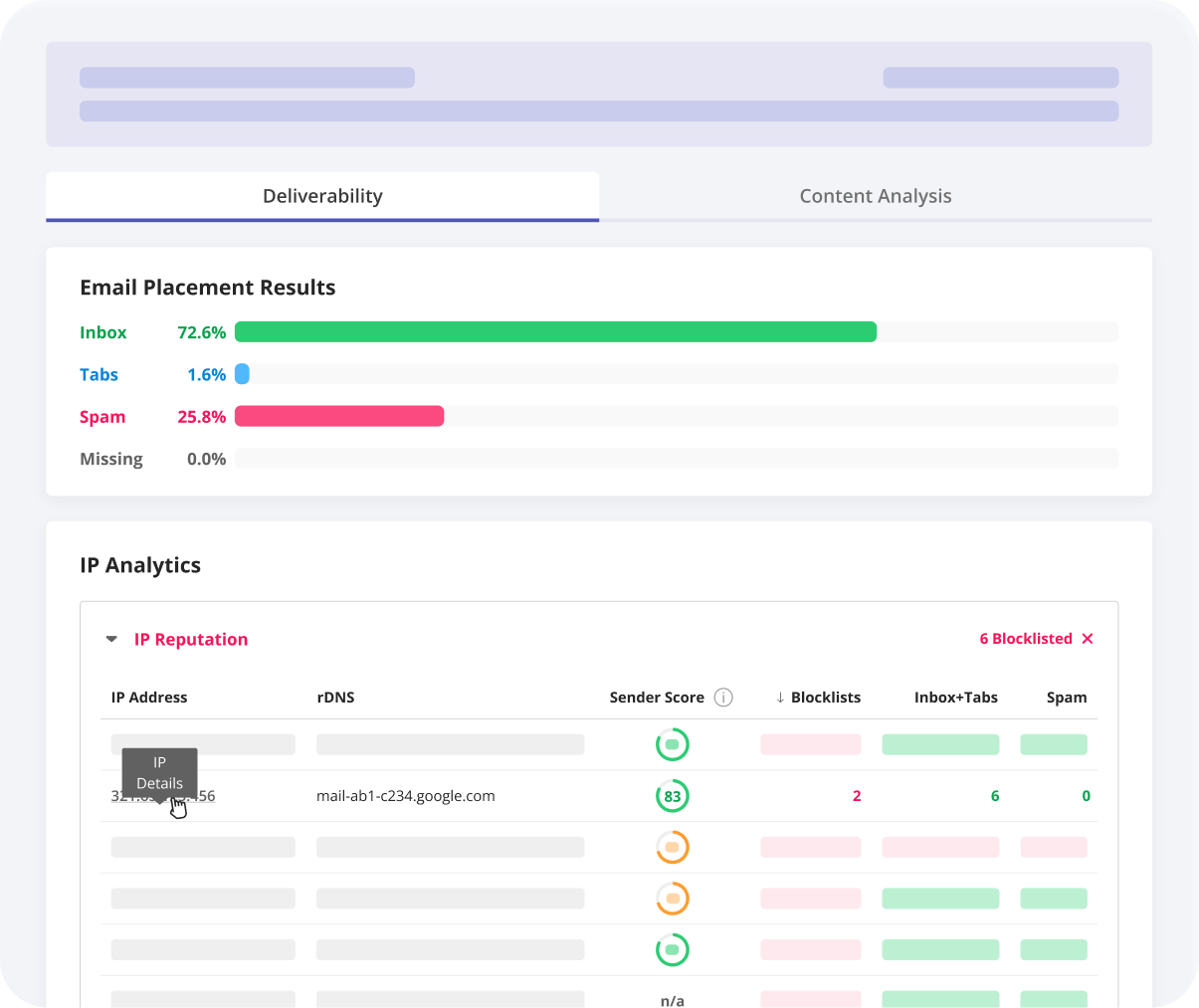
Inbox Insight puts placement and the sender’s reputation in one report
One report sets the inbox, tab, spam and missing shares beside the sending server’s reputation and blocklist hits. A second tab analyzes the content. For a single campaign, it puts where the email landed and the likely cause side by side 5.
Verdict: the tester for a team that checks a campaign now and then, across more providers than any other cold tool here. Buy credit packs before a plan. Skip it as your only check on cold email to companies, and run a business-inbox test beside it.
MailReach
Best for: lean outbound teams that warm their mailboxes and want placement tests on the same bill.
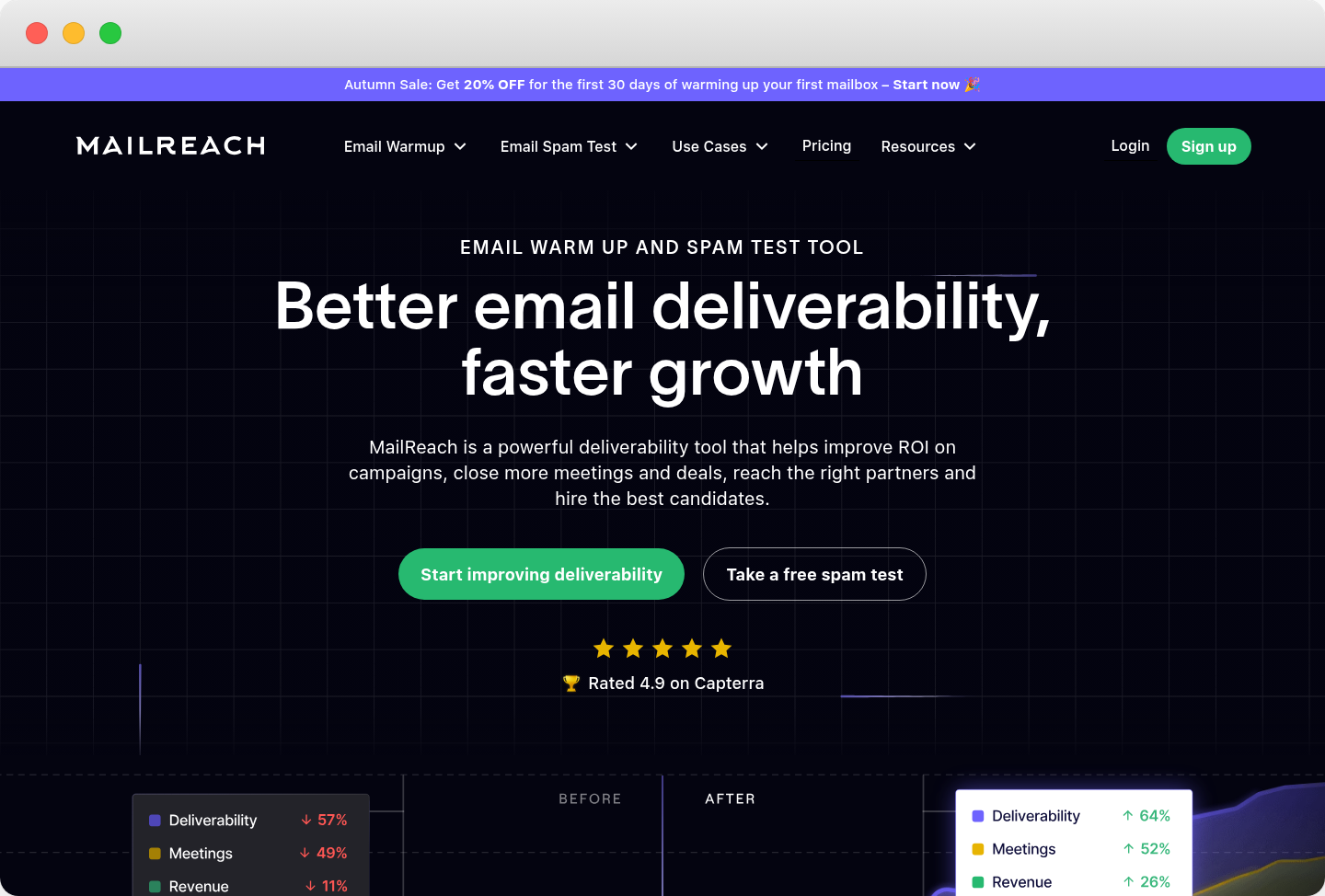
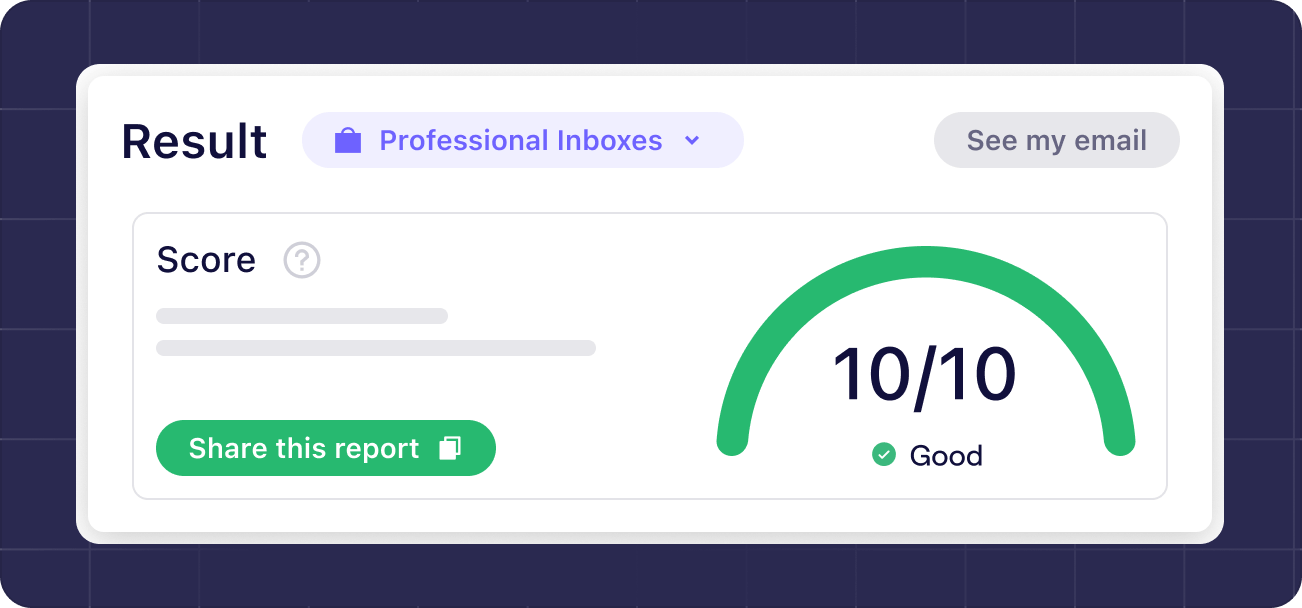
MailReach is a warmup tool with a spam tester attached, and the tester can be bought alone. The free version sends your email to 28 addresses, up to three times in 24 hours, and scores the result out of 10 8. Paid credits add automatic tests with alerts in Slack or by webhook, a view by provider and rotating test addresses 9.
The provider view is what makes it useful for cold email. One operator on r/Coldemailing ran it on a campaign email and a neutral two-line control. Every Google copy went to spam and every Office 365 copy reached the inbox, which pointed at the domain’s reputation rather than the words.
Look at whose addresses those are, though. Of the 28, sixteen sit on company-style domains such as reputationwarmup.com and landininbox.com, and twelve are Gmail, Hotmail and Outlook.com addresses 8. Those domains are test mailboxes, not companies your buyers work at. A 10 out of 10 tells you how the email fared there, not at your buyers’ own company mail.
Pricing
- Free spam test: $0, up to 3 tests in 24 hours.
- Warmup with tests: $25 a mailbox a month, or $20 billed annually, with 20 spam test credits included.
- Monthly credits: $15 for 20 tests, $30 for 50, $55 for 100 and $135 for 300.
- Pay as you go: $19.50 for 20 tests or $39 for 50.
- Currency: the same figures in euros for buyers in Europe.
Pros and cons
MailReach makes testing cheap and frequent, and its score is easy to over-read:
Pros
- A free test, up to three times a day
- A professional-inbox view of every result
- Alerts in Slack or by webhook on paid credits
Cons
- Test addresses on deliverability-named domains
- One score out of 10 across a mix of test addresses
- Reporting over time that users find thin
What Reddit and G2 reviewers say about MailReach
Users value the provider split and warn that the score moves slowly:
r/Coldemailing
View threadGoogle (Gmail + Workspace): 14/14 spam every time, neutral included.
Oct 2026 It takes time to improve deliverability - for me, it was almost 5 weeks to move from 4/7/10 to 10/10 inbox placement
Operations manager at a small businessAug 2025 I think MailReach could improve by offering more reporting insights, especially to compare performance over time.
Reviewer on G2Jan 2026
The spam test scores professional inboxes on their own
The result can be filtered to professional inboxes, personal inboxes or both, so a cold sender can take the Gmail and Hotmail addresses out of the score. That filter is the closest MailReach comes to a business-only test 8.
Verdict: the tester for a small team already warming its mailboxes, which gets tests on the same bill and a free one to start. Read the professional-inbox score and check it against replies. Skip it as proof that your email reaches company mail on Microsoft 365.
Inbox Monster
Best for: enterprise lifecycle teams that want placement weighted by their own subscribers, with a consultant attached.
Inbox Monster tests a send against more than 90 mail systems across North America, Europe, Asia and South America. It pairs the result with Google Postmaster Tools, Microsoft’s Smart Network Data Services (SNDS) and Spamhaus data 10. The brands on its homepage, Delta and Morning Brew among them, send to subscribers, and the product is built around that.
The deliverability suite starts at $15,000 a year, sold on annual contracts after a demo, with setup done for you 11. Several G2 reviewers write about their named deliverability consultant as warmly as about the software.
For a cold outbound team there is nothing to buy here. No self-serve plan, no price per test, and a test weighted to a subscriber base that a cold sender does not have.
Pricing
- Deliverability suite: from $15,000 a year, with setup done for you.
- Creative suite: from $3,750 a year for 15,000 email previews.
- Text message suite: from $6,000 a year.
- Terms: annual subscriptions, after a demo.
Pros and cons
Inbox Monster sells to subscriber programs, with a consultant and an annual price to match:
Pros
- Placement weighted by your real subscribers
- Postmaster, SNDS and Spamhaus data beside each test
- A deliverability consultant with the contract
Cons
- From $15,000 a year, annual only
- No self-serve plan for testing alone
- Fewer automatic alerts than some users want
What G2 reviewers and Reddit say about Inbox Monster
Reviewers run it on large programs and ask for more alerts:
We rely on it regularly to monitor sender reputation, validate inbox placement across major providers, and quickly diagnose issues that could impact engagement at scale.
VP of retention and lifecycle marketing at a mid-market sports companyMar 2026 I would like to see more proactive alerts or automation around deliverability changes.
VP of retention and lifecycle marketing at a mid-market sports companyMar 2026 Some of their features cost a premium compared to other services, but you get what you pay for, and I trust Inbox Monster’s quality and effectiveness.
Senior director of CRM at an enterpriseJul 2026 r/Emailmarketing
View threadWe regularly use a mix of Validity Everest and Inbox Monster depending on the client as they seem to be the most reliable in my experience.
Sep 2025
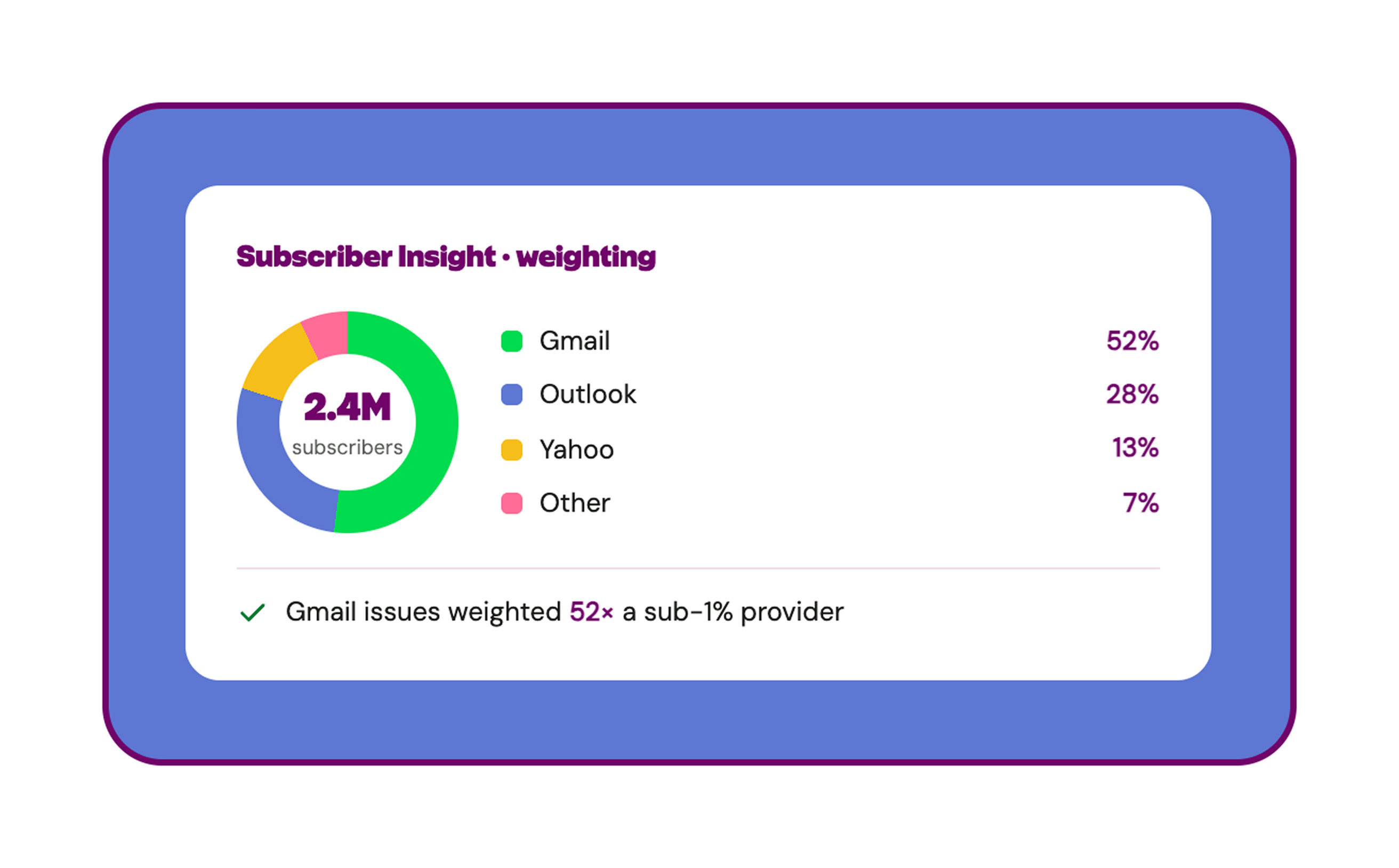
Subscriber Insights weights each provider by your audience
Subscriber Insights maps your subscribers to the mail systems behind them and weights placement by provider. A problem at the provider serving half your audience outranks one at a provider serving under 1% 10. For a program that is mostly Gmail, a bad week at a small provider stops looking like a crisis.
Verdict: the tester for a lifecycle team with a large subscriber program and the budget for a consultant. We would put it on a marketing team’s shortlist and never on an outbound team’s. Skip it if you send cold email from a handful of domains.
Validity Engage
Best for: enterprise email programs that buy placement testing inside one platform with rendering, address validation and competitor data.
Validity Engage is where Everest went. Validity launched Engage on 11 February 2026 as one platform run by four AI agents, and Everest’s inbox placement and deliverability monitoring now live inside it, beside Litmus and BriteVerify 1 2. Placement is tested across more than 90 email providers, next to Sender Score reputation, authentication and blocklist monitoring 12.
Validity publishes no price. It moved its products to an unlimited model with no seat caps, priced for each program after a demo 1 12. A comparison that still quotes Everest tiers describes a product Validity now sells inside Engage.
The small-team route has closed. A founder who used Validity to test email designs says on G2 that it dropped his self-service package with a month’s warning and offered only the enterprise plan. A cold outbound team testing a few sending domains is not who Engage is priced for.
Pricing
- Validity Engage: no published price, a quote after a demo.
- Model: unlimited access, with no seat caps or usage limits.
- Everest: its placement and monitoring now sit inside Engage.
Pros and cons
Engage makes sense for a team that checks rendering, addresses and competitors as well as placement:
Pros
- Placement across 90+ providers beside Sender Score
- Rendering, address validation and competitor data on one platform
- No seat caps under the unlimited model
Cons
- No published price and no self-serve plan
- A small-team package dropped after the launch
- Built for subscriber programs, not cold domains
What G2 reviewers say about Validity
Validity’s G2 profile merges Engage with Litmus and BriteVerify, so its 705 reviews mix rendering and address checks with placement, and the placement record is thin:
They dropped their self-service package with only 1 month’s warning and no migration path except for to upgrade to their (unaffordable) enterprise package.
Founder and CEO of a small businessMay 2026 I have to say the price is a bit steep and sometimes I wish they’d release updates that actually change things in a meaningful way
Jefe de proyecto at an enterprise telecommunications companySep 2025
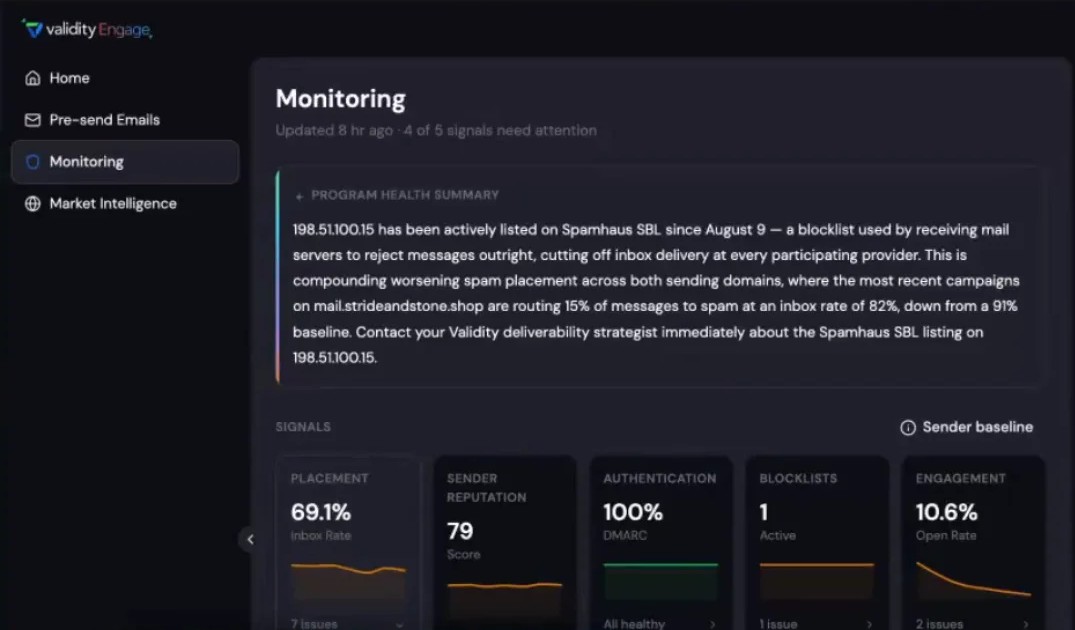
The Guardian agent watches deliverability between sends
Guardian is the Engage agent that monitors subscriber experience and deliverability, so a sender catches a problem early 1. In Validity’s own demo, its Monitoring view writes a plain-language health summary first, then shows placement, reputation, authentication, blocklists and engagement as signals underneath.
Verdict: the platform for an enterprise marketing team that wants placement, rendering and validation from one vendor. Ask for the placement module’s price on its own before you sign for the rest. Skip it for cold outbound. A per-test tester answers that question without an enterprise contract.
Which Tester Fits How You Send
Start from how often you need the answer and whose mail it is:
- Every sending inbox: EmailGuard, on Pro or above, after every change.
- An occasional campaign: GlockApps credit packs, across many providers.
- A warmup stack: MailReach, read on its professional-inbox score.
- A subscriber program: Inbox Monster, weighted by your own audience.
- One enterprise platform: Validity Engage, with placement inside it.
No tester wins all five situations. Each answers for the inboxes it owns, so check first that the test copies your real send.
How We Test Placement on Our Own Sending Domains
Our own runs taught us more about running a test than about choosing one. On 3 November our campaign email, sent one recipient at a time from 62 of our inboxes, reached 65% of the Google test mailboxes and 24% of Microsoft’s.
Blended into one number, that result would only have said something was wrong somewhere. Split by provider, it pointed at Microsoft. Split again by domain, it showed our company domain landing in every test while the separate sending domains almost never reached a Microsoft inbox.
The email matters as much as the provider. On 1 October our plain test email reached the Google inbox 88% of the time and our real campaign email 69%, from the same inboxes, sent the same way. A test written for the test makes your campaign look better than it is.
Our campaign email reached 65% of the Google test mailboxes and 24% of Microsoft’s in the same run.
Operators who test cold email every week reached the same rules on Reddit, and add a few habits worth copying:
Tips from Reddit
How cold email operators keep a placement test honest
What’s worked better at low volume is a handful of real mailboxes at friendly companies on different setups, Workspace, 365 and one behind a gateway, and sending them the actual campaign copy.
On a new low volume one it can be a real share of your weekly volume, and those seats never open, so youre feeding zero engagement into a domain with no history to absorb it.
Once a week is fine. Several times a day is not.
Whichever one consistently gets closest to the live data is probably more useful than simply picking the tool with the biggest seed list.
The last tip is the one teams skip after they buy. Whatever tester you choose, set its result beside the replies each inbox got that week, and keep the tool that tracks them.
You can run the same kind of test on your own setup. Our Inbox Placement Test gives you the addresses of eight business inboxes, four at Google Workspace and four at Microsoft 365.
You send your real email from the tool you already use, with your usual sender, and the result comes back by provider within about ten minutes. Our Outbound partners get the full agent, which retests their domains after every new domain, sequence or setting, and this free run shows you what it reads:
If your replies have slipped, we would start where this page does, with a test of each sending inbox run the way it sends. Every inbox we send from for partners is tested twice a month as well, and our consultants compare each result with the last and pause any domain that slips. The outbound itself includes:
What you get from our Outbound work
- Emails sent when something changes at the company you write to, each under its sender’s own name
- Separate sending domains that our team sets up and warms
- Volume on a domain only after its test email lands in Google and Microsoft inboxes
- Sending caps, with a stop that stays in your team’s hands
- Replies read and answered, and buyers who ask to meet passed to your sales team
Heather Holland wrote the steps down for teams that would rather run these tests themselves:
Whichever tester you buy, read its score beside the replies. When a green result sits next to a silent inbox, question the test first, then who you wrote to and what you offered.
Frequently Asked Questions
What does an inbox placement test measure?
Where one email lands at a set of test mailboxes: the inbox, a tab such as Gmail’s Promotions, the spam folder, or nowhere. Your sending tool cannot see past the receiving server, so it calls all four delivered. A placement test follows the email into the mailbox.
It measures that one email, from that one inbox, at that moment, which is why the way you send the test matters as much as the tool you pick.
How accurate are inbox placement tests for cold email?
Accurate about the test mailboxes, and only as representative as those mailboxes are of your buyers. Test inboxes never open or reply, and a company on Microsoft 365 filters with rules its own admin sets. Treat a result as an early warning and confirm it against replies and auto replies for each inbox.
A tester built on business inboxes at Google Workspace and Microsoft 365 says more about cold email than one built on personal Gmail.
Why do two inbox placement testers disagree?
They send to different mailboxes at different providers, and they often count tabs and missing results differently.
How the test email is addressed changes the score too. In our runs, Google placed one email addressed to every test mailbox far less often than the same email sent one recipient at a time. Compare both tools against a few real sends and keep the one whose results track your replies.
How often should we run a placement test?
Before a campaign goes out, and again after any change to a domain, a sequence or a sending setting. A regular check on top catches slow drift.
Weekly is a sensible ceiling on a low-volume inbox, because test mailboxes never engage and several tests a day become a real share of what that inbox sends.
Can a placement test hurt a new sending domain?
Rarely, if the tests are occasional and the domain already sends steadily. A new domain that sends a few emails a day is different.
There, a burst of test emails is a large share of its traffic, and none of it gets opened or answered. Keep tests small and spaced while the domain warms up. Send them one recipient at a time as a campaign would, and never treat one result as a verdict on a domain that young.
Should we test with our real campaign email?
Yes. Test the first email of the campaign you are about to send, its merge fields filled for a real lead, from the inbox that will send it. A short plain message tells you about the domain and very little about the campaign, because links, length and wording all move the filters. When the two disagree, believe the campaign email.
Why does Microsoft junk mail that Google lets through?
The two filter differently, and a company on Microsoft 365 adds its own rules on top. In our own runs the company domain reached Microsoft inboxes while the separate sending domains rarely did.
One email can reach the inbox at one provider and junk at the other in the same hour. Read the two results separately, and look first at the sending domains that fail at that provider.
What happened to Validity Everest?
Validity launched Validity Engage on 11 February 2026, and Everest’s inbox placement and deliverability monitoring became part of it, along with Litmus and BriteVerify. Engage is sold as one platform run by four AI agents, by quote, under an unlimited model with no seat caps. Any comparison that still quotes Everest tiers and prices is out of date.
How much does inbox placement testing cost per test?
At the prices on 23 November 2026, EmailGuard Pro works out to about 16 cents a test and MailReach’s Spam Tester to 45 to 75 cents, depending on volume. GlockApps costs about $2.83 a test on its monthly Essential plan and $3.80 to $5.66 in credit packs. Inbox Monster’s deliverability suite starts at $15,000 a year, and Validity publishes no price.
Is there a free inbox placement test for cold email?
Several. GlockApps gives two free tests at sign-up and a free checker that needs no sign-up at all. MailReach’s free spam test runs up to three times a day. EmailGuard’s free plan has no placement tests. Our own Inbox Placement Test is free, takes your real email from your usual sending tool, and reports Google Workspace and Microsoft 365 apart.
What should we check when replies drop but the test says inbox?
First the test: was it your real email, sent one recipient at a time from the inbox that is struggling, and read at Google and Microsoft apart? Then the signals a test cannot fake, such as bounce and deferral codes, auto replies for each inbox and replies by the recipient’s provider.
If those hold, look at who you are writing to and what you offer, and give the channel the time outbound takes to work.
Sources (12)
- Validity, "Announces Engage, the Next-Generation AI Email Platform to Help Marketers Execute with Confidence" (2026)↩1↩2↩3↩4
- Validity, "A New Look. A Bigger Vision. Welcome to Validity Engage" (2026)↩1↩2
- EmailGuard, "Pricing" (2026)↩1↩2
- EmailGuard, "Inbox Placement Tests" (2026)↩1↩2
- GlockApps, "Email Deliverability and Inbox Placement Testing Tool" (2026)↩1↩2
- GlockApps, "Spam Test Credit Packs" (2026)↩1
- GlockApps, "Pricing" (2026)↩1
- MailReach, "Free Email Spam Test and Checker" (2026)↩1↩2↩3
- MailReach, "Pricing" (2026)↩1
- Inbox Monster, "Inbox Placement Tool" (2026)↩1↩2
- Inbox Monster, "Pricing" (2026)↩1
- Validity, "Inbox Placement and Deliverability" (2026)↩1↩2
Keep reading
Outbound 5 Best Video Prospecting Tools for Outbound Sales Teams
Five video prospecting tools sorted by who records and what triggers the send, with live prices and where each fits in a sequence.

Outbound 5 Best Corporate Gifting Platforms for ABM and Sales Teams
Five gifting platforms matched to how often your team sends and where your buyers sit, with live prices and what each one records.

Outbound Why Cold Email Belongs on a Separate Sending Domain
Cold email belongs on its own domains. What they protect, what still ties them to you, and what four of ours that hit spam showed.