
How To Run A Blog Design Audit Before You Redesign Anything
Audit your blog’s templates before the mockup goes to development. Many faults are fixes your CMS can already make, without a redesign.
 Wihan van ZylWith
 Vlad Shvets
On this page
- Why an Outdated Blog Template Costs You Credibility on Every Post
- Set Up the Sheet, Then Capture Every Template
- Check What Your CMS Can Fix Before the Mockup Goes to Development
- Rank the Fixes by Reach and by What They Cost Readers
- Test Every Fix on Your Longest and Oldest Posts
- Keep the Element Your CEO Loves and Fix How It Works
- Decide Which Posts Stay, Then Retrofit the Template Across Them
- How We Run a Blog Design Audit for Partners
- Frequently Asked Questions
Empact Newsletter
One email a month on what is working in AI search and SaaS go-to-market.
The redesign is approved. A designer has made a mockup that looks better than your blog, the kickoff is booked, and nobody can say what the current templates are costing you. Everyone agrees the blog looks older than a competitor’s. Nobody knows which faults lose readers, which ones your content management system (CMS) could fix this week, or what the mockup fixes.
Audit the templates before the mockup goes to development. A blog’s design faults live in a handful of templates, so each one repeats on every post built from them. Once someone on your team finds them, writes them down and checks each against your CMS, you know what the redesign has to do, and it is usually less than the mockup.
Empact Partners audits SaaS websites and blogs as part of its brand marketing, so buyers meet one clear message wherever they land. Before a partner’s blog is redesigned, we look hard at the templates it already has.
Why an Outdated Blog Template Costs You Credibility on Every Post
A reader decides whether to trust a post long before they finish it. Much of what they go on comes from the template: who wrote it, when, and whether anyone still looks after the page.
In a 2002 Stanford study of how people judge websites, 46.1% of the comments that 2,684 participants made about credibility concerned the design, more than any other feature.2 The study is old and was not about blogs or SaaS, so read it for the direction rather than the size.
The template is where those judgments get made, which is what makes its faults expensive. A byline the template hides or a callout it sets smaller than the text appears on every post built from it, the old ones and next week’s. That is why we treat a dated, hard-to-read blog as a leak in the funnel rather than a cosmetic problem.
A fault in a blog template ships again with every post you publish on it.
Google asks a similar question of written content. Its guidance asks whether it is obvious who wrote a page and whether pages carry a byline where readers would expect one, and it strongly encourages accurate authorship information.1 A post that names nobody fails that question before anyone reads a line.
So the audit looks at templates rather than posts, and it needs somewhere to write down what it finds.
Set Up the Sheet, Then Capture Every Template
Open the sheet before you take a single screenshot. Screenshots that are never filed against a template turn back into a general impression, and a general impression can’t be handed to anyone. The sheet takes one row per fault per template, with these columns:
Scroll horizontally to see all columns when the table is wider than this page.
| Column | What goes in it |
|---|---|
| Fault | What is wrong, in a sentence a developer could act on |
| Template | Post, blog home, category, author page or search results |
| Screenshot | The file it came from, desktop or phone |
| Posts affected | Every post built on the template, or which ones |
| Fix route | Filled in at the next step: a CMS setting, a template change or the new design |
| What it costs readers | Trust, clicks or looks |
| Rank | Filled in last |
With the sheet open, capture the blog the way a reader meets it:
Name every template.
The post page, the blog home, category and tag pages, author pages, search results, and the page each call to action sends readers to.
Pick the posts to capture.
For the post template, take your newest post, your longest, your oldest one that still gets traffic, and one by a guest or a writer who has left. Faults hide in posts nobody has opened since they went live.
Capture each page top to bottom.
Full-page screenshots at desktop and phone width, with the cookie banner dismissed, so each image shows what a reader sees past it.
Click everything that looks clickable.
Every contents link, button and icon. Write down what happens, including nothing.
Log every element that looks dated, inconsistent or unclear.
One row each, with the screenshot it came from.
Most rows fall into a short set of faults, and we look for these on every post template:
- A post with no named author, or a byline that names only the company
- Calls to action competing in the text, or the same one repeated
- Cover images cropped to a shape the template wasn’t built for
- Icons with no label, such as a clock beside a number that could mean minutes or views
- A contents block whose links don’t jump to their sections, or aren’t links at all
- Callouts, quotes and takeaway boxes set smaller than the text around them
- Boxes and underlined phrases that look clickable and do nothing
- Bold, spacing and colors that change from post to post
These faults turn up even on the blogs of public SaaS companies. Of the first posts that 63 such companies showed on their blogs on 24 November 2026, a quarter named no person as the author:3
Template Faults on 63 SaaS Blog Posts
Share of posts with each fault, one post per company, BVP Emerging Cloud Index, Nov 2026
buttons in the text7.9%
in the page code6.3%
than the text4.8%
View the data
| Label | Value |
|---|---|
| No person named as author | 25.4% |
| Two or more call-to-action buttons in the text | 7.9% |
| Author named only in the page code | 6.3% |
| Callout set smaller than the text | 4.8% |
That quarter is 16 posts. Nine credited the company or a team, and seven showed no byline at all. Four of the sixteen had a person’s name in the page code that the template never displays. Five posts put two or more call-to-action buttons inside the text. Each of these can usually be fixed without a redesign, and the next column of the sheet is where you find out.
Check What Your CMS Can Fix Before the Mockup Goes to Development
The fix-route column is the one teams leave empty, and it changes the plan. Some faults are a setting or a field in the CMS, such as an author name nobody filled in. Some need a small change to one template, like showing an author field the template ignores, or giving each heading an identifier (ID), the anchor a contents link jumps to. The rest need a new template, and only those belong to the redesign.
A custom or unusual CMS moves rows from one route to another, so fill the column in with someone who knows how yours behaves, before a designer starts. The expensive order is the common one. The mockup is approved, development starts, and the team learns which parts fight the CMS after the budget is committed.
Place each fault by what it costs readers and by the route that fixes it, and the sheet splits into the work you do now and the work you hand the redesign:
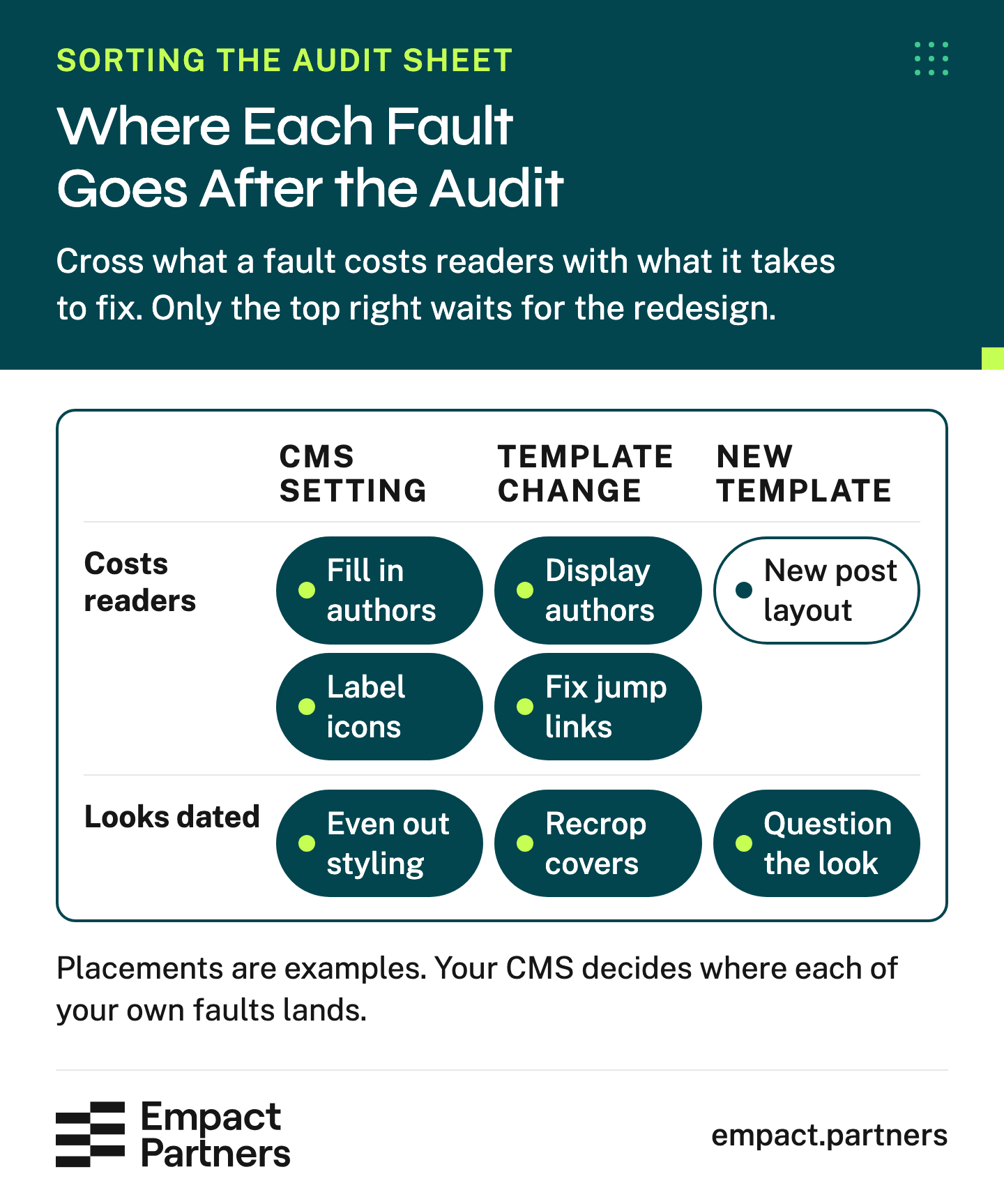
The top row’s fixes that need only a setting or a template change come first, ahead of any redesign. The top right is the redesign’s real scope. The bottom right holds faults that only look dated and still need a new template, which is the hardest part of a mockup to justify.
People who build and audit sites make the same case against rebuilding first, and one of them names what a polished redesign can cost in clarity:
Tips from Reddit
What web practitioners on Reddit say about rebuilding
I don't recommend a full rebuild, as clients are then wary and assume you're taking them for a ride. All of the issues can be fixed. Maybe expensively, but it can be done.
if you just keep redesigning sites for the sake of it, you’re not going to see an improvement.
time on site increasing while conversion drops almost always means clarity decreased. people are reading more because they're confused, not engaged.
With the sheet filled in, the mockup gets a fair test. Check which rows it closes and which it ignores. Then look for the new faults it brings, such as a cover shape your images can’t fill or a larger call-to-action box. A mockup that closes few rows is a new look, and the sheet shows what that look leaves broken.
Approving a redesign from a mockup means signing off on how a few posts look. Approving it from the audit sheet means signing off on which faults get fixed, and that is the version anyone can check after launch, row by row.
 Wihan van Zyl on LinkedInOpens in a new tab
Rank the Fixes by Reach and by What They Cost Readers
The order of the sheet comes from two questions, how many posts carry each fault and what it costs the reader who meets it. Work through them in this order:
Count the posts each fault touches.
Use how many posts the template serves, not how many screenshots show the fault.
Mark what it costs the reader.
Trust first (no named author, links that go nowhere, buttons that do nothing), then clicks (competing calls to action), then looks (an odd cover crop, an old font).
Weigh reach against cost.
A dated cover crop on every post can outrank a broken button on a few old posts.
Break ties by route.
A CMS setting goes before a template change, and a template change before anything that waits for the redesign.
Before anything changes, write down what each template does today. Record clicks on each call to action, sign-ups or demo requests from blog visits, and how far readers scroll on long posts. Without those numbers nobody can say afterwards whether the fixes worked, and the redesign that follows gets judged on looks again.
Whoever edits your templates can usually ship the top of the sheet without a redesign, wherever the route says setting or template change. What remains needs a new template and a developer’s time, and that remainder is the redesign worth budgeting for.
Everything on the sheet is about the template. Whether a post’s claims hold up when a buyer checks them is the other part of its credibility, and no template fixes that part. Our free Proof Audit checks that part on your own key pages, before the redesign starts:
Test Every Fix on Your Longest and Oldest Posts
Mockups usually show a few posts picked to look good. They are short and recent, with fresh cover images, and most of an archive looks nothing like that. A callout that sits well in a short mockup post can break across a long guide. An old post can carry tables and embeds nobody remembers adding, and a guest post may have no bio to fill a new author box.
So the top of the sheet goes onto a staging copy of the blog first, with real posts, and someone reads them there before anything reaches the live site:
- Your longest post, read on a phone from the first line to the last
- Your oldest post that still gets traffic, in its original formatting
- A post with a table, an embedded video or a code sample
- A post by an author who has left, or a guest with no bio
- Every contents link and button on those posts, clicked
Whatever breaks on staging goes back into the sheet as a row of its own. That is far cheaper than finding it after launch, on the posts that bring in your readers.
Keep the Element Your CEO Loves and Fix How It Works
Every redesign meets an element somebody senior won’t give up: an illustration on every cover, a sidebar widget, an icon set from the last rebrand. More data rarely wins that argument, and the redesign waits while it runs.
Our rule is to keep the element and fix how it works. Resize it, label it or move it below the first paragraph, until it stops costing readers what it costs them now. A redesign that ships with the beloved element beats a better one stuck in review.
Decide Which Posts Stay, Then Retrofit the Template Across Them
A new template lands on posts written by different people over several years, each with its own bold habits, image sizes and leftover formatting. How consistent that archive looks decides how professional the whole blog looks, so the retrofit has to reach every post you keep.
The first question, then, is which posts you keep. Retrofitting a post you will delete next quarter is wasted work.
Every post leaves the sort with a verdict. It stays as it is, gets refreshed, folds into a stronger post on the same subject, or goes. Every post that goes gets a redirect to the closest live page, so its links and rankings land somewhere. Sorting a large archive is an audit of its own, of what each post says rather than how it looks:
PDF Reader Pro went through both halves, the sort and the retrofit. Our team read hundreds of existing posts in its publication, pruned the ones holding back its inbound marketing and marked each pruned post for a redirect.
The redesign put new templates across the existing archive, worked through with PDF Reader Pro’s own design and development team. The templates added author attribution, contents links that jump to their sections, updated calls to action and pull quotes.
The stakes on that blog were plain. Its product guides were bringing in 15 to 20% of monthly sales when the case study was written, so the template under them was carrying revenue.
How We Run a Blog Design Audit for Partners
For a team with a mockup already in hand, Empact Partners would start before development does, with screenshots of every template and each fault logged against what your CMS can already do. The redesign that goes ahead can then be limited to what a new template has to fix. When your leadership won’t let an element go, we keep it and fix how it works.
A blog design audit with us includes:
- Screenshots of every template, with each dated, inconsistent or unclear element logged
- A map of what your CMS already does against what needs a developer, before anyone proposes a design
- Proposed changes tested on staging with real posts before they reach the live blog
- A senior go-to-market (GTM) consultant who owns the audit, by name
- Specialists in messaging and the site for their parts of the roadmap
The same order works for a homepage or pricing page redesign, which has templates, a CMS and a favorite element of its own. Starting there with the audit is how a team learns early how much of the project needs a new design.
Frequently Asked Questions
How long does a blog design audit take?
The number of templates sets the length, and the number of posts barely moves it. A blog with a post page, a blog home, category pages and author pages has four templates to capture, whether it holds forty posts or four hundred.
Most of the time goes into two places. The first is capturing the longest and oldest posts at desktop and phone width. The second is the fix-route column, which needs someone who knows how your CMS behaves.
Do we need a designer to run the audit?
No. The audit is screenshots, clicks and a sheet, and anyone who reads the blog carefully can run it.
Two other people make it better. Someone who can edit the templates fills in the fix-route column. A designer comes in afterwards and works from the rows the redesign has to close, instead of from a blank page.
Should we fix the blog we have or redesign it?
Fix first, in almost every case. Many of the faults that cost readers trust or clicks are settings or small template changes, and they can ship while the redesign is still being argued about.
A redesign earns its budget in three situations. The rows that need a new template outnumber the rest, the CMS blocks the fixes that matter most, or the brand itself has changed and every template has to follow it.
What should every blog post template show?
Start with a named author, their role and a short bio. Add the date the post went live or was last updated, and label any icon in words, such as “8 min read.” Long posts need a contents block whose links jump to their sections.
Callouts and quotes should be at least as large as the body text. Each post needs one call to action that fits what the post is about, placed where a reader who finished it would look for the next step.
How many calls to action should a blog post have?
One main ask, written for that post and placed where the reader finishes, is our default. It does more than several banners and pop-ups competing for the reader mid-read, and it treats their attention with more respect.
Anything else, such as a free tool or a guide, belongs beside the paragraph it serves and should look secondary. Never let two asks compete for the same click in the same spot.
Do author bylines matter for Google?
Google’s guidance asks writers whether it is self-evident who authored their content and encourages accurate bylines where readers expect them.1 It also tells them to avoid deceptive authorship information.
A real name with a short bio and a link to that author’s other posts is the safe form. It serves the reader whatever it does for rankings, and it is often a setting or a small template change. Check the page code too, because some templates store the author there and never show it.
What if our CMS can’t do what the design needs?
Then that fault belongs on the template-change or new-design route, and the question becomes cost. A developer can often add a single missing piece, such as heading IDs for a contents block or an author box, without a redesign.
If most of the sheet fights the CMS, the real project may be a move to a new CMS. That needs its own plan, with every old address redirected before launch.
Will a blog redesign hurt our SEO?
A redesign can hurt SEO when URLs change or when headings and structured data drop out of the new template. Keep every post’s URL and check that the new template keeps a single H1 and the heading order. Then compare a crawl of staging against the live blog before launch.
A technical SEO audit covers what a design audit leaves out, such as page speed and indexing.
How do we know whether the fixes worked?
Compare against the numbers you recorded before anything changed: clicks on each call to action, sign-ups or demo requests from blog visits, and how far readers scroll on long posts.
Change one group of rows at a time where you can, so a lift can be traced to a fix. Give each change several weeks of normal traffic before you judge it.
Should we redesign the blog and the website at the same time?
Only if the brand is changing. A new name, logo or message has to reach every template at once, and running two projects in sequence would leave the blog speaking in the old voice for months.
Otherwise, keep them apart. The blog’s faults sit in a handful of templates and can ship quickly, while a website redesign moves pages, navigation and copy. Bundling them holds the blog’s quick fixes hostage to the slower project.
How often should we audit the blog’s design?
Audit it before any redesign, after any change to a shared template, and whenever a new kind of post appears, such as a first video post or a comparison page.
Between those, a yearly pass over the oldest posts that still get traffic catches the formatting that drifts as writers come and go.
Sources (3)
- Google Search Central, "Creating Helpful, Reliable, People-First Content" (2026)↩1↩2asks whether pages carry a byline where readers expect one and encourages accurate authorship information. Page last updated 5 October 2026. Read 24 November 2026.
- B.J. Fogg and colleagues, Stanford Persuasive Technology Lab for Consumer WebWatch, "How Do People Evaluate a Web Site’s Credibility? Results from a Large Study" (2002)↩1Of the credibility comments from 2,684 participants, 46.1% concerned the site’s design look, more than any other feature. Read 24 November 2026.
- Empact Partners, "sweep of 63 SaaS blog posts" (2026)Empact Partners' own data↩1↩2the first post each company in the BVP Nasdaq Emerging Cloud Index showed on its blog on 24 November 2026, checked in a browser and by hand. 16 named no person as the author, 4 named one only in the page code, 5 had two or more call-to-action buttons in the text and 3 set a callout smaller than the text.
Keep reading
Brand Marketing How to Check Whether AI Engines Still Find You After a Rebrand
Find outdated profiles, broken pages and missing recommendations after a rebrand, then assign the fixes your team can make.

Brand Marketing Keep Your Brand Consistent When Every Team Ships Content
Stop teams recreating your brand. Build one approved library, name its owner, and check files and wording before they spread.
Brand Marketing Creative SaaS: Choose Your Segment Before Spending More
Lessons from creative software for choosing a buyer segment, testing your product’s fit and deciding where to spend next.