
Is a Free Technical SEO Audit Enough to Decide What to Fix?
A free technical SEO audit finds what’s broken in minutes. Ordering the fixes takes facts it can’t read: pipeline, past decisions, capacity.
 Eulene du PlessisWith
 Vlad Shvets
On this page
- What a Free Technical SEO Audit Checks in a Few Minutes
- Why a Free Report Counts the Same Fault Again and Again
- What the Crawler Can’t Know About Your Business
- How to Decide Between Fixing Now and Paying for an Audit
- The Fixes Stall When They Compete With Product Work
- How We Run the Full Audit for SEO Partners
- Frequently Asked Questions
Empact Newsletter
One email a month on what is working in AI search and SaaS go-to-market.
A free technical SEO audit needs your website address and a few minutes. It sends back a column of warnings, usually sorted by severity and often with a score on top. Then your team has a choice to make. Start fixing from the top, or pay for a full audit before you put a quarter’s SEO work behind that report?
Run the free one first and keep running it, because it finds faults in minutes. Its technical ranking can’t set the order your team should work in, which depends on what a crawler never reads: the pages that bring in pipeline, the errors made on purpose and the hours your developers have. When your team can’t answer those, pay for the full audit.
Every SEO partnership Empact Partners runs opens with an audit, because a SaaS company’s visibility on Google and in AI answers starts with a site engines can read. It ends in a roadmap, and the order of fixes in it matters most.
What a Free Technical SEO Audit Checks in a Few Minutes
A technical audit reads your site the way a search engine’s crawler does. It asks for each page and records what comes back. Does the page load or return an error? Where does a redirect send it? Which address does it name as its main version, and does the sitemap agree? None of that needs judgment, which is why a tool does it well.
Our own free Technical SEO Audit works this way on up to 100 of your pages, following each redirect chain up to five hops and checking your sitemap against what each page says about itself. When one of its checks fails to run, it marks the check unavailable instead of passing it.
Four free options are worth knowing, and they differ in how far they reach and what they hand back:
Scroll horizontally to see all columns when the table is wider than this page.
| Free option | What it asks for | What it reads | What it sends back |
|---|---|---|---|
| Our Technical SEO Audit | A website and a work email | Up to 100 pages: responses, redirect chains, canonicals, the sitemap, speed on up to three pages | Fixes in ranked order, with any check that failed marked unavailable |
| Our SEO Audit | A website and a work email | Up to 10 of your most visible pages, picked from search data: titles, descriptions, headings, internal links, US rankings | Fixes in order, each with the first step to take |
| Screaming Frog SEO Spider, free version | A download on your own computer | Up to 500 URLs | A crawl you sort and export yourself |
| Google Search Console | Proof that you own the site | Google’s own record of which pages it indexed and why it left others out | Reports, with no order of fixes |
The free version of Screaming Frog stops at 500 URLs, and a paid license lifts that limit.1 For a site of a few hundred pages, those four cover the checks above at no cost. Search Console is the one nothing outside replaces, because only Google knows what Google indexed.
So whichever report you ran, the faults in it are worth reading. The trouble starts when your team tries to work from it, because of the way a crawler counts.
Why a Free Report Counts the Same Fault Again and Again
A crawler judges one address at a time. When a fault sits in a template, it shows up once for every page built from that template, which is why most technical faults repeat across many pages, as the page for our own Technical SEO Audit warns. A report with hundreds of warnings can hold a handful of problems.
A website audit we ran for a partner earlier this year found that repetition in a template and in a sitemap. Close to half of the pages outside the partner’s blog came from one template, and most of those we sampled carried the same out-of-date screenshots. A fault like that repeats on every page built from the template, so the audit wrote one fix, for the template.
The sitemap named dozens of addresses for individual FAQ questions that all lived on one accordion page, and about half of them returned a 404. A tool counts each as a broken page. The audit wrote them up as one sitemap clean-up. Your own report hides jobs like these, and a spreadsheet is enough to find them:
Export every warning.
Pull the full report with the affected address beside each warning, never just the summary score.
Group the warnings by type.
Put every missing description together, every redirect chain together and every 404 together.
Open three addresses in each group.
Check whether they share a template, a section of the site or a setting. If they do, the group is probably one fault.
Confirm the fault on a live page.
Load one of the pages and see the problem yourself, so nothing reaches a developer that the tool only guessed at.
Write one line per fault.
Name the template or setting, roughly how many pages it touches and who on your team can change it.
Auditors who work on large sites say which groups matter and why every finding gets verified, and a store owner on r/TechSEO said what a buyer wants back:
Tips from Reddit
What auditors and site owners on Reddit say about tool output
Someone with 20 years experience is probably not going to tell you about the twelve 404s on your 10k page site because those don’t matter. But they will tell you about how you have all sorts of canonical tag issues with many pointing to the wrong URLs.
I never take the output from any tool and present that as an audit without verifying everything first
I’d rather pay for someone who finds 5 important issues than someone who sends me 200 warnings with no clear action plan.
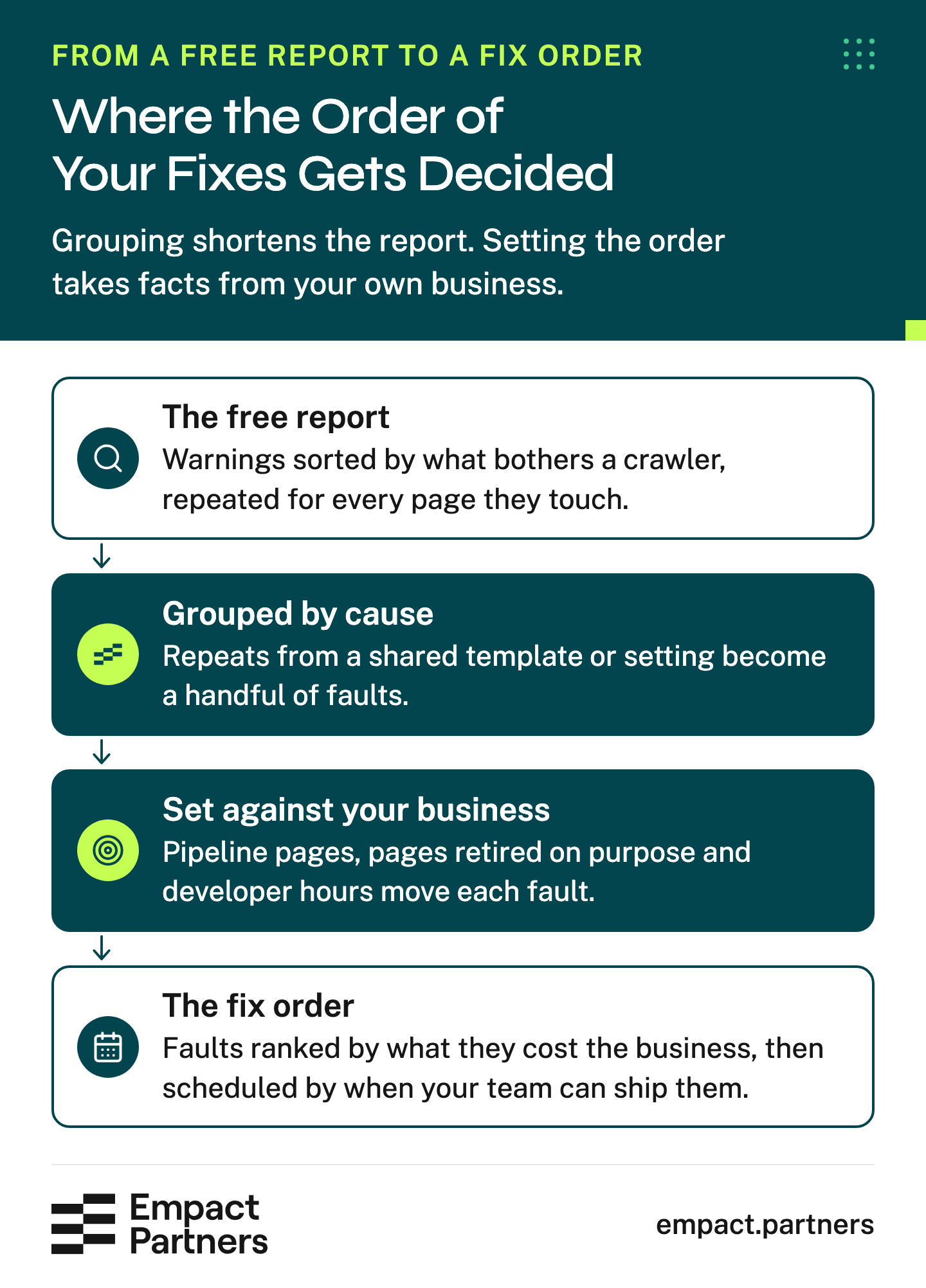
A regrouped report is shorter and closer to the truth. It still doesn’t say which fault comes first.
What the Crawler Can’t Know About Your Business
The order of the fixes rests on facts that live in your analytics, your CRM and your team’s heads, and a crawler reads your pages and nothing else:
Which pages bring in pipeline
A free audit treats your pricing page and a five-year-old blog post as equals. Your analytics and CRM don’t, because they know which pages a visitor read before asking for a demo or starting a trial. A missing description on the page that brings in most of your demos matters more than the same fault on a hundred posts nobody buys from.
The severity score in a free report is the crawler’s opinion of your site. It counts a fault once for every page it touches, so a template problem on old blog posts can outrank a wrong canonical on your pricing page. Use the score to group the faults, and let the pages that bring in demos decide which group goes first.

Our free SEO Audit goes part of the way. It picks your most visible pages from search data, reviews their titles, headings and internal links, and sends back its fixes in order, each with the first step to take. Visible still isn’t the same as selling, so set its plan beside the pages your CRM credits with leads.
Run it on your own site for ranked fixes on up to ten of your most visible pages. It is the agent we use to reread our SEO partners’ top pages and rankings, and each report is one free run of it:
Which errors were decisions
In the partner audit, some of the 404s were pages about a company a bigger one had since bought. Bringing those pages back would have been the wrong fix. The partner’s team knew about the deal, which no crawler could, so the audit called for redirects to the buyer’s page instead.
To a crawler, a page someone retired on purpose looks exactly like a broken one.
The same team changed the audit while it ran. They moved their FAQ into scope, and they ruled out adding their own usage figures to any page, because those figures are confidential. Both changed the plan, and neither was in the crawl.
What buyers read before they reach your site
A technical audit stays inside your own domain, and ours says so on its page. Your buyers don’t stay there. Before they reach your site they read Reddit threads and other companies’ pages, and the AI engines they ask quote the same places.
If those threads name a competitor and never you, the fix that pays first may not be on your site at all, and no technical audit, free or paid, will tell you. That question needs a broader SEO review, one that reads those pages along with your site.
Before you put the regrouped faults in order, answer these questions. Each one changes what goes first:
- Pipeline. Which pages did buyers read before they asked for a demo or started a trial?
- Decisions. Which of the “broken” pages did someone retire on purpose, and where should their visitors go now?
- Constraints. What may not change on the site, from legal wording to figures you can’t publish?
- Capacity. Which fixes can marketing make in your content management system (CMS), and which have to wait for a developer?
- Outside your site. Do the threads and pages your buyers read name you, or only your competitors?
How to Decide Between Fixing Now and Paying for an Audit
Those answers decide what happens to each fault. Fix it now when you have seen it on a live page and it keeps an important page out of search, like an error or a wrong canonical on a page that brings in demos. A template fix one person can make in an afternoon can go now too.
When a fault’s place in the order depends on your own data, check it in-house, with the five questions and your analytics open. Pay for what is left. If your team can’t answer those questions, or a wrong order would cost more than the audit, bring in someone who can, above all in these situations:
- A migration or platform move. Every old address needs a decided destination before launch, and a crawler only sees the addresses something still links to.
- An unexplained traffic drop. The cause may be a template, a setting or a change outside your site, and a free crawl can test only the first two.
- A template rebuild or redesign. The new templates will set the faults of every page built on them.
- A quarter’s SEO budget. Before that money goes in, the order should be decided once, by someone working from your numbers.
A paid audit should add the evidence the free ranking lacks, so ask for it. Every warning should be shown on a real page before it becomes a ticket. Someone should read the pages the sample skipped, and what Search Console says about them. Each fix should name who can make it and what it waits on, with a check after release that it worked.
Between full audits, keep the free run going. Run it after every release, plugin update, theme change or CMS change, because that is when templates break. Two practitioners in an r/TechSEO thread on how often to audit described the routine:
Tips from Reddit
What practitioners on Reddit run between full audits
keep a small fixed test set of URLs that represent your important page types.
Search Console already covers most of it: Pages (how many URLs are indexed and why the rest aren’t), Settings - Crawl stats (spikes in 404s, server errors, slow responses) and the product snippets report for schema.
A fixed set of addresses for each page type turns each run into a comparison with the last one, so a broken template shows up in the first run after the release that broke it.
The Fixes Stall When They Compete With Product Work
Developer time belongs in the order from the start, and the partner audit shows why. Capacity set the order there as firmly as severity did. The blog’s posts could be changed by script through the CMS, so fixes there could ship in bulk. The landing pages lived in a page builder and could only be edited by hand.
So the queue ran by when each fix could ship. Here is how four of the audit’s findings were decided:
Scroll horizontally to see all columns when the table is wider than this page.
| What the audit found | What it decided | When it was scheduled | Why |
|---|---|---|---|
| 404s on pages about an acquired company | Redirect each to the buyer’s page | The first week | The partner’s team knew about the deal, and a redirect is a small edit |
| FAQ addresses in the sitemap, about half of them returning 404 | One sitemap clean-up, with redirects | The next two weeks | One cause, and the real FAQ page worked fine |
| The same stale screenshots on page after page | One fix to the template | The next two weeks | A single change covers close to half of the pages outside the blog |
| Thin copy on the pages built from one template | Rebuild each page by hand | The second month | The page builder allows no edits by script |
Each of those reasons came from the partner’s business or the team’s tools, which no free ranking can supply. Once the order is set, your team can take it into one sprint of tested fixes, with a note of which ones passed, using our technical audit playbook:
This week, your team can regroup the report, confirm the faults, answer the questions and ship the small fixes. Rebuilding templates, rechecking every fix after each release and working on the pages buyers read elsewhere take longer than a week.
That work stalls more than any other, because it competes with the product for the same developers, and it needs somebody whose job is keeping it moving.
How We Run the Full Audit for SEO Partners
For a team in your position, Empact Partners would start where the regrouped report ends. We would put the faults on your pipeline pages first and ask your team which errors were decisions before anyone files a ticket. The rest gets scheduled by what your developers can ship.
Technical fixes are one part of the SEO work we do, for Google and the AI engines alike. The roadmap we write from the audit weighs them against mentions on the sites AI answers cite and the Reddit threads where users recommend products. Alongside the roadmap, you get:
- A named senior go-to-market (GTM) consultant who owns the partnership and is on your calls
- Specialists for the site, for mentions and for Reddit as each part of the roadmap starts
- A standing report in which every recommendation, each fix included, comes with its first step
Search work takes months to show, so we plan in quarters. Through all of them the free run stays worth doing after every release, because it catches a broken template while the change that broke it is still fresh.
Frequently Asked Questions
Is a free technical SEO audit enough for a small site?
Often, for finding the faults. The free version of Screaming Frog crawls up to 500 URLs and Search Console shows what Google indexed, which together cover a site of a few hundred pages.
What a small site still needs is the order. If three of your forty pages bring most of your demo requests, their faults go first, whatever severity the tool gives them. If you can name those pages yourself, you may not need to pay anyone.
How often should we run a free technical audit?
At least monthly on a site that ships often, and again after each release, plugin update, theme change or CMS change, since those are the moments a template breaks without anyone noticing.
Compare each run with the previous one instead of reading the whole report again. Keep a fixed set of addresses for each page type, so a fault that shows up on one of them, and was absent last time, points you at the release that caused it.
What should a paid audit give us that a free one doesn’t?
The faults in order, the pages each one touches, who on your team can fix it, what it waits on and a first step. Expect it to be shorter than the free report, because repeats are grouped by template.
A good audit also names the pages it left out and the faults it chose to leave alone, with a reason for each, so your team can argue with the order before work starts.
Why does our free audit show hundreds of errors?
Mostly because the crawler counts every affected address separately. A missing description on a template shows up once per page built from it, and leftover sitemap addresses that return an error each count as a broken page.
Group the warnings by type and open a few addresses in each group. You will usually find a handful of causes behind the total, and each cause is one ticket.
What should we do with page speed warnings?
Treat them as the last group, unless a slow page is one that brings in demos. A free audit measures speed on a few pages in a lab, at one moment, and lab numbers move from run to run.
Before you schedule speed work, check the same pages in Search Console’s report on real visitors. If they pass there, the warning can wait behind every fault that keeps a page out of search.
What if we can’t tell which pages bring in pipeline?
Start with what you can see. Your pricing, product and comparison pages are enough to order the first fixes, together with the pages sales sends prospects to and the pages visitors view in the same session as a demo request.
Fixing the tracking itself is worth its own project, run beside the fixes. Without it, every later audit has to guess at the same question.
Can a free audit tell us which pages Google has indexed?
No outside tool can. Google keeps that record, and Search Console is where your team reads it, along with the reason each excluded page was left out.
A crawler shows what your site tells search engines and how your pages respond, which is the half you control. When a page is missing from Google, read the two side by side.
Do we need a full audit before a website migration?
Yes, and before launch rather than after. A move to a new platform or framework, a Next.js rebuild for example, changes every template at once, and every old address needs a decided destination.
A free crawl after launch will show the redirects that broke. It can’t show which old addresses mattered to buyers, and that is what decides what to protect.
Which technical fixes should come first?
Faults that keep pages out of search come before faults that only slow them down. Errors and wrong canonicals usually lead, then redirect chains and sitemap conflicts, then speed, which is the order our Technical SEO Audit ranks them in.
Inside that order, start with the pages that bring in demos and trials, and with fixes made once in a template.
Does a technical SEO audit cover AI search?
Partly. AI engines have to reach and read your pages too, so the crawl basics apply to them.
Whether ChatGPT or Google AI Mode names your product also depends on what other sites and Reddit threads say about it. No audit of your own domain reads those, so treat them as a separate piece of work from the technical fixes.
Should we fix every warning the audit flags?
No. Some warnings describe choices you made on purpose, such as a retired page that should stay gone, and some cost more to fix than they will ever return.
A warning earns a ticket when someone can open the page, see the fault and say what the page should do instead.
Which of our people should make the fixes?
Split the work by who can change what. Titles, descriptions and copy go to whoever edits the pages in your CMS. Redirects, canonicals, templates and speed usually need a developer, depending on your CMS and who has access, scheduled in a sprint like any other work.
One person should own the order and decide when a template fix beats a content fix for the same week.
Sources (1)
- Screaming Frog, "SEO Spider Pricing" (2026)↩1the free version crawls up to 500 URLs and a paid license removes the limit. Read 21 November 2026.
Keep reading
SEO Should Your SaaS Hire an SEO or Outsource the Work?
One SEO generalist can’t run technical work, content, mentions, and Reddit. Name the owner of the roadmap and the pipeline number first.

SEO How Should a SaaS Company Split Its SEO Budget?
Decide what your SaaS search budget should fund first: website fixes, relevant mentions, community work or better measurement.
SEO Is SEO Dead, or Does Your Retainer Need to Change?
Decide which SEO work to keep, how to measure AI visibility, and what your retainer should prove beyond rankings.