
How To Plan A CMS Migration You Never Have To Recover From
Pick a CMS that can carry your URLs, map every old address before launch, fix what is wrong in the move and watch the first two weeks.
 Eulene du PlessisWith
 Vlad Shvets
On this page
Empact Newsletter
One email a month on what is working in AI search and SaaS go-to-market.
Moving to a new content management system (CMS) puts every address your site has earned at risk at once. That means the blog posts that rank, the product pages AI answers cite and the URLs other sites link to. Most of that risk is settled before launch day, by the platform you choose and by the redirect map your team builds.
The stakes depend on the move. Keeping the URLs is the mildest version. New URLs add a redirect for every changed address, and a new domain is the hardest. Even done well, a small or medium site needs a few weeks for most of its pages to move in Google 1. A badly run one costs months. On a URL restructure we watched, a move planned for a short window took several.
Our view at Empact Partners, where we run the SEO that gets SaaS companies found on Google and in AI answers, is that a site move rises or falls on one spreadsheet. The redirect map says where every old address should forward.
What the New CMS Has to Handle Before You Sign
The map comes second, though. The platform comes first, and CMS shortlists are usually decided on the editor, the price and the templates. Those matter to the people who will use the platform every day. They say nothing about whether it can carry your URLs, and a platform that cannot will force a second migration later.
Test these in the trial, before anyone signs, and treat a no on any of them as a reason to keep looking:
Scroll horizontally to see all columns when the table is wider than this page.
| What the CMS must do | How to test it in the trial | What breaks without it |
|---|---|---|
| Host the blog in a subfolder of your main domain | Ask the vendor to serve the blog at yourdomain.com/blog, not blog.yourdomain.com | The blog sits on a subdomain that search engines tend to treat as a separate site, and moving it later is another migration |
| Let you control the XML sitemap and the hreflang tags that tell search engines which language version is which | Export the generated sitemap, check that every live page is in it, and ask how the CMS declares language versions | Pages fall out of the sitemap, or language versions point at the wrong pages |
| Load redirects in bulk | Upload a few hundred old-to-new pairs from a spreadsheet, pattern rules included | Every redirect waits on a developer, and the map launches half loaded |
| Let marketing edit slugs, titles and meta descriptions | Have a marketer change one page’s slug and title with no developer involved | Every fix after launch becomes a ticket, so the weak titles stay |
| Export every page as plain text | Export the blog to Markdown or HTML with titles, slugs and publish dates | The content is locked into one vendor’s format, and the next move starts with a rebuild |
A platform that passes all five still moves nothing on its own. What carries the traffic across is the redirect map, and most teams build it from too few sources.
Map Every Old URL Before Anything Moves
A redirect map has two columns. One holds every address the old site answers on, the other the page on the new site each one forwards to. A permanent 301 redirect passes the old page’s value to the new one, and Google says it loses no PageRank doing so 1. The map is only as complete as the set of old addresses that goes into it.
The pages AI answers cite sit below the homepage
The usual shortcut maps the pages that bring traffic and lets the rest fall to a 404. That shortcut drops pages AI answers still cite. The Empact Panel is the tracker we run for partners. Each week it types their buyers’ questions into Claude, ChatGPT and Google AI Mode and stores the pages the answers cite.
Our latest collections, from late October to mid-November 2026, covered twelve partner panels. On the median panel, Google AI Mode sent 97.6% of its citations of the partner’s own site to pages below the homepage, and ChatGPT 66.2% 4. Each row below is one partner:
How Often AI Answers Cite a Partner’s Pages Below the Homepage
Own-site citations below the homepage, per Empact Panel, Oct to Nov 2026
View the data
| Label | Google AI Mode | ChatGPT |
|---|---|---|
| Partner A | 100% | 87.5% |
| Partner B | 100% | 69.5% |
| Partner C | 99.5% | 63.6% |
| Partner D | 99.4% | 79.6% |
| Partner E | 99.2% | 78.2% |
| Partner F | 97.7% | 28.4% |
| Partner G | 97.6% | 88.4% |
| Partner H | 95.8% | 61.5% |
| Partner I | 95.1% | 59% |
| Partner J | 72.7% | 64% |
| Partner K | 43.8% | 68.4% |
| Partner L | 32.6% | 53.8% |
The cited pages ran to dozens per site in two weeks, a median of 84 different pages on ChatGPT and 62 on Google AI Mode. They were blog posts, product pages and the rest of each site below the homepage, help articles included.
A page can be cited in AI answers and still earn few clicks, so a report sorted by traffic ranks it near the bottom. Add Search Console’s AI report to the sources of the map, because its Pages table counts the links Google’s AI answers gave each of your pages.
Build the map from every place an old address can come from, and only then decide where each one goes:
Collect every old address.
Crawl the live site and add the XML sitemap, the file of pages you ask search engines to crawl. Then add Search Console’s pages and its AI report, the pages other sites link to and the landing pages in your analytics, and remove the duplicates.
Give each one a destination.
Pick one new page per old address, the closest match in subject. A page with no equivalent returns a 404 or a 410, never a redirect to the homepage.
Rewrite the old redirects.
If the last site sent A to B and this move sends B to C, point A straight at C, so no address takes more than one hop.
Load the map on staging and test it.
Request every old address against the staging site and check that each returns what the map says, a live page in one hop or the 404 or 410 you chose.
Crawl staging against the live site.
Titles and meta descriptions match the plan, canonical tags point at the new addresses, and the noindex tag that keeps staging out of search is not carried into the live site.
The third step is the one teams skip, because a chain from an earlier launch stays invisible until somebody follows it. Our Technical SEO Audit follows every redirect chain on up to 100 pages of your current site. It also checks the sitemap against what each page returns, which is worth knowing before the map is written:
Switch the new map on before the old one comes down
The restructure that took several months had a map. What failed was the order. Its old redirect rules came down before their replacements were fully staged. Pages meant to stay out of search got indexed in the meantime, and the broken links it left were still being cleaned up long after launch.
Both orders use the same map. Only one of them leaves a window in which every old link breaks:
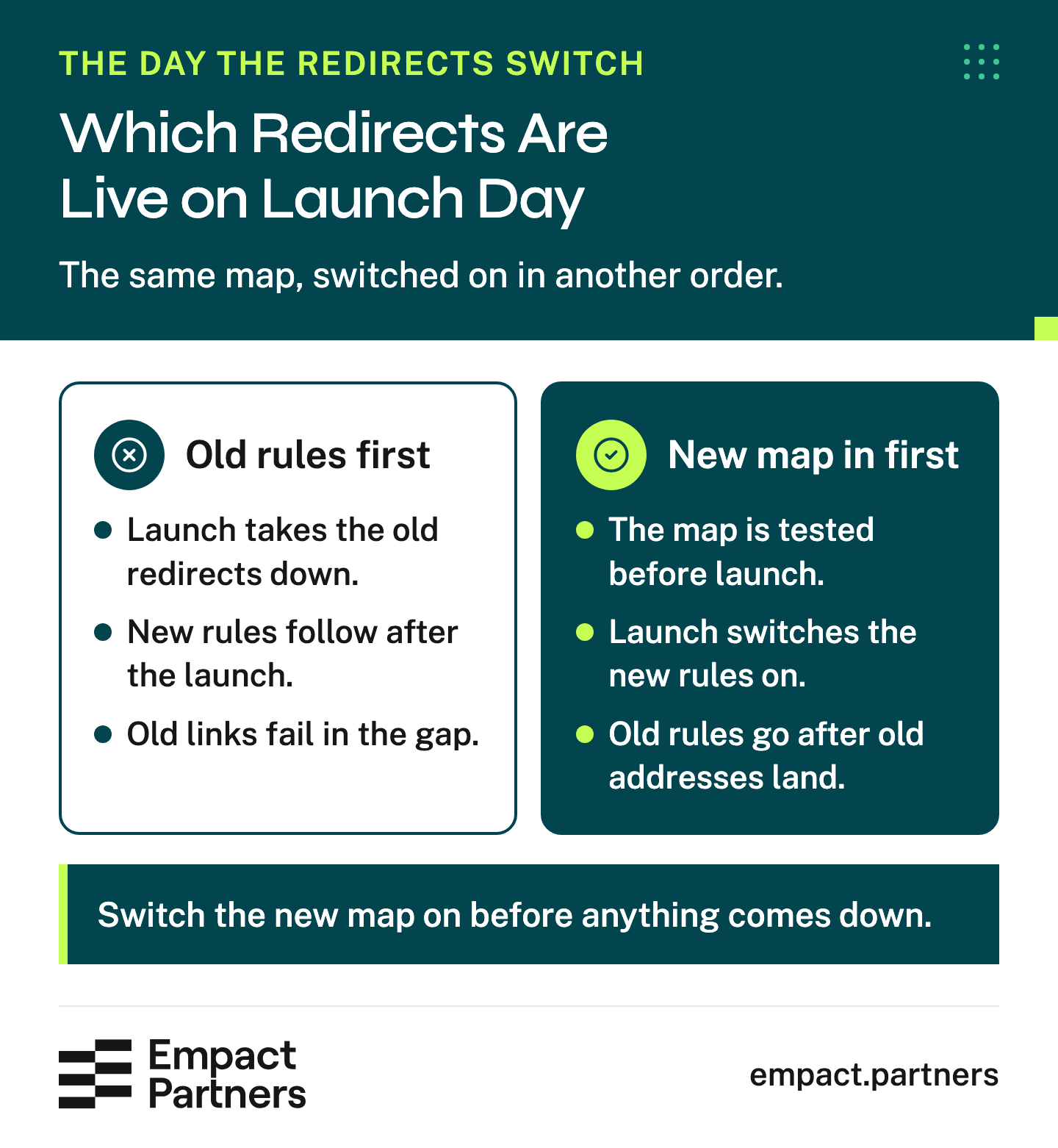
Turn the new rules on, request the old addresses against the live site, and remove nothing until every one of them returns what the map says. Links in places you do not control keep using old addresses long after the move. Garith Prior put the standard on our audit page:
Our redirect reviews include the addresses that links in old Reddit threads still use, since those links keep pointing at whatever address a page had when the thread was written. Each should forward in one hop to the page that replaced it.
 Garith Prior on LinkedInOpens in a new tab
Fix the Slugs and Titles That Are Wrong While Everything Moves
There is a respectable case for changing nothing during a migration, and SEO forums give it often. If the CMS, the URLs and the content all change in the same week and traffic falls, you have three suspects and no way to tell which one did it.
The diagnosis problem is real, and it has a cheaper fix than freezing everything. Keep a record of every change, so the watch after launch can check the changed pages first. Freezing has its own cost. Every URL on the site is recrawled during the move anyway, so a slug fixed now costs one redirect. The same slug fixed next year costs a second move for that page.
Every URL is reprocessed during a migration, which makes it the cheapest time to fix a slug that was wrong.
What counts as wrong is usually plain to see. Dates and database numbers sit in the address, an old category folder nobody uses stays in the path, a title does not say what the page is about.
We treat the title and the slug as the summary a language model reads before it decides what a page covers, which is reason enough to fix the bad ones. Weighed both ways, a slug change during the move looks like this:
Pros
- It costs one redirect while every URL is being reprocessed anyway
- The address finally says what the page is about
- Dates and database numbers leave the address for good
Cons
- A drop after launch has one more possible cause
- Links and citations to the old address depend on its redirect for as long as it stays
Where the line sits between changing and leaving alone is a judgment call, and this is where I draw it:
I would rather fix a bad slug during the move than protect it. The redirect costs the same either way, and an address that says what the page is about helps buyers and AI answers place it. What I would leave alone that week is the copy of pages that already rank, so nobody has to guess what caused a drop.

Done with a redirect for every change, a clean-up does not have to cost traffic. buycycle’s move is the case we point to. The Munich bike marketplace moved from buycycle.de to buycycle.com and opened in 32 languages and countries in the same project.
We mapped every URL on the old domain to its new address and simplified the structure on the way, removing redundant subfolders and bringing subdomains under the main domain.
Meta descriptions and formatting were revised, every language version got hreflang tags, and we helped buycycle’s team set up the 301s and monitored them after launch. Monthly organic traffic grew by 190K+, as the case study reports it.
Keep a Plain-Text Copy Before Any Bulk Edit
Most migrations contain a bulk edit, whether that is an import script, a find-and-replace across the blog or an AI agent rewriting titles. A bulk edit that goes wrong goes wrong on every page at once, and by the time anyone notices, the old CMS may already be switched off.
We learned what a copy is worth on a partner’s site, outside any migration. One bulk command stripped every outbound link from their published content. A clean Markdown copy of the same pages already sat in a version-controlled repository, so the links were back within minutes instead of being rebuilt by hand.
The same copy is what you restore from if the launch has to be rolled back, and what the weeks after launch get checked against.
Decide Who Can Stop the Launch
The launch goes when the map tests clean on staging and the staging crawl matches the plan. One person, the one who owns the map, should have the right to stop it when either check fails, with the old site’s configuration kept ready to switch back.
A delayed launch costs days. A launch on a half-tested map turns every untested address into a fault you find after the traffic has gone.
Watch the First Two Weeks, Then the First Year
Before launch, write down what normal looks like for each group of URLs, such as the blog, the product pages and the docs. Record organic clicks, sign-ups and the AI citations you track, over the weeks before the move. A drop measured against that baseline tells you which group to check. A drop measured against last month mixes the move with the season and every other change.
Some faults are faults on day one. An old address that does not reach a live page in one hop is broken, whatever the traffic says. Other signals need the first two weeks to show. Google asks for two sitemaps from the map, the old addresses and the new, and expects the old one’s indexed count to fall as the new one’s rises 1.
The first two weeks after launch
- Every old address from the map requested again, each one returning what the map says
- The old and new sitemaps submitted in Search Console, and the new one in Bing Webmaster Tools
- Search Console’s Change of Address and Bing’s Site Move Tool, if the domain changed
- The indexing report read every day for new errors, 404s and redirected pages
- Clicks and sign-ups for each URL group set against the same weeks before the move
- Server logs checked for crawler requests that end in an error
People who run these moves on r/TechSEO add three habits worth taking:
Tips from Reddit
What r/TechSEO adds to the watch
the thing that saved me over and over was taking some time to write some scripts for observable behavior of the site before + after.
submit a sitemap to Google Search Console with all the OLD URLs once the new site is in place. This will make Google pick up the redirects a lot faster than without the sitemap.
If a page no longer exists and there’s no equivalent for a 301 redirect, then use a 404
Read the counts before you raise an alarm. On one partner’s multi-language site, localized pages looked missing from the sitemap, yet the CMS had declared each language version through hreflang tags instead. Google accepts those tags in the page’s HTML, in HTTP headers or in the sitemap, as equals 2. Ask which method the new CMS uses before the watch starts.
The redirects outlast the watch by a long way. Google asks for them to stay at least a year 1. Bing asks for one to two years, preferably longer, and for server logs read daily for at least three months 3. Treat the longer of the two as the minimum, because old addresses keep arriving from links nobody will update.
When a URL group falls below its baseline anyway, the job is to find what changed and give each fix an owner. Our four-page playbook on diagnosing a traffic drop is written for that moment:
We think the redirect map decides how much of the traffic, links and AI citations a migration keeps, so we would start there, with the old site’s addresses, redirects and sitemaps and the pages AI answers cite.
We would build the map from them, as we did for buycycle, and test it on staging before anything moves. Each partnership with us begins with an audit of where you stand and a roadmap, and on a site move we would put the URL map first in it.
Planning a migration with Empact Partners
- An audit first, of the old site’s addresses, redirects, sitemaps and the pages AI answers cite
- A roadmap, with the URL map at the top of it
- One senior GTM consultant who owns the work and joins the calls
- Redirects set up with your team and monitored after launch, as on buycycle’s move
- Standing reports on visibility and citations
One number tells you whether the move held. It is the share of old addresses that return what the map says, a live page in one hop or the 404 you chose. On launch day it should be all of them, and a year later it should still be all of them.
Frequently Asked Questions
Does changing CMS hurt SEO by itself?
No. Search engines do not rank a site on the platform it runs on. They react to what changes with the platform, such as the addresses, the titles, the internal links, the sitemap, the page speed and what the rendered HTML contains.
A new CMS that keeps every address, carries every title across and serves the same content can launch with little movement. The risk sits in everything the move changes without anyone deciding it should.
How long does organic traffic take to recover after a migration?
Recovery time depends on the move and on the map. Google expects most pages of a small or medium site to move within a few weeks, and larger sites to take longer 1. That is how long Google needs to process the pages. It says nothing about when the traffic comes back.
A domain change is the hardest move and the slowest to settle. When the redirect map is wrong, recovery runs to months. We have seen a restructure planned for a short window run for several months, because its old redirects came down before the new ones were ready.
How long should we keep 301 redirects after a migration?
At least a year, and longer is better. Google asks for at least one year so it can pass every signal to the new addresses, and suggests keeping them indefinitely for visitors 1. Bing asks for one to two years, preferably longer 3.
Links in old forum threads, newsletters and partner sites never get updated, so a redirect removed after a year breaks every one of them. Keeping a redirect rule live costs almost nothing.
Should we keep our URLs exactly the same?
Keep every URL that is already right, and change the ones that are wrong in the same move. Dates, database numbers and old category folders in an address are worth fixing while every page is being recrawled anyway.
Each changed address needs one redirect to its new page, and a record of the change, so a drop after launch can be traced to the pages that moved. Changing a working URL for taste alone adds risk and gains nothing.
Where should deleted pages redirect?
To the closest page in subject, if one exists. Google asks for content you are not moving to return a 404 or a 410 1. A redirect to the homepage sends the visitor, and the engine, to a page that does not answer what they came for.
Before deciding, check whether the page still has links from other sites or citations in AI answers. If it does, a merged page that covers its subject is usually the better destination.
Should our blog be on a subdomain or a subfolder?
A subfolder of the main domain, in most cases. Search engines tend to treat a subdomain as a separate site that does not fully inherit the main domain’s strength, so a blog on blog.yourdomain.com competes partly on its own.
Some subdomain blogs perform well, so it is a default rather than a law. If the new CMS can only host the blog on a subdomain, weigh that before signing, because moving it later is another migration.
Will we lose AI search citations when our URLs change?
AI answers cite specific pages, and on our partners’ panels those are mostly pages below the homepage. When a cited address changes, the citation keeps working only if the old address forwards, ideally in one hop, to the page that replaced it.
In our panels this month, answers still cited some of a partner’s help pages at addresses the partner had already changed, and the redirects sent those readers on to the new pages. Put the cited pages into the map, from Search Console’s AI report and whatever tracks your AI visibility.
Should we migrate the whole site at once or section by section?
Google recommends that a large site move one piece first to test the effect on traffic and indexing, then the rest at once or in chunks 1. That works best when sections have clean boundaries in their URLs.
A site of a few hundred pages usually moves at once with less coordination. Either way, the map for every section is built and tested before the first one moves.
Do we need to tell Google and Bing about the move?
Yes, through their own tools. Submit the old and the new sitemaps in Search Console so Google finds the redirects and the new pages, and submit the new sitemap in Bing Webmaster Tools.
If the domain changes, Search Console has a Change of Address tool and Bing has a Site Move Tool for it 3. Neither replaces the redirects. They only tell each engine to look for them sooner.
What should we back up before a CMS migration?
Two things, kept apart. A full backup of the old CMS lets you restore the site if launch goes badly. A plain-text export of every page, with its text, title, meta description, slug and publish date, lets you see what changed and repair a single page in minutes.
Keep the export in a version-controlled repository the new CMS cannot touch, and take it before the first import script or bulk edit runs.
Can an AI agent build the redirect map for us?
An agent can do most of the matching. It can compare the text of every old page with the new pages and propose the closest match, which is the slowest part of a large map.
A person should still check every proposed pair on the pages that earn traffic, links or citations, and decide the pages with no good match, because those decisions are what the map is for.
Sources (4)
- Google Search Central, "Site moves and migrations" (2026)↩1↩2↩3↩4↩5↩6↩7↩8
- Google Search Central, "Localized versions of your pages" (2026)↩1
- Microsoft Bing Webmaster Blog, "Website migration with Bing" (2020)↩1↩2↩3
- Empact Partners, "Empact Panel cut" (2026)Empact Partners' own data↩1↩2every ChatGPT and Google AI Mode citation of the partner’s own site in each panel’s latest two weekly collections (30 October to 16 November 2026) on 12 partner panels, sorted by whether it pointed at the homepage or a page below it. Read 16 November 2026.
Keep reading
SEO How to Plan Internal Links for a Whole Blog With Claude Code
Map every post and link on your blog with Claude Code, find the orphans and the links to rivals, and plan the few links worth adding.

SEO Google Traffic Dropped? Diagnose It Before You Change Your Site
Separate a manual action from an unexplained traffic drop, prioritize the pages that matter, and plan your next SEO steps.

SEO 6 Best Website Builders for a SaaS Marketing Site
Compare six SaaS website builders by running costs, search controls, migration limits and who will maintain the site.