
HubSpot vs Salesforce: Pick the CRM Your Team Can Keep Clean
Choose by who will run the CRM each week and what your deals need, then count what AI agent calls will cost on each.
 Eulene du PlessisWith
 Vlad Shvets
On this page
- Start With Who Will Run the CRM Every Week
- How the Answer Changes for Product-Led, Mid-Market and Upmarket Teams
- A Quoting Problem Rarely Needs a New CRM
- Running Both CRMs Means Someone Owns the Sync
- What Each CRM Charges When an AI Agent Uses It
- Design the Pipeline Before You Pick the CRM
- Frequently Asked Questions
Empact Newsletter
One email a month on what is working in AI search and SaaS go-to-market.
A SaaS company’s first CRM setup tends to stop keeping up the same way. Deals sit in stages nobody defined, two reports give two pipeline numbers, and someone, often a new sales leader, proposes moving to Salesforce. The comparisons the team finds line up features and seat prices, which answers a question nobody on the team was asking.
For a growing SaaS team, the choice turns on who will run the CRM every week and on what your deals need that the current setup can’t do. Since November there is also the question of what each vendor charges when an AI agent works in the CRM, and that answer leads back to who runs it.
Empact Partners does RevOps for SaaS companies, getting the CRM their teams already run to report pipeline numbers people trust. We recommend replacing it only when the tool itself holds the team back, and most teams can test which case they’re in.
Start With Who Will Run the CRM Every Week
A CRM is a weekly job before it is a purchase. A sales stage means something only while somebody keeps its definition current, and lead routing works only until the team or the territories change. So the first question is who on your team will do that work, and how many hours a week they really have for it.
Write the jobs down before any demo. Whoever owns the CRM does these every week, on HubSpot or on Salesforce:
- Stage rules. Keeping each stage’s definition and exit evidence current as the sales motion changes.
- Routing. Changing who gets which lead, company or renewal when people, regions or plans change.
- Data rules. Required fields, duplicate merges, and the forms and imports that create bad records.
- Reports. The pipeline and forecast numbers leadership reads, and why two of them disagree.
- Agent access. Which AI agents may read or change which records, and under whose name.
If you can name the person and their hours, you have a CRM owner. If the honest answer is whoever has a free evening, you don’t, and that answer decides more than any feature comparison. Whether anybody’s job includes it is quick to check:
Ask who changed your deal stages the last time and how long it took. If it was a sales manager over two weekends, a platform that needs an admin will get one anyway, and it will be that manager. Choose the CRM that person can keep clean, and hire the owner before you buy the bigger tool.

Salesforce is built to be configured, with custom objects, flows, permission sets and a data model you shape yourself. Each of those is something a person builds and then keeps working, so a team without that person waits on every change.
HubSpot asks fewer hours of that person. Lead routing, a forecast report and most of what a growing SaaS team needs can be set up without building them, which usually makes it the CRM a sales manager or a marketer can keep clean alongside a day job. Test that on your own routing and reports during the trial.
A CRM nobody owns gets messy on either platform, and messier on the one built to be configured.
So the test is whose job the CRM is. If it gets part of a sales manager’s or a marketer’s week, choose HubSpot and keep it clean. If it belongs to someone whose job is RevOps, Salesforce becomes a real option, and the deals decide whether you take it.
How the Answer Changes for Product-Led, Mid-Market and Upmarket Teams
Company size is the usual trigger for the Salesforce conversation, and it is the wrong one. What should trigger it is a step in your deal process that the current CRM can’t record or enforce, named well enough that you could show it to a vendor in a demo. SaaS sales motions start from three different places:
Scroll horizontally to see all columns when the table is wider than this page.
| Team | What the CRM has to do | Our call |
|---|---|---|
| Product-led, adding sales | Get signup and usage signals to a rep, and show which signups are worth a call | HubSpot, unless the usage data needs a custom data model that someone builds and maintains |
| Sales-led, mid-market deals | Stage evidence, approvals, several pipelines and a forecast | HubSpot, unless territory rules, several legal entities or custom objects need more than HubSpot can show in a demo |
| Moving upmarket | Every buying role on the deal, company hierarchies and longer cycles | Either can hold this, so move only for a named limit and a named owner |
Most of the pressure comes from the last row, usually as the argument that serious companies run Salesforce. Plenty do, and plenty of them pay an admin team to match. The setup a CRM needs for bigger deals, with buying roles on each deal and stages that move on the buyer’s evidence, is work you can do in either one.
So the move to Salesforce earns its cost when two things are true at once. Your deals have a named step that HubSpot can’t carry, and a named person will own Salesforce after the migration. One without the other is how a team pays for a migration and lands in a CRM as messy as the one it left.
If that step turns out to be the quote, slow down before you switch.
A Quoting Problem Rarely Needs a New CRM
A SaaS quote can carry usage tiers, discounts that need approval and upgrades in the middle of a contract. When HubSpot’s quotes stop keeping up with that, Salesforce and its CPQ (configure, price, quote) tools look like the fix. One buyer who has run both put the trade from each side:
Tips from Reddit
What a buyer who ran both CRMs said on Reddit
HubSpot is insanely limited with Cpq and no third party is useful.
With SF and CPQ, along some creativity, i could build anything i could imagine.
The second line is the ownership question again. That buyer could build anything in Salesforce because they were the one building, and everything they built became someone’s to maintain.
The switch now comes with a second purchase too. Salesforce no longer sells Salesforce CPQ, its quoting product, to new customers. Existing users can renew and add seats, and Revenue Cloud Advanced is the successor.6 A team moving to Salesforce for Salesforce’s own quoting is buying a second product and a second project on top of the CRM migration.
Start from the quote that fails today, written down, then price a quoting tool that connects to the CRM you have against the full cost of the move, the owner included. Some teams settle it another way and keep both CRMs.
Running Both CRMs Means Someone Owns the Sync
The usual split leaves marketing in HubSpot, where its emails, forms and lead scoring live, and moves sales to Salesforce, with HubSpot’s Salesforce integration copying records across. Each team keeps the tool it likes. Two systems now hold the same companies and people, and any record that crosses can arrive twice, late or overwritten.
Judged as one option, the split looks like this:
Pros
- Marketing keeps its emails, forms and lead scoring where they already work.
- Sales gets Salesforce’s deal configuration without a marketing migration.
Cons
- Both systems create companies and contacts, so duplicates arrive from two sides.
- Every field that exists in both needs a rule for which system wins a conflict.
- A failed sync is nobody’s job until someone is named to own it.
- Two sets of licenses and two queues of change requests.
Two people in a thread about exactly this split put the cost where it lands:
Tips from Reddit
What people weighing the split said on Reddit
We currently use only Hubspot (sales and marketing professional) and it’s already a headache to get Sales to maintain CRM hygiene, I can’t imagine how will it work if we use two different systems.
Another new sales leader who needs to “make their mark” and condemn another sales team to janky CRM hell by mashing “best of breed” tools together.
If you run both anyway, name the owner of the sync before the first record moves. Decide in writing which system creates companies, which one wins when the same field disagrees, and who fixes a sync that failed overnight.
AI agents are the newest thing reading and changing those records, and this autumn both vendors said how they will charge for them.
What Each CRM Charges When an AI Agent Uses It
An agent working in your CRM, such as Claude summarizing open deals, reaches the data through the CRM’s API or through the Model Context Protocol (MCP), the connection AI tools use to work inside other software. Salesforce and HubSpot have now said how they will charge for that access, and they charge for different things.
Salesforce will require an admin to register each outside agent, with its own identity and narrower permissions than the person it helps.1 Then every successful call it makes to a production org, over MCP or the API, counts as one Headless Platform Interaction, paid in Flex Credits at $500 per 100,000.3 What Salesforce hasn’t published is how many credits one interaction takes:
HubSpot set out its own terms in mid-November. Every HubSpot seat now includes everyday use of the CRM from Claude, ChatGPT and other AI tools.4
An agent you built or bought that calls HubSpot’s existing APIs draws on the daily API limit your plan has and uses no credits. For apps your team builds for its own account, that limit is 625,000 calls a day on Professional and 1,000,000 on Enterprise.5 Credits cover heavy everyday use and an environment for agents that HubSpot is still building, with no rates published for it yet.
Both of those meters count calls, and a single question can take an agent several requests, such as a search, then the record, then the records linked to it:
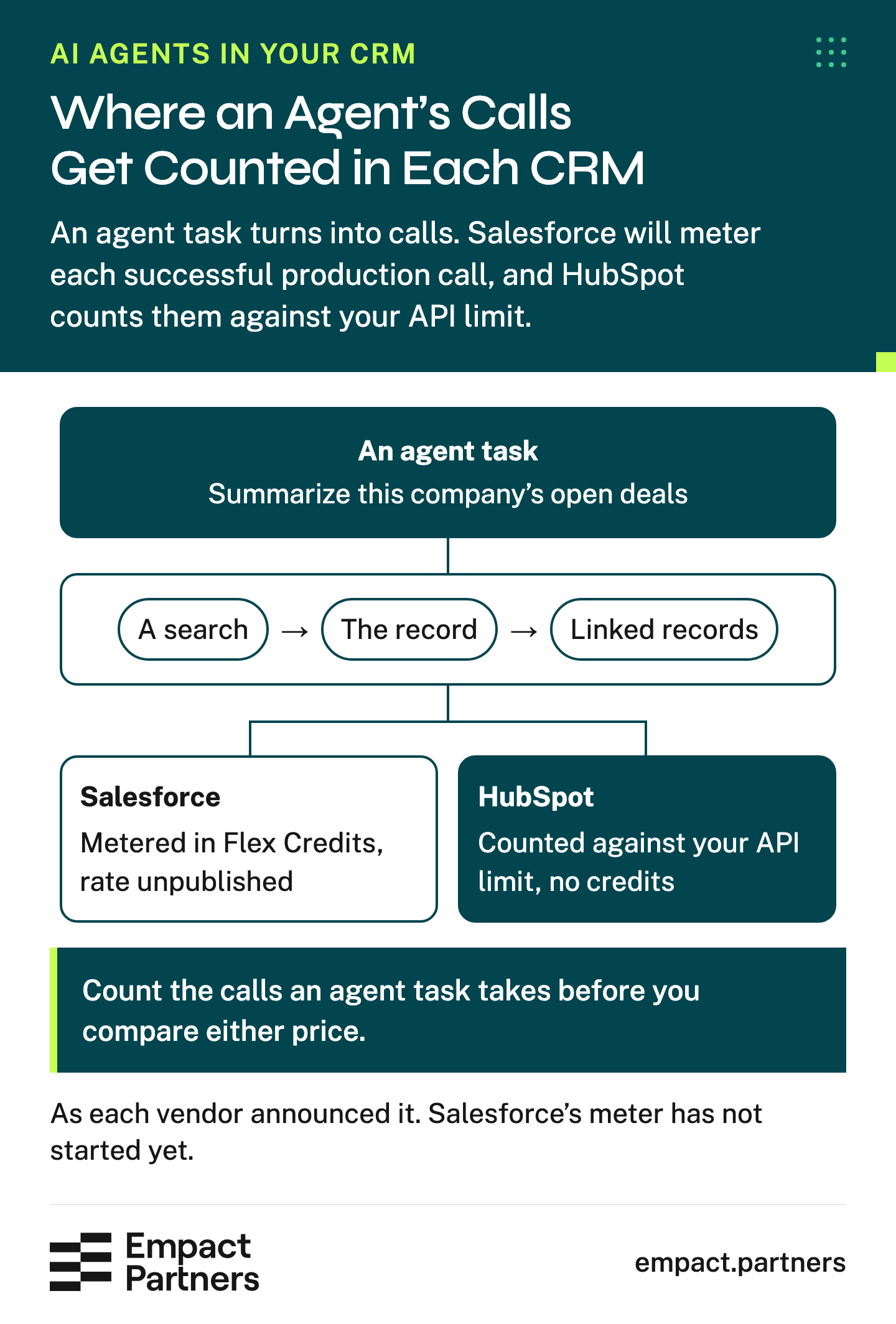
On Salesforce the agent bill can’t be priced yet, so any per-call cost quoted to you is a guess. The calls themselves can be counted, though. Salesforce’s sandboxes aren’t metered, so run your agents’ real tasks there and count the calls each one takes.1
Registration is also a job, and it lands on whoever owns the CRM. Every Salesforce MCP connection must be registered within three months of Salesforce’s notice, and existing customers move API agents to the new model at renewal.1 Add agent access to that person’s weekly jobs before the first agent goes live, and on either CRM, test an agent’s first write with a person watching.
What remains is the deal-process test, and you can run it before buying anything by writing the pipeline down.
Design the Pipeline Before You Pick the CRM
A migration moves your stages across as they are, so a stage that means whatever each rep decides will mean that in Salesforce too. Stages defined by something the buyer did, such as a reply, a booked call or a written go-ahead, work the same in either CRM. Written down, they also show which of the two your process needs.
Before any CRM changes, ask every rep to sort the same 10 to 20 recent deals into the new stages alone, then compare. Wherever two reps put one deal in different stages, the rule needs rewriting. A definition your reps read two ways is unclear, and a CRM will only enforce whichever reading someone typed in.
Pipeline Design drafts that design from a few lines about your stages, team and tools. For every stage you describe, it proposes what the stage means, what a deal must show before it moves on and where your CRM records it. Your admin gets a file to build from, and nothing in the CRM itself changes:
The design is free, and it previews an agent we run for our RevOps partners. With a partner, we start earlier, by auditing the stack and data flows, because the audit shows whether the tool or the setup is holding the team back. From there, the work covers:
- Audit first. Your CRM, the systems around it and how data moves between them, read before we recommend anything.
- Pipeline, built in. The stages your reps agree on, set up in the CRM you keep, each with the evidence it needs.
- Reports people use. Automated pipeline and attribution reporting in dashboards your team already opens.
- An agent reviewing. The agent behind Pipeline Design reviews it, and our consultants take any deal that moved without its evidence back to its rep.
- Migration on evidence. If the audit shows the tool itself is the problem, we plan the move with you.
Writing those stage definitions has a playbook of its own, built around one buyer action per stage so that two reps never file one deal in two places:
Then run the last check on the CRM itself, once the stage definitions are settled. If the CRM you have can record and enforce them and somebody owns it, stay and clean it up. If it can’t record a step your agreed process needs, and a named person will run the replacement, that step is what you ask Salesforce to show in the demo.
Frequently Asked Questions
Does Salesforce need a full-time admin?
Not always full time, but always someone whose job is RevOps or the company’s systems. A small Salesforce org with one pipeline can run on part of a RevOps person’s week. Once it carries custom objects, several pipelines or territory rules, the change requests can fill most of a role, so count them for a month before you decide.
The risk is the org nobody owns. It keeps working while every quick fix piles on the last one, until somebody is paid to untangle it, and the untangling often costs more than the admin would have.
When should a SaaS company move from HubSpot to Salesforce?
When a step in your deal process can’t be recorded or enforced in HubSpot, and someone is ready to own Salesforce afterwards. Growth, a new sales leader or a competitor on Salesforce are not reasons on their own. Write the step down, ask both vendors to show it working in a demo with your own deal data, and price the migration and the owner together.
If HubSpot can show the step too, the problem was the setup, and a migration would have carried it across.
Does connecting Claude or ChatGPT to HubSpot cost extra?
Not for everyday work. HubSpot says each seat includes enough access to use HubSpot from Claude, ChatGPT and other AI tools through its connectors and MCP server, and heavy users can add capacity with HubSpot Credits. An agent your team built that calls HubSpot’s public APIs draws on your plan’s daily API limit, not on credits.
What will Salesforce charge when an agent reads data through MCP?
Salesforce has said each successful call by a registered agent will be one Headless Platform Interaction, paid in Flex Credits, but it has not published how many credits that is. Nothing is metered until it does, and it has promised 30 days’ notice. Plan on call counts rather than a price, and ask your account executive for the rate in writing before you renew.
Can we avoid that charge by using the REST API instead of MCP?
No. Salesforce meters calls from registered agents whether they arrive over MCP or the API. Two things stay off the meter. A traditional integration, such as a scheduled sync, keeps today’s pricing, and so does work in sandboxes, scratch orgs and Developer Edition orgs. Rebuilding an agent on the other protocol leaves the bill where it was.
Is HubSpot cheaper to run than Salesforce?
Count what each costs to keep clean along with the seats. The license is the number on the quote. The larger costs sit around it, in the person who runs the CRM, the integrations, the reports someone rebuilds after every change, and a second migration if the first choice was wrong.
A cheaper license on a CRM nobody can maintain ends up costing more than a pricier one your team keeps tidy.
Is HubSpot enough for a company moving upmarket?
Often, if someone sets it up for larger deals. Those deals need the whole buying group on each deal record, parent and child companies, and stages that move only when the buyer has done something, and HubSpot can hold all three. Move when a specific requirement, such as complex territory rules or several legal entities, has no clean home there.
Should marketing stay in HubSpot if sales moves to Salesforce?
Only if someone owns the sync between them. Splitting keeps marketing’s tools where they work, but every company and contact now lives in two places and every conflict needs a rule. If nobody has time for that work, putting both teams in one CRM usually costs less than years of duplicates.
How long does a migration take, and what comes first?
The length depends on your data and your process more than on either vendor, so be wary of a fixed estimate before anyone has seen both. The order rarely changes.
Agree the stage definitions and required fields, clean the records you will move, rebuild routing and reports, and plan the switch for the start of a quarter, so each quarter is reported on one set of definitions.
What about CPQ if we stay on HubSpot?
Use a quoting tool that connects to HubSpot once its own quotes can’t carry your pricing, such as usage tiers, ramps or approvals by discount size. Salesforce stopped selling its CPQ product to new customers, so moving for Salesforce’s own quoting now means buying Revenue Cloud Advanced as well.
Start from the quote that fails today and test every tool you shortlist against that quote.
What does the free Pipeline Design tool send back?
A proposed sales process built from the way your team describes its stages today. Each stage gets a plain definition, the evidence a deal has to show before it moves on, and the fields that hold that evidence, along with suggested automation rules and how each dashboard number should be counted.
The design arrives by email as a PDF and a structured file for your admin, and nothing in your CRM changes.
Should we wait for Salesforce’s agent rate before deciding?
Only if AI agents will do much of your CRM work in the coming year. Otherwise the choice still rests on who owns the system and what your deals need, and the rate decides a budget line rather than the CRM. Either way, write down which agents would call the CRM and roughly how often, so the rate turns into a monthly number the day Salesforce publishes it.
Sources (6)
- Salesforce Help, "Understand AIforce Impact" (2026)↩1↩2↩3knowledge article 005360285, published 17 September 2026. Read 24 November 2026.
- Salesforce, "Flex Credits Rate Card" (2026)↩1updated 3 November 2026. Read 24 November 2026.
- Salesforce, "Agentforce Pricing" (2026)↩1Read 24 November 2026.
- HubSpot, "is headless. Here’s how we’ll price it" (2026)↩1by Duncan Lennox, updated 18 November 2026. Read 24 November 2026.
- HubSpot Developers, "API usage guidelines and limits" (2026)↩1Read 24 November 2026.
- Salesforce, "CPQ Not End of Life: What End of Sales Means" (2026)↩1published 14 July 2026. Read 24 November 2026.
Keep reading
RevOps How To Audit The HubSpot Workflows You Already Run
Find conflicting HubSpot workflows, assign owners and test what is safe to pause before you delete it or add an AI agent.
RevOps 5 Best CPQ Tools for SaaS Subscription and Usage Pricing
Five CPQ tools for SaaS teams, compared by the CRM each one needs and what happens when a usage deal changes mid-contract.

RevOps What Your CRM Needs When Your SaaS Moves Upmarket
Bigger deals stall on people your CRM never recorded. Put every buying role on the deal, and flag one-person deals past discovery.