
How to Plan Internal Links for a Whole Blog With Claude Code
Map every post and link on your blog with Claude Code, find the orphans and the links to rivals, and plan the few links worth adding.
 Teddy CipollaWith
 Vlad Shvets
On this page
Empact Newsletter
One email a month on what is working in AI search and SaaS go-to-market.
Most SaaS blogs past a hundred posts are full of internal links and still badly linked. Every writer links the posts they happen to remember. From inside one post, nobody can see which posts hold a topic together, which ones nothing points to, or which links send readers to a rival. A crawler export hands you every link in a spreadsheet with no topics in it, and a linking plugin suggests links between posts that happen to share words.
I’m Teddy Cipolla, and I do SEO for SaaS companies at Empact Partners, so their pages rank on Google and get quoted in ChatGPT, Google AI Mode and Claude. With a blog this size, its internal links are part of the audit we start with.
Below, Claude Code does that step on our own blog of 180 posts, and you end with a backup of every post, the link graph and the plan as a sheet. On ours, every post linked to another, and 24 still had no post linking to them. You need less than a crawler subscription, plus one thing from whoever runs your website:
This plans links between posts and nothing else. Crawl errors, redirects and pages Google cannot index belong to a technical SEO audit, and a graph built on top of them shows gaps that are not there.
Mapping Every Post and Every Link
The first three steps put the whole blog in one folder and show how its posts point at each other. Nothing is edited yet, and the only requests that leave the folder are reads of your own site.
Step 1: Write the rules, then back up every post and link
Make an empty folder, run git init in it, and save the file below as CLAUDE.md before you open Claude Code. Claude Code reads that file at the start of every session, so its rules hold for every prompt that follows.
The plan rules are our own refresh method, written for a model. A link goes in a sentence that already names its target, its anchor is two to five words that say what is there, and no post takes more than three new links.
# Internal link plan

This folder holds a copy of our blog and the plan for its internal links.

## While you work
- Read the blog only: send GET requests to it and nothing else, until a prompt says to write to staging.
- posts/ and links.csv are the backup of the blog as published. Never edit them.
- Save scripts in scripts/ and commit after every step.

## Clusters
- A cluster is a set of posts about one topic, judged by what the posts say, not by the words they share.
- Each cluster has one pillar: the post that covers the topic most broadly. The other posts in the cluster link to it,
  and it links back to them.

## The plan
- Add at most three links to any one post.
- A link goes on words a sentence already has, and that sentence must name the subject of the page it links to.
  Never write a new sentence to hold a link.
- The anchor is two to five words from that sentence that say what the reader will find on the other side.
- Never use the target page's exact target term as the anchor, and never "click here", "read more" or "this post".
- Never add a link to a page the same post already links to.
- Flag every link that sends a reader to another company's page written for the same search term as the post it sits
  in. Those links are removed, not added to.
Then open Claude Code in the folder and send the first prompt, with your own sitemap address and your blog’s path in place of ours:
Our blog lists its posts in https://www.empact.partners/sitemap.xml. The posts are the URLs with exactly one path segment after /empact-zone/. Skip the /empact-zone/ index itself, the author pages and the page/ URLs.

Write scripts/pull.py, using only the Python standard library, that fetches each post once and saves:
- posts/<slug>.md: the title on the first line, then the article body as text, with its headings kept as markdown headings. Only the article itself, not the navigation, the footer, the cards or the related posts.
- links.csv: one row for every link inside the article body, with the columns source, target, anchor, sentence, kind. source is the post's slug, sentence is the whole sentence the link sits in, and kind is internal or external.

Run it. Tell me how many posts and links it saved and anything it could not read, then commit everything with the message "backup: posts and links as published".
Claude Code read the sitemap, opened one post to find where the article body starts in our template, then wrote scripts/pull.py and ran it. The script saved 180 posts and 2,100 links from inside their bodies, 1,124 to our own site and 976 to other sites.
Each link row carries the sentence the link sits in. That sentence column is what makes the plan possible later, because a new link has to go into a sentence the post already has.
Check two things before you go on. The post count should match your blog’s, and a post opened at random should hold its headings and body text, with no navigation or related-post cards in it. Our run also fetched every page into /tmp before writing the script, outside the folder and outside git. Ask for the cache inside the folder if you want to rerun without fetching again.
Step 2: Group the posts into clusters and pick each pillar
A cluster is a set of posts about one topic, and its pillar is the post that covers the topic most broadly, the one the rest should point to. Shared words are the wrong test. Two posts that both say “share of voice”, how often AI answers name a brand against its rivals, can be a measurement guide and a statistics roundup. Only one of them belongs at the center of the topic.
Read the title, the headings and the first paragraph of every post in posts/. Group the posts into topic clusters by what each post is about, not by the words they share. Name each cluster in a few plain words and pick its pillar, following CLAUDE.md. For every post, also write its target term: the search phrase it is written to rank for, in two to six words.

Save clusters.csv with the columns slug, title, cluster, pillar (yes or no) and target_term. Show me each cluster with its size and pillar, then commit.
Claude Code printed each post’s title, H2 headings and first paragraph into one digest of 89 kilobytes, short enough to read in one pass. Then it grouped our 180 posts into 18 clusters of 2 to 29 posts. Statistics posts went to the topic they measure rather than into a cluster of their own. We would make the same call, because a reader looking for AI citation numbers is reading about AI citations.
Read clusters.csv before you go on, since every later step trusts it. Look for a post in the wrong cluster, and for a pillar that is a narrow method page where a broad one exists. A wrong cluster spreads into every row of the plan. Practitioners who link by hand land on the same rule:
Tips from Reddit
Linking inside a cluster
Now I try to cluster topics together only, up and down the pillar you want.
Then I would set up cornerstone content pages (generic overall topics) and then link to more detailed content pages covered in your cornerstone content pages.
Step 3: Build the link graph and read what it says
The graph is every link from one post to another, each counted once. Links to your other pages, such as service pages, go in a separate file because they do a different job.
Using links.csv and clusters.csv, build the link graph between posts. Count only links from one post to another post. List links to other pages on our own site separately.

Save graph.csv with one row per post: slug, cluster, pillar, links in from any post, links in from its own cluster, links out to posts.

Then write findings.md with:
1. orphans: posts that no other post links to;
2. each pillar, and how many posts in its cluster link to it;
3. posts that link to no other post;
4. for each cluster, how many of its posts have no link in from their own cluster.

Commit.
Our blog had 644 links between posts, and every one of its 180 posts linked to at least one other. That is the part a post-by-post habit gets right. Section 1 of findings.md is the part it misses: 24 posts that no other post links to.
Every one of our 180 posts linked to another post, and 24 of them had no post linking to them.
Orphan here means no link from another post’s body. Your blog index and related-post cards still link every post, which is why a crawler report shows fewer orphans than this. Body links are the ones a reader follows mid-sentence, and Google’s own link guidance says their words tell people and Google what the page on the other side is about.
Section 2 is where clusters earn their place. A pillar should collect links from its own cluster, and ours mostly did not:
Scroll horizontally to see all columns when the table is wider than this page.
| Cluster | Posts | Cluster posts linking to the pillar |
|---|---|---|
| Reddit marketing | 29 | 3 of 28 |
| Getting named in AI answers | 24 | 2 of 23 |
| Measuring AI visibility | 13 | 4 of 12 |
| Mentions and listicles | 13 | 4 of 12 |
| What AI engines cite | 9 | 0 of 8 |
| Brand and positioning | 8 | 0 of 7 |
The links had gone somewhere. A method post on getting into existing listicles takes 33 links from other posts, more than any post on the blog, while the broad post on building mentions takes 14. Writers linked the post they remembered, so no page reads as the one that owns its topic. Here is how I read that table:
Our blog did not lack links. Every post linked out, most of them several times. What it lacked was a decision, made once for each topic, about which page that topic points to. Without it, links pile up on whichever post a writer remembered, and the page that should hold the topic gets two links from twenty-three posts.
 Teddy Cipolla on LinkedInOpens in a new tab
We treat internal linking as building clusters. Every post connects to at least one other, each cluster points up to its pillar, and the pillar links back down to its posts. Linking everywhere does the opposite of what it promises, because a post that links to everything leaves no page reading as the authority.
So check each pillar against its cluster’s most-linked post before the plan, and where they differ, decide which one is the pillar. We kept all 18, since each is its cluster’s broadest post and the hubs are method pages a reader reaches from it.
Section 4 shows how unevenly the gaps fall. In one cluster, 15 of 24 posts get no link from any other post on their own topic:
Posts With No Link From Their Own Cluster
Our blog’s 18 topic clusters, body links between posts, 16 November 2026
View the data
| Label | Value |
|---|---|
| Getting named in AI answers (24) | 62% |
| Marketing engineering (5) | 60% |
| GTM strategy (5) | 60% |
| Product-led growth (5) | 60% |
| Communities (2) | 50% |
| What AI engines cite (9) | 44% |
| SEO strategy and budget (8) | 38% |
| Backlinks and off-page SEO (6) | 33% |
| AI agents for marketing and sales (12) | 33% |
| AI search across countries (4) | 25% |
| Brand and positioning (8) | 25% |
| Measuring AI visibility (13) | 23% |
| Content marketing (15) | 13% |
| Your site, readable by AI (9) | 11% |
| Mentions and listicles (13) | 8% |
| Reddit marketing (29) | 3% |
| AI-native content production (7) | 0% |
| Outbound (6) | 0% |
Two clusters sit at zero and one at 62%, on one blog written to one standard. That spread is what linking post by post produces, because the result depends on which writer remembered which post.
Put side by side, the two ways of linking leave different shapes on the same posts:
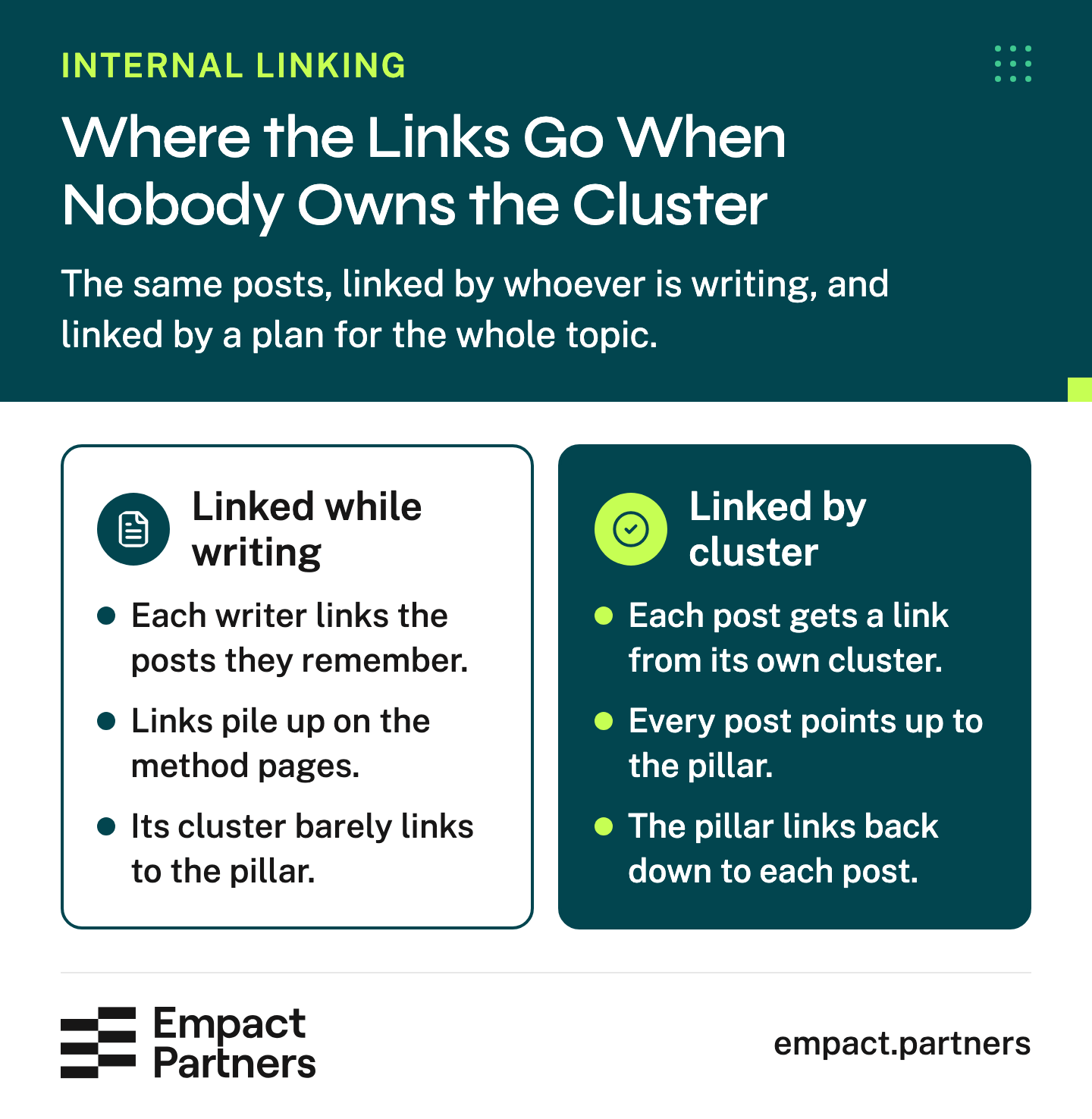
Choosing the pillar gives every post in a cluster the same place to point, and the links back down tie its posts together.
Finding Links That Send Readers to a Rival
The last check before the plan looks the other way, at the links that leave your site.
Step 4: Check every outbound link against the post’s own search
A post written to rank for a search should not send its reader to another company’s page written for that same search. We rule it out in our refresh method, and our own blog still had five. Nobody finds these links reading one post at a time, and they survive edit after edit unless someone looks for them on purpose.
Now check where our posts send readers off the site. For every external link in links.csv, decide whether it points to another company's page written for the same search term as the post it sits in (use target_term from clusters.csv). Narrow the candidates first by the words in the target URL and the anchor, then fetch only those candidate pages, with GET, and read their titles to decide. Don't fetch every external link.

Add a section 5 to findings.md: each flagged link with the post, the anchor, the page it points to, that page's title, and one line on why it competes. Save the rows to competitor_links.csv and commit.
Matching each post’s target term against the words in 976 outbound links left 117 candidates, and Claude Code fetched only those 117 pages to read their titles. Most were where a figure came from, such as a study, a report or Google’s own documentation. Those stay, because a number should link to where it was measured. Five did not, all in the Sources of four statistics posts:
Scroll horizontally to see all columns when the table is wider than this page.
| Our post | Where its link sends the reader |
|---|---|
| AI share of voice statistics | LLM Pulse’s guide to measuring AI share of voice |
| AI share of voice statistics | Ahrefs’ guide to AI share of voice |
| Gemini citation statistics | Omnia’s guide to ranking in Gemini |
| Reddit Google search visibility statistics | Nectiv’s roundup of Reddit statistics |
| Self-reported attribution for AI signups | Ruler Analytics’ guide to self-reported attribution |
Each one cited a number, so none was careless. The cost is where the reader goes next, to a rival’s guide for the search this post wants to own. The fix is to cite the study the guide itself quotes, or another source, and to take the link out rather than swap it for another guide.
Some flags are not faults. A vendor’s own documentation, cited where a post discusses that vendor’s feature, sends the reader exactly where they need to go.
Writing the Plan, Two or Three Links at a Time
With the graph read and the pillars settled, the plan is a short job, because three links a post at most keeps it short.
Step 5: Ask for the plan, then read every row
The order matters. Orphans come first, so every post gets at least one way in, then the pillars, so each cluster points up to its broadest page.
Write the plan, following the rules in CLAUDE.md. Work cluster by cluster. First give every orphan at least one link from a post in its own cluster. Then give each pillar links from the posts in its cluster that don't link to it yet. Read the posts to find each sentence. Don't edit any post.

Save plan.csv with the columns cluster, source_slug, sentence, anchor, target_slug, reason. Copy each sentence exactly as it is in the post, and take the anchor from that sentence. Then show me how many links the plan adds, per cluster, and which orphans or pillars it could not find a sentence for. Commit.
Claude Code looked for sentences by shared words first and found 343 for 38 of the 42 orphans and pillars. Most did not name the page they would link to. For a post on call recorders, the closest match was a sentence about Zapier’s agents, which shares two words with it and says nothing about recording calls.
Read one by one, 31 survived, in 15 clusters. The validator Claude Code wrote for the plan refused two rows on its first run. One anchor was not a run of words in its sentence, and one sentence was cut short at a colon. Both were fixed before plan.csv was written, and here are five of its rows:
Scroll horizontally to see all columns when the table is wider than this page.
| Post the link goes in | Anchor | Links to |
|---|---|---|
| Why AI recommends your competitors | every competitor named | Why rivals show up in AI search |
| AI search adoption statistics | ask for the engines separately | How to choose your next AI visibility fix |
| Should your SaaS website have an llms.txt file? | words arrive through a script | Fixes for JavaScript pages AI crawlers can’t read |
| Software listicle statistics | a listicle budget | When cited listicles deserve your link budget |
| How to plan a SaaS rebrand | a website refresh | Website builders for a SaaS marketing site |
Eight of the 24 orphans and eight of the 18 pillars got no row, because no post in their cluster has a sentence that names them. The plan leaves them alone on purpose. A sentence written only to hold a link reads like one, so each of these is a person’s call. Add a sentence at the post’s next refresh, merge the post into another, or accept that the cluster does not need it.
Then read every row yourself. A tool suggests links and an editor decides which ones ship, which is how we split the work in our refresh method. These are the checks we ran on all 31:
Before a row ships
- The sentence names what the target page is about
- The anchor tells a reader what they will find there
- The anchor is not the target’s exact search term
- The sentence is not the one that says who your company is
- The post takes three new links at most
- The two posts do not answer the same question
Two rows failed. One put a link on the sentence where a post introduces us, which should send a reader to the service page and not to another article. The other used the words “OpenAI’s own guidance” for a post about Google’s guide, so a reader would not find what the anchor promised. The other 29 stayed.
The sheet covers one pass. The rest of the archive goes the same way, a cluster or a few posts at a time, and our playbook on updating every post you have published walks through that rhythm:
A plan for 180 posts is 31 rows. On a blog of a thousand it runs to a few hundred, and the hard part stops being the links and becomes the order. Empact Partners works out that order in the audit and the roadmap a partnership starts with. The first cluster is the one closest to what your buyers search before they buy.
Its links go in beside the rest of your SEO, from the pages that already rank to the mentions on pages AI answers cite. You get the plan applied a cluster at a time, every row read by a consultant, and a report that gives each recommendation its first step.
To try the page-level half on your own site first, the SEO Audit reads the titles, headings, content and internal links of up to ten of your pages. It sends ranked fixes to your work email, and it runs a shorter version of an agent we use in full for partners:
Applying One Cluster on Staging, With a Backup First
The plan is still a sheet. This step turns one cluster of it into edits on a site you can throw away.
Step 6: Apply one cluster through the CMS API and read it back
We gave the first pass to “Getting named in AI answers”, because it had the most orphans on our blog and only 2 of its 23 posts linked to its pillar.
Our blog does not run on WordPress, so our staging site was WordPress Playground. It is a disposable WordPress that runs on a laptop and answers the same REST API calls as a hosted staging copy, and it held the seven posts the first pass touches. On your blog, use the staging copy your host gives you.
Keep the application password out of the prompt and the folder. Put it in an environment variable, and the prompt tells Claude Code never to print it. On an address without HTTPS, the padlock in the browser bar, WordPress offers application passwords only when the site’s environment is set to local, which is how our laptop copy was set.
Our staging WordPress runs at http://127.0.0.1:9400 and holds copies of the posts in the cluster "Getting named in AI answers". The user name and an application password are in the environment variables WP_USER and WP_APP_PASSWORD. Never print them.

Apply the rows of review.csv for that cluster where keep is yes, and nothing else:
1. For each post, GET it from the REST API with context=edit and save the raw content to staging-backup/<slug>.html. Commit the backups before you change anything.
2. Put each planned link into its exact sentence, on the anchor, pointing to https://www.empact.partners/empact-zone/<target_slug>. Change nothing else in the post. If the sentence or the anchor is not in the content, skip that row and say so.
3. Send the new content back with POST, GET the post again, and check that the only difference from the backup is the new link.

Print a table of post, anchor, target and result, then commit with the message "staging: first-pass links applied".
All seven links went in, one per post. Read back through the API, each post with its new link removed was identical to its backup, character for character. That is the check worth asking for, because it proves the only change is the one you planned.
Scroll horizontally to see all columns when the table is wider than this page.
| Post | Anchor | Result |
|---|---|---|
| B2B buyer AI research statistics | vendors missing from AI results | added, only change |
| How to find your gaps in AI search | getting your company named | added, only change |
| AI search adoption statistics | ask for the engines separately | added, only change |
| Should you fund your website, mentions or Reddit first? | the next AI-visibility budget | added, only change |
| How to get discovered on ChatGPT | a competitor ChatGPT kept recommending | added, only change |
| How to get named in AI search | links the pages it used | added, only change |
| Why AI recommends your competitors | every competitor named | added, only change |
Run Step 3 again once the first cluster is live. The number to watch is that cluster’s share of posts with no link from their own topic, 62% on ours before the pass, and its count of orphans. If either barely moves, the cluster or its pillar was drawn wrong, which is worth knowing before the next cluster takes an afternoon.
Frequently Asked Questions
How many internal links should a blog post have?
There is no right number, and a count is the wrong target. What matters is whether each link sits in a sentence that names the page it points to, so a reader knows why to click. We add at most three new links to a post in one pass, which keeps every one of them readable in review. Google’s guidance also warns against chaining links next to each other, because readers cannot tell them apart.
Should internal anchor text use the exact keyword?
We never make the anchor the target page’s exact search term. A sentence bent around a keyword reads like one, and two to five plain words tell the reader more about what waits on the other side. Google asks for anchor text that is descriptive, reasonably concise and relevant to both pages, and warns against cramming keywords into it. A descriptive anchor meets that and still reads like a sentence a person wrote.
Do links in the navigation, footer or related-post cards count?
Navigation and footer links make a page reachable, and a crawler will rarely call a post an orphan while they exist. They say little about what the linked page covers, since the same links repeat on every page of the site. Our graph counts only the links inside a post’s body, the ones a reader meets mid-sentence. That is why it finds orphans a site crawler misses.
Do I need Ahrefs, Screaming Frog or a linking plugin?
Not for this. The sitemap, Claude Code, Python and git cover the whole procedure, and nothing in it needs a paid SEO tool. A crawler adds data this guide leaves out, such as status codes and how many clicks a page sits from the home page, and that belongs in a technical audit. A plugin suggests links by shared words, which in our run was wrong more often than right: 343 suggested sentences came down to 31 rows worth keeping.
Can Claude Code choose our clusters and pillars on its own?
Claude Code drafts both well, and a person should still read clusters.csv before anything depends on it. On our blog it put every statistics post with the topic it measures, the call we would have made. Where it needs you is the pillar. Your writers have often made a different post the hub of a topic without deciding to, and only you know which of the two should own it.
Which cluster should we fix first?
Start where the gap and the stakes meet: a cluster with many orphans that also covers what your buyers search before they choose a product. A cluster your readers rarely reach can wait, however bad its graph looks. Our first pass went to the cluster with the most orphans on our blog, which was also the one closest to what our own buyers search for.
What is the difference between internal links and backlinks?
Internal links run between your own pages, and you decide every one of them. Backlinks come from other sites, and you earn them with outreach or with a resource worth citing, such as the link magnets other writers reach for. Internal links decide how authority moves around your site. Backlinks decide how much arrives in the first place.
Is it safe to let Claude Code edit our posts?
On a staging copy with a backup, yes. Our prompt saved each post’s raw content and committed it before writing anything, changed only the planned links, and read every post back to prove nothing else moved. Never point it at the live site first. Keep titles, addresses and redirects with a person, since those decide where a page lives and what search engines already know about it.
How long does the whole pass take?
Claude Code’s part took about an hour for 180 posts. Your part takes longer, because you read the clusters, settle the pillars and review every row of the plan. Budget an afternoon for a blog this size. If your Claude plan is shared with other work, start early in the week, since a run across a whole blog can use up a weekly allowance.
How often should we run the graph again?
Run it after each cluster goes live, to see whether its gap closed, and whenever a batch of new posts ships. New posts are where orphans come from, because nothing older knows to link to them yet. Rerunning Step 1 refreshes the backup, so Step 3 compares the blog as it is now with the blog as it was.
What should we do with an orphan no other post mentions?
Decide whether the cluster needs it. If it does, add a sentence that names it in a related post at that post’s next refresh, written for the reader and not for the link. If another post answers the same question, merge the two and redirect the old address. If neither fits, it may be a post your blog no longer needs.
Does this work on Webflow or another CMS?
Yes, wherever the content management system has an API that returns a post’s body and accepts an edited one. Webflow’s CMS API, for example, reads and updates a collection item’s rich-text field. The steps stay the same. Back up the body, change only the planned links, then read the post back and compare it with the backup. Without an API, the plan still works as the sheet your writers edit from by hand.
Sources (1)
- Empact Partners, "Empact Partners link graph of its own blog, 16 Nov 2026" (2026)Empact Partners' own data↩1The source printed on the chart; each plotted value is traced to a row of the article's claims ledger.
Keep reading
SEO How To Plan A CMS Migration You Never Have To Recover From
Pick a CMS that can carry your URLs, map every old address before launch, fix what is wrong in the move and watch the first two weeks.

SEO Which Link Magnets Are Worth Building for SaaS?
Choose a resource worth citing, assign its upkeep, and judge whether link magnets deserve part of your SaaS SEO budget.

SEO Organic Traffic Dropping? Check Pipeline Before Blaming AI Search
Find which pages lost clicks, whether qualified leads fell, and what to check before changing your SaaS content budget.