How to Set Up Brand Mention and Backlink Alerts Your Team Acts On
Backlink and mention alerts pile up unread in one inbox. Route each to the person who acts on it, then sort the week in Claude Code.
 Garith PriorWith
 Vlad Shvets
On this page
Empact Newsletter
One email a month on what is working in AI search and SaaS go-to-market.
Ahrefs has emailed a backlink alert for MarketSplash and another for Hutte, two of our ventures, almost every week since August 2024. Of those 112 emails, Gmail still marks 76 as unread. One of the unread ones counted 4,092 lost MarketSplash backlinks in a single week.
The alerts did their job and found the links. Then each one went to the inbox of the person who had created it, as one email mixing new links with lost ones. An email that is half one person’s job and half another’s ends up being nobody’s.
So the fix has two halves. Split the alert in three and send each part to the Slack channel of the person who acts on it, with Google Alerts as the free route for mentions. Then, once a week, have Claude Code sort what came in, checking every row on the live page. We ran the sort on the last week our own alerts covered:
Empact Partners asks the editors behind the pages AI answers cite to name the SaaS products we work with. That is mention building, and a page that already names you is its warmest lead, the kind an alert finds.
Ahrefs carries the backlink half. The rest is free or already in tools most marketing teams pay for, and one setting may need your Slack admin:
This gets every alert in front of someone who will act on it and turns each week into sorted rows. It does not write the emails to editors, which is where the work begins.
Splitting One Ahrefs Alert Into Three
Our MarketSplash alert used the setting that puts everything in one email. This is its last one, for the week of 20 to 27 March 2026:
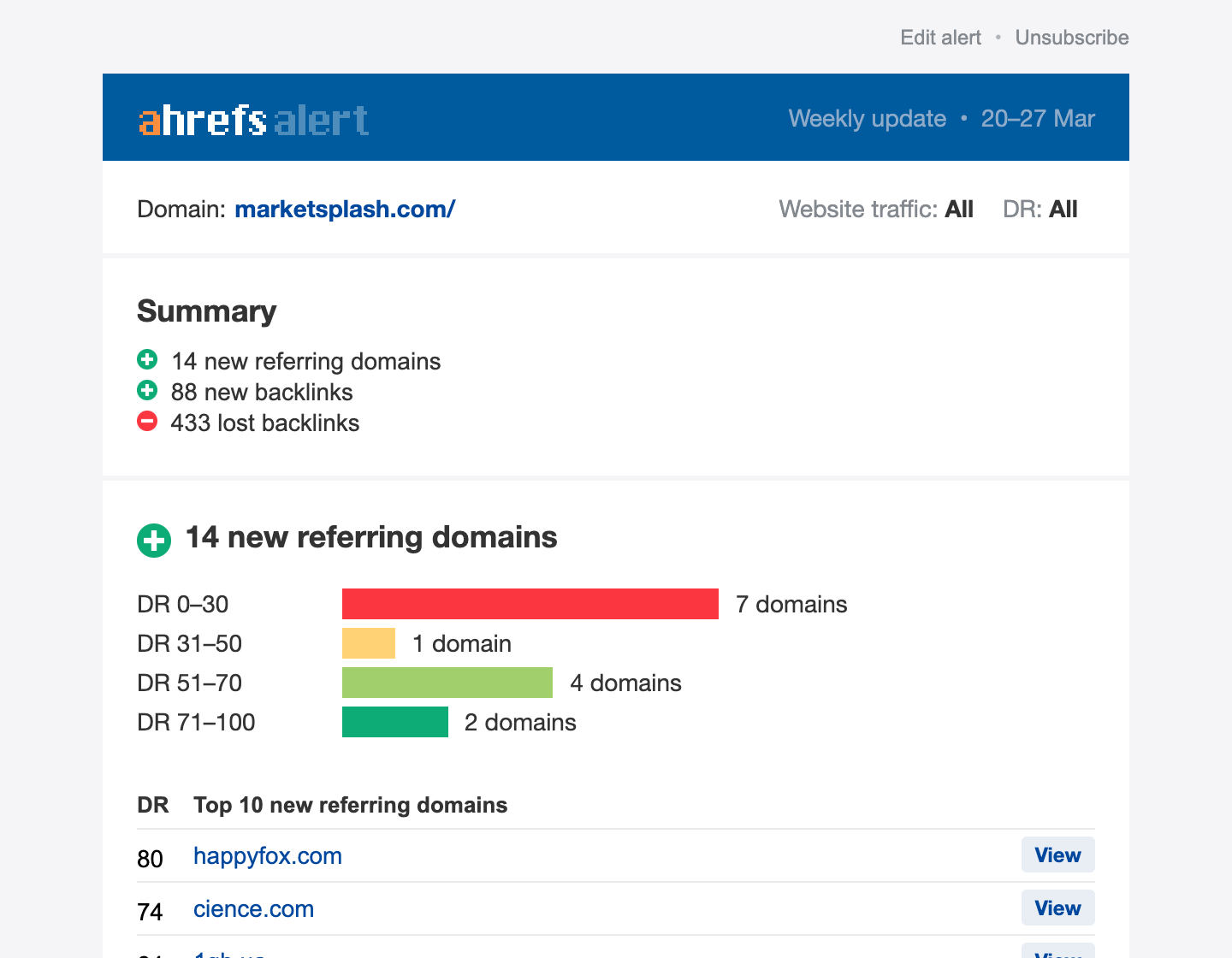
A filter can send an email to one place. This one holds two jobs, checking the new links and chasing the lost ones, so it reaches one person who must do both or nobody in particular. Split it first.
Step 1: Add a lost-backlinks alert and a new-backlinks alert
In Ahrefs, click More in the top menu, then Alerts, and open the Backlinks tab. Click Add alert. Enter your domain in Domain or URL, set Mode to Domain, Scope to Lost backlinks and Interval to Weekly, leave Send email on, and click Add 2. Then add a second alert the same way with Scope set to New backlinks.
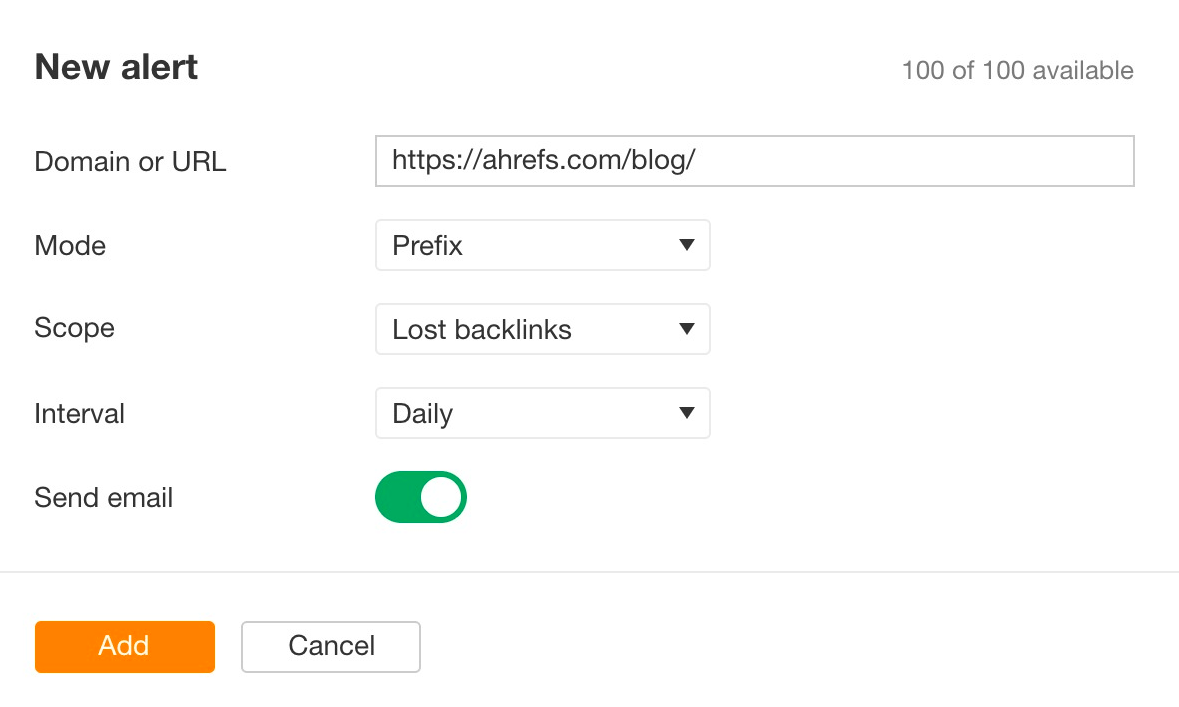
From then on each email carries one kind in its subject. Ours did in the weeks only one kind changed: “60 new backlinks - marketsplash.com/” in one, “61 lost backlinks - marketsplash.com/” in another. Those two phrases are what the filters in Step 4 match.
A lost-backlinks email also says why each link went. Ahrefs sorts the losses into problems with the referring page, such as a 301 or 302 redirect, a noindex tag or a 404, and problems with the link itself 2. The second kind means somebody removed the link.
Only that kind is a decision made on the other site. The rest are pages that moved or vanished, and Step 7 shows how often a moved page still carries the link.
Step 2: Add a mentions alert, and a free Google Alert beside it
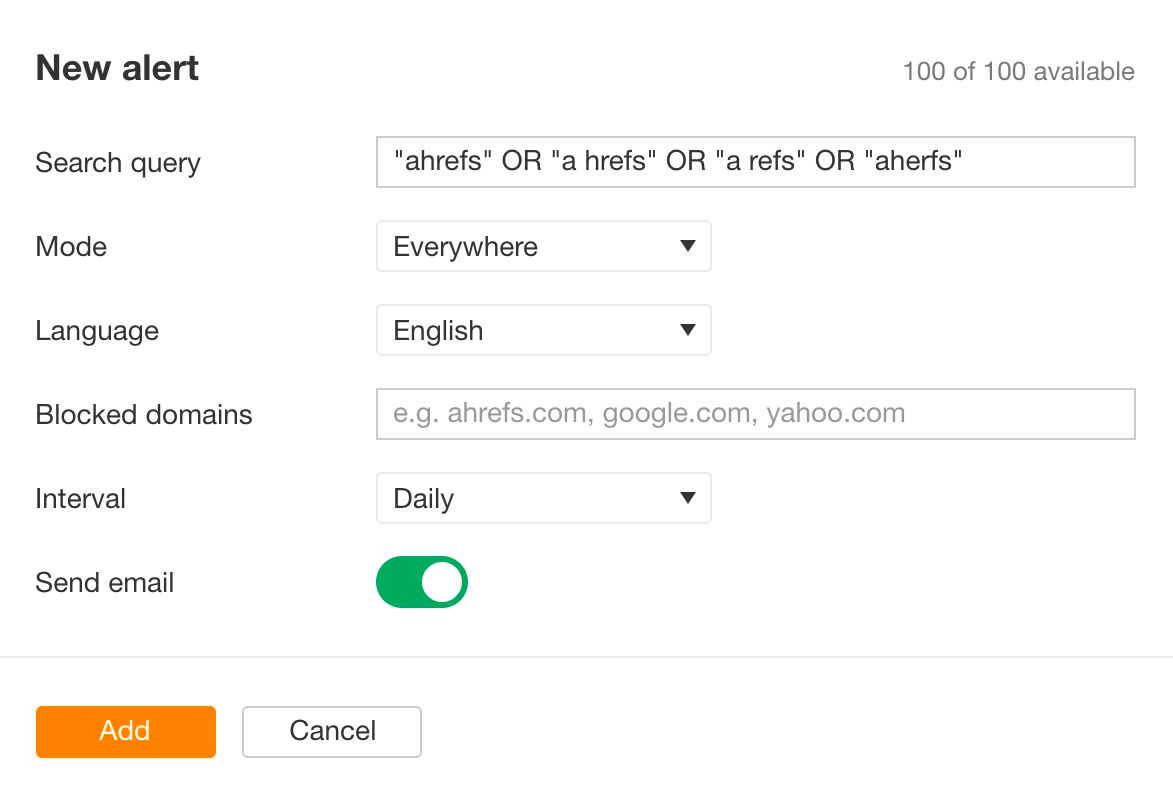
Still in Alerts, open the Mentions tab and click Add alert. In Search query, put your brand in quotes and join its common misspellings with the word OR. Leave Mode on Everywhere, add your own domains under Blocked domains, choose Weekly and click Add 3.
Google Alerts covers the same half for free. At google.com/alerts we typed MarketSplash without quotes first. The preview held nothing about us: “market splash” in stories about stock market debuts, a casino’s Splash Coins, a dark-web market’s splash page.
In quotes, with our own site excluded, it found pages that cite us. It also found one 2011 article about a logo service Hewlett-Packard ran under the same name.
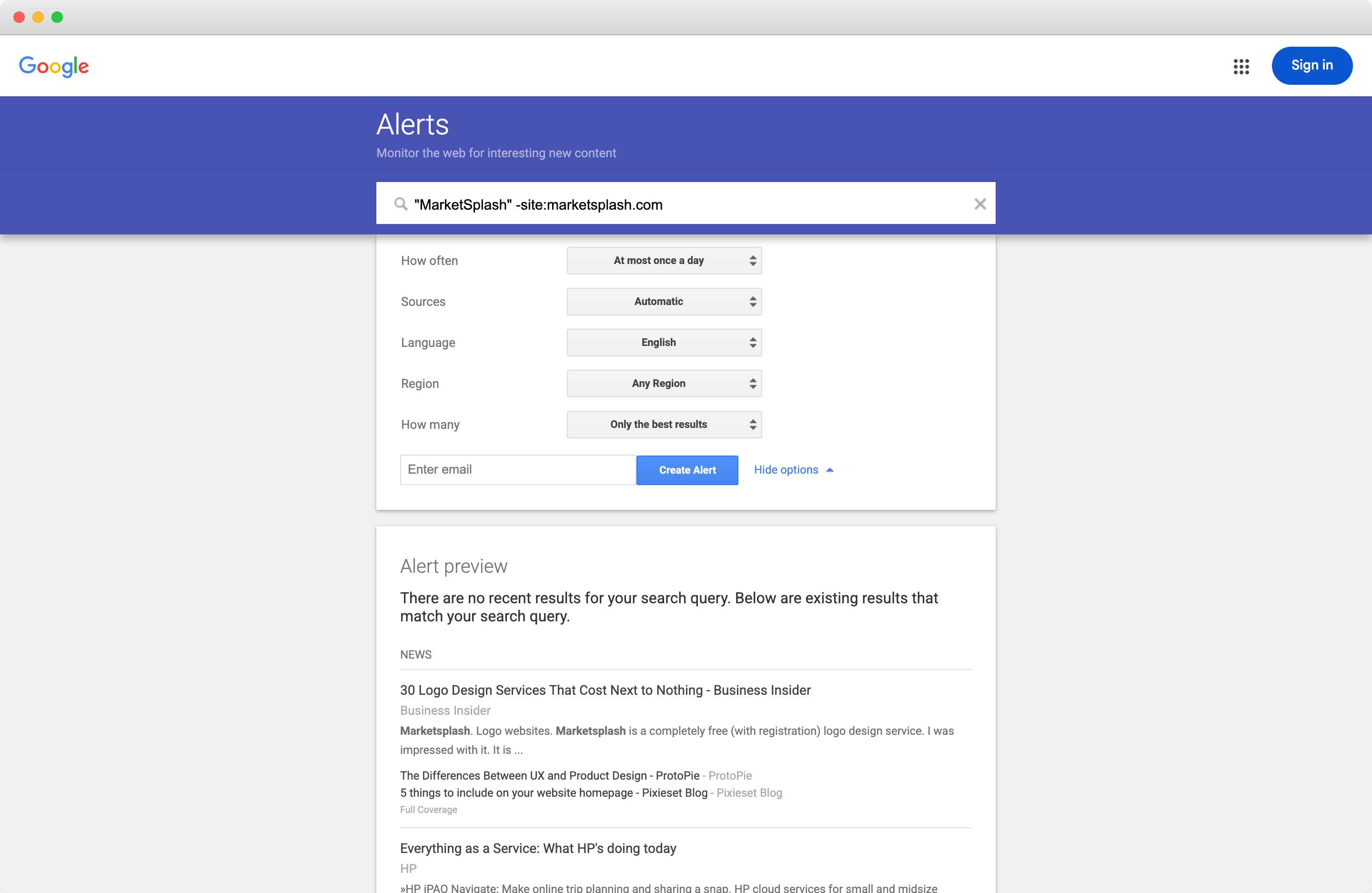
Under Show options, set How often to at most once a week and How many to all results, enter the address the alert should reach and click Create Alert 4. Both of our previews opened with “There are no recent results for your search query” and showed older pages. It means nothing new matched that day. The alert itself still works.
Neither alert tells you whether a page links to you. A mention alert reports a name, and that is the point of it. A site that already names you knows who you are, which makes it a far warmer lead than a cold prospect.
Sending Each Alert to the Person Who Acts on It
Splitting the alert makes routing possible, and that is all it does. This is what one inbox did to our alerts over seven quarters:
Weekly Backlink Alerts We Opened, by Quarter
Our 112 Ahrefs alerts for MarketSplash and Hutte, Aug 2024 to Mar 2026
View the data
| Label | Opened | Still unread |
|---|---|---|
| Q3 2024 | 6 | 3 |
| Q4 2024 | 11 | 7 |
| Q1 2025 | 8 | 5 |
| Q2 2025 | 3 | 6 |
| Q3 2025 | 2 | 17 |
| Q4 2025 | 4 | 16 |
| Q1 2026 | 2 | 22 |
Our alerts never changed in that time. What changed is that reading them stopped being anyone’s job. Give each kind of alert its own channel and one named owner:
Scroll horizontally to see all columns when the table is wider than this page.
| Alert | Who acts on it | Slack channel | What they check first |
|---|---|---|---|
| Lost backlinks | whoever owns your site’s redirects | #alerts-lost-links | whether the page moved or the link went |
| New backlinks | your SEO lead | #alerts-new-links | that the link is live and lands on the right page |
| Mentions, from Ahrefs and Google | whoever runs mention building or PR | #alerts-mentions | whether the page links to you, and how much it matters |
Our MarketSplash alert was opened most weeks in late 2024 and almost never in 2026, and the alert itself never changed. Reading it was simply nobody’s job. Give each alert one owner, by name, in the channel where that person already works, and check a month later that somebody has acted on what arrived.
 Garith Prior on LinkedInOpens in a new tab
Step 3: Give each channel an email address
In Slack, open the channel, click its name in the header, and on the About tab choose Send emails to this channel. Click Get Email Address, then Copy 6. Do it for all three channels.
Channel addresses are a paid-plan feature, and owners and admins can limit who creates them 6. If the option is missing, that is the message to send your admin. With a free plan, Slack’s Gmail add-on sends one email at a time by hand, which brings the inbox problem straight back.
Step 4: Forward each alert with a Gmail filter
In Gmail, open Settings, then See all settings, then Forwarding and POP/IMAP, and add each channel’s address as a forwarding address. Gmail sends a verification link to every new forwarding address 7. With a channel’s address, that link arrives as a message in the Slack channel itself, so open the channel, click it there, and refresh Gmail.
Leave the option to forward all incoming mail switched off. Then make one filter per alert: type the search into Gmail’s search box, open the search options, click Create filter, tick Forward it and pick that channel’s address 7.
from:se@ahrefs.com subject:"lost backlinks"
from:se@ahrefs.com subject:"new backlinks"
from:googlealerts-noreply@google.com
The first two use the sender on every backlink alert we have received. Google names its alert address in its own help 4. For the Ahrefs mentions alert, open its first email, click More, then Filter messages like these, and Gmail fills in the sender for you 8.
A filter only acts on mail that arrives after you create it 8, so nothing moves today. The next weekly alert should land in its channel. If the lost-links channel gets an email with new links in it too, that alert is still set to All backlinks, and its subject matches the first search.
Our own Reddit mentions tracker works the same way for partners, posting one short message a day in each partner’s internal channel.
Sorting a Week of Alerts in Claude Code
Routing gets the email read. It does not make the rows true. Ahrefs reports what its crawler last saw, and a week of alerts mixes pages that moved, archive pages and your own posts with the links that matter. So once a week, Claude Code checks every row on the live page.
Step 5: Put the week’s alerts in one folder
Create a folder, start Claude Code in it, and make a folder called alerts inside. In Gmail, open each of the week’s alert emails, click More, then Download message, and save it into alerts. Google Alerts emails go in the same place.
Once a month, add a file called cited-pages.txt. Ask ChatGPT and Google AI Mode the five questions your buyers ask most, and paste the links each answer cites, one to a line. Ahrefs’ Brand Radar tracks five such prompts daily on its Lite plan and shows which sources the answers pull from, so you can copy them from there instead 9.
Our folder held the last two alerts Ahrefs sent for MarketSplash and Hutte, for 20 to 27 March 2026, because no alerts arrived after that week. It also held the 26 pages Google Alerts previewed for our quoted query on 20 November. A third file listed the 47 links ChatGPT and Google AI Mode cited when we asked them five questions that day.
Step 6: Write the rules, then run the prompt
Claude Code loads CLAUDE.md whenever a session starts, which makes it the place for the rules. This is ours as it ended the run. The section headed “Three rules the first pass taught us” came after our first pass, and Step 7 says what each one fixed. Change the brands, domains and accounts to yours:
# Weekly alert triage

You sort one week of brand alerts into a sheet a person acts on.

## Our brands

- MarketSplash, marketsplash.com
- Hutte, hutte.io

## The inputs

- `alerts/` holds this week's alert emails: Ahrefs backlink alerts saved from Gmail as .eml files, and what Google Alerts sent for our brand name.
- `cited-pages.txt` holds the pages ChatGPT and Google AI Mode cited when we asked them our buyers' questions this month, one URL per line.

An Ahrefs email shows only the top rows of each section. Work with the rows it shows and say how many the email counted in total.

## One row per page

A row is one page that links to us or names us. The same page listed twice (with and without a trailing slash on our URL, or under both new and lost) is one row. Say so in the evidence.

## Check every page yourself

Use curl, never a tool that summarises the page. Follow redirects, record the status code and the final URL, and search the raw HTML for a link to our domain and for our brand name. For a lost backlink, also check the page of ours that the link pointed to: does it answer 200, redirect, or 404?

## Buckets, one per row

- **cited**: the page, ignoring tracking parameters, is in cited-pages.txt. This beats every other bucket.
- **unlinked**: the page is live and names our brand, with no link to our domain. A lost link whose page still names us goes here, and the evidence says the link was removed.
- **lost**: the link is gone. Name the cause:
  - their page moved: the linking page redirects. Check the page it redirects to for our link before you call it lost.
  - their page is gone: 404, 410, or no page.
  - link removed: the page is live and neither links to us nor names us.
  - our page broke: the page of ours the link pointed to is a 404 or redirects somewhere unrelated.
- **linked**: the page is live and links to our domain.
- **noise**: the page is not about our brand (another company with the same name, the words used in another sense), a search results page, an image search, or a scraper.

## Three rules the first pass taught us

- Pages that are ours are noise. Our own sites (marketsplash.com, hutte.io, empact.partners), our own accounts on Pinterest, dev.to, YouTube, LinkedIn and X, and posts our own team wrote on forums. Write "ours" in the evidence.
- A listing page that moved on is noise. A numbered archive, tag, category or author page, or a news feed, that showed us once and now shows newer posts. Nobody removed the link: it moved further down the archive.
- Check where our own page lands. When the page of ours a link points to redirects, write where it lands. If it lands on a page about something else (a tag page, the home page, another topic), add "fix the redirect" to what_happened and give the row to whoever owns redirects, whatever its bucket.

## The sheet

Write `triage.csv` with these columns: bucket, page, our_page, what_happened, evidence, owner, next_action.

- owner: cited and unlinked go to the person who runs mention building, lost with "our page broke" to whoever owns redirects on our site, other lost rows and linked rows to the SEO lead, noise to nobody.
- next_action: leave it empty. A person fills it in.
- Sort the rows: cited, unlinked, lost, linked, noise.

When you finish, tell me how many rows went into each bucket, and which rows you were least sure about and why.

Never contact anyone, and never change anything on any website.
Then give it one line:
Read CLAUDE.md, then triage this week's alerts in alerts/ and write triage.csv.Claude Code asks before it runs curl or Python, so allow both, or the checks never happen. In our first pass, a command that chained two Python calls stopped for approval even though Python was allowed, and Claude ran them one at a time instead.
The first pass took 33 turns and under seven minutes. The second, with the three rules added, took seven more turns, and Claude Code put both at $1.07 in API rates.
Step 7: Read the sheet one bucket at a time
The sheet came back with 56 rows, one per page. Claude had folded the duplicates, such as a page listed once with a trailing slash and once without, or under both new and lost:
Scroll horizontally to see all columns when the table is wider than this page.
| Bucket | Rows | What ours held | Who acts |
|---|---|---|---|
| Cited | 0 | none of the week’s pages among the 47 cited links | mention building |
| Unlinked | 11 | pages that name MarketSplash or Hutte with no link | mention building |
| Lost | 7 | pages gone, links removed, and one link our own redirect broke | SEO lead, or redirects |
| Linked | 25 | live links, seven of them landing on our own redirects | SEO lead, or redirects |
| Noise | 13 | our own pages, archive pages that moved on, another company’s MarketSplash, an image search | nobody |
Start with lost, because it is the bucket an alert gets most wrong. The MarketSplash email listed eight pages as lost, and six still linked to us.
Proton’s post on Google Docs security, in English and in Italian, had moved from /blog/ to /business/blog/. Nativo’s post now redirects to ads.life360.com, and a Zenvia post had moved to its address without www. All four pages kept the link through the move. Canva and Default still linked to us too, only to a different MarketSplash page than the one Ahrefs had on file.
Most of what the alert called lost was still linking, one redirect away.
Of the two real losses, Wordstream had removed the link. Glints had dropped it after our own tag page started redirecting to an unrelated one, which makes it a fix on our side before it is an email to anyone. Practitioners say the same about losses that start on your own site:
Tips from Reddit
What practitioners say about links to your own broken pages
If you've got a link pointing to 404'ing page on your site its a million times easier/quicker/cheaper to fix it, than it is to build a new link. So yes of course they're worth fixing, you'll never see a better ROI.
Redirecting to the homepage is good as a last resort. It's better to recreate those old pages or at least 301 to a related page.
The same check found the cheapest fix on the sheet. Seven live links from other sites, among them SlashGear and World Population Review, point at MarketSplash pages, most of them statistics pages, that now redirect to a tag page. A reader who clicks gets a page of recent posts instead of the figure they came for. Each row went to whoever owns our redirects, and none needs an email.
Unlinked is the bucket worth the most. Nine pages from the Google Alerts preview name MarketSplash without linking to it, DemandSage among them, with “Source: Marketsplash.” under its cybersecurity figures. Two Hutte pages had removed the link and kept “hutte.io” in the text. Three of the eleven sites blocked Claude or ran on JavaScript, so a person opens those.
Our Unlinked Mentions Finder starts from the other end, from your site instead of your alerts. It finds pages that name you without linking, with a contact route for each. It is free to try, and the full agent is one we run for our partners:
Noise held 13 rows after the second pass. Four were our own pages, among them our venture page on empact.partners and our dev.to account, which the first pass had counted as links.
Four more were numbered archive pages, such as page 169 of a news archive, that had shown us once and moved on. The first pass had counted those as lost. They became two of our three new rules, and the third flagged the links that land on our own redirects.
Cited came back empty. None of the week’s pages was among the 47 links the two engines cited. Keep the bucket anyway. A page an answer already cites is a page buyers read through that answer. The week the bucket fills, its rows go first. Set side by side, the email and the live check describe two different weeks:
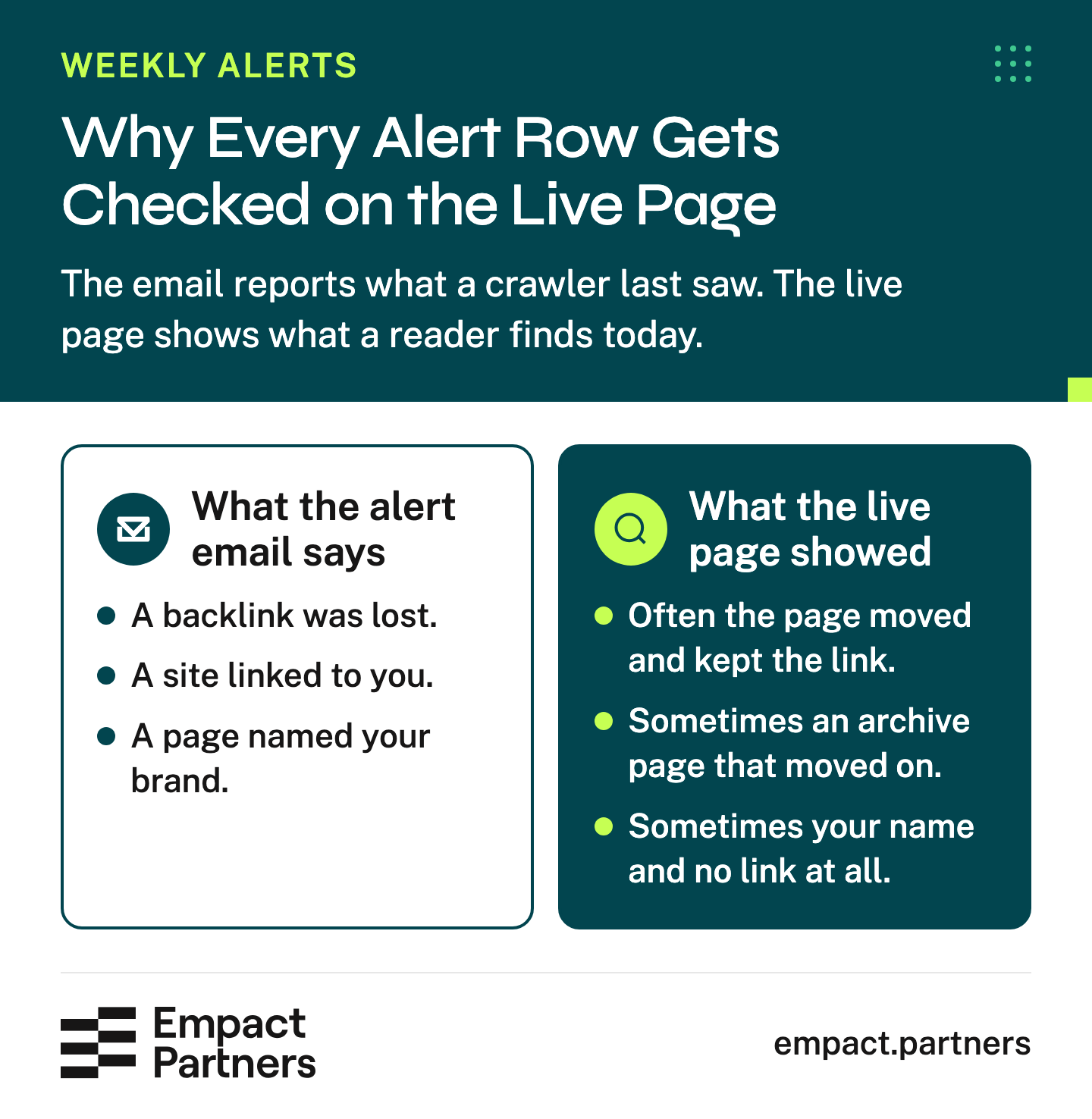
Empact Partners would take the redirect rows first on a sheet like this, because they cost nothing and nobody has to be persuaded. The cited and unlinked rows come next, and those are mention building. Working with us on it includes:
What mention building with us includes
- We find the best-of listicles AI answers keep citing in your category
- We pitch your product to the editor behind each one
- A log of each placement, read every week beside that week’s ChatGPT, Google AI Mode and Claude answers in your category
- Standing reports with a first step beside every recommendation
For the unlinked rows on your own sheet, the playbook covers getting a link added on the pages that already name you:
One number tells you whether the routine works. After four weeks, count the rows with something written in next_action. If most of them are still empty, the alerts reached a channel and found no owner there, and the fix is in the routing table under Step 3.
Frequently Asked Questions
Can Ahrefs send new and lost backlinks in separate emails?
Yes. A backlinks alert has a Scope setting for new backlinks, lost backlinks or both 2. Make two alerts for the same domain, one per scope, and each email carries one kind in its subject. That is what lets a Gmail filter send each to a different person. An alert left on both sends one email a week that nobody can route.
Why does Ahrefs show a backlink as lost when the page still links to me?
Usually the linking page moved. Ahrefs saw the old address redirect and logged the link under it as lost, while the page at the new address still carries it. In our week, six of the eight pages Ahrefs listed as lost still linked to MarketSplash, four of them after a move and two to a different page of ours.
Open the page and follow any redirect before anyone writes to the site about it. The lost email’s own reasons help here. A redirect or a 404 on the referring page points to a move, and only a removed link on a live page is somebody’s decision.
Is Google Alerts good enough for brand mentions?
For a free route, yes, if you put the brand in quotes and exclude your own domain. Unquoted, MarketSplash matched stock market news about a “market splash” and a casino promotion. Google Alerts watches new results in Google Search and shows only what it rates as the best results unless you change How many 4. If you already pay for Ahrefs, run its mentions alert beside it.
Can we send alerts to Slack on a free plan?
Not automatically. Giving a channel an email address is a paid-plan feature, and Slack’s email add-ons for Gmail and Outlook send one message at a time by hand 6. The nearest free option is a shared inbox that one named person checks on a fixed day, which works only as long as that person still does.
Keep the three Gmail filters anyway, labeling the alerts instead of forwarding them. The day you move to a paid plan, the routing is one setting away.
Who should own the lost-backlinks alert?
Whoever can change redirects on your site, because most lost rows are fixed or dismissed without an email. Pages that moved still link, and links landing on your own redirects need a redirect to the right page. Only a link removed from a live page goes to the person who writes to editors.
Is an unlinked mention worth chasing?
Usually more than a cold prospect. The site already chose to name you, so the conversation starts from something they wrote. For AI search, we count the mention itself, link or not. Start with the pages AI answers cite for your buyers’ questions, then the pages that cite you as the source of a figure.
How often should we sort the alerts?
Weekly, matched to the alert interval, so each sort covers one email per alert and no lost row is more than a week old when someone opens it. A monthly sort lets the lost rows sit while the pages that dropped you keep changing. Refresh cited-pages.txt once a month.
Can Claude Code tell reliably whether a page links to us?
On most pages, yes, because it reads the page’s own code, the raw HTML, with curl and searches it for your domain. Some sites refuse curl’s default request and answer a browser’s, which three of ours did until Claude retried as a browser.
Claude Code cannot read pages behind a bot challenge or pages built in JavaScript. Three of our 56 were like that, and Claude marked them unverified. Open those yourself before anyone acts on them.
What does the whole setup cost?
Ahrefs Lite starts at $129 a month 10. Google Alerts and Gmail filters are free. Slack needs a paid plan for channel email addresses 6. Claude Pro, which includes Claude Code, is $20 a month, or $200 a year paid up front 11. Our two sorting passes came to $1.07 at API rates. The rest is the time someone spends on the rows.
What should we do with a link that lands on one of our redirects?
Point the redirect at the page the link meant, or the closest page about the same thing. A redirect to a tag page or the home page wastes a link someone gave you on purpose. In our sheet, seven live links to MarketSplash pages landed on a tag page, and each went to the redirects owner.
Should the alerts track competitors too?
Competitor alerts are worth adding once your own three alerts have owners. Ahrefs suggests a new-backlinks alert on a competitor’s top pages to see who links to them and might link to you 2. Send it to the person who runs mention building, never to the channel for your own lost links, or the two jobs mix again.
When is it worth bringing in a consultant?
When the sheet fills every week and the next_action column stays empty, or when the cited and unlinked rows outnumber the hours anyone has for outreach. By then the alerts are working and the bottleneck is the editor conversations they point to.
A consultant also helps when nobody can tell which pages naming you are the ones AI answers lean on in your category. That decides which rows get an email first.
Sources (11)
- Empact Partners, "Ahrefs backlink alert emails for MarketSplash and Hutte in our own Gmail, August 2024" (2024)Empact Partners' own data↩1↩2to March 2026, and the Claude Code sort of the alerts of 20 to 27 March 2026 with the Google Alerts preview of 20 November 2026, run on 20 November 2026.
- Ahrefs Academy, "Backlinks alerts" (2026)↩1↩2↩3↩4read 20 November 2026.
- Ahrefs Help Center, "How to set up new mentions emails in Ahrefs Alerts" (2026)↩1updated 3 September 2026.
- Google Search Help, "Create an alert" (2026)↩1↩2↩3read 20 November 2026.
- Ahrefs Help Center, "help article on setting up Alerts for another user of a workspace" (2026)↩1updated 3 September 2026.
- Slack Help Center, "Send emails to Slack" (2026)↩1↩2↩3↩4read 20 November 2026.
- Gmail Help, "Automatically forward Gmail messages to another account" (2026)↩1↩2read 20 November 2026.
- Gmail Help, "Create rules to filter your emails" (2026)↩1↩2read 20 November 2026.
- Ahrefs, "Custom Prompts" (2026)↩1read 20 November 2026.
- Ahrefs, "Pricing" (2026)↩1read 20 November 2026.
- Anthropic, "Plans & pricing" (2026)↩1read 20 November 2026.
Keep reading
Mention Building How to Rank Mention Targets by How Often AI Cites Them
Count how often ChatGPT and AI Mode cite each page for your buyer questions, re-sort your mention targets and give each one an owner.

Mention Building How to Build Mentions for Your SaaS Brand
Choose relevant roundups, reach the right person and judge a SaaS mention program without mistaking placements for AI citations.

Mention Building Mention Building vs Link Building: What Should You Renew?
Compare a link-building renewal with a mention-building proposal: what each buys, what to keep and what to get in writing first.