
Which Signup Form Fields to Keep, and How to Test a Cut
Asked to cut signup fields? Judge each by who reads its answer, move what can wait, and test every cut on paying accounts per visitor.
 Samantha SpiroWith
 Vlad Shvets
On this page
Empact Newsletter
One email a month on what is working in AI search and SaaS go-to-market.
Someone has looked at your signup funnel, seen the drop at the form and asked for fewer fields. The cut ships in a day, and completed forms can rise the week after. Whether more people pay is a different number. It arrives a trial later, long after the team has called the change a win.
The fields worth keeping on the form are the ones somebody needs before the account exists. A work email tells sales which company signed up. A company-size question can send a large account to sales instead of the self-serve path. A check that keeps fake accounts out protects every honest user who comes after. Everything else can wait for the first screen after signup.
This page walks a real public signup route and turns what it finds into a sheet for your own form. The sheet says who reads each field and whether it stays, moves or gets tested, and every cut gets a written test. The walk takes minutes and the sheet an afternoon. Four of the five things you need come from colleagues, so ask for them first:
This page decides what stays on the first form. It doesn’t compare trial models, and it stops where the account exists, before the screens where new users stall in onboarding.
Cutting isn’t the only way to take a gate off a form. Resend’s handbook says most of its competitors make new users fill out a long form and wait days for approval before they can send. Resend lets every account send from the moment it signs up and watches for abuse afterwards 1 2. The check moved to after signup, so honest users no longer wait for it.
Empact Partners walks SaaS signup routes the way buyers meet them and finds what stops the ones who would pay, so product-led growth brings in paying accounts and not just signups. We judge every change to a route by paying accounts per visitor.
Record the Route a Buyer Takes to Your Form
You need two kinds of evidence to decide a field. The route is public, so anyone can walk it and see what a buyer is asked. Who reads each answer, who paid and which accounts turned out to be fake sit in your own records, where only your team can look:
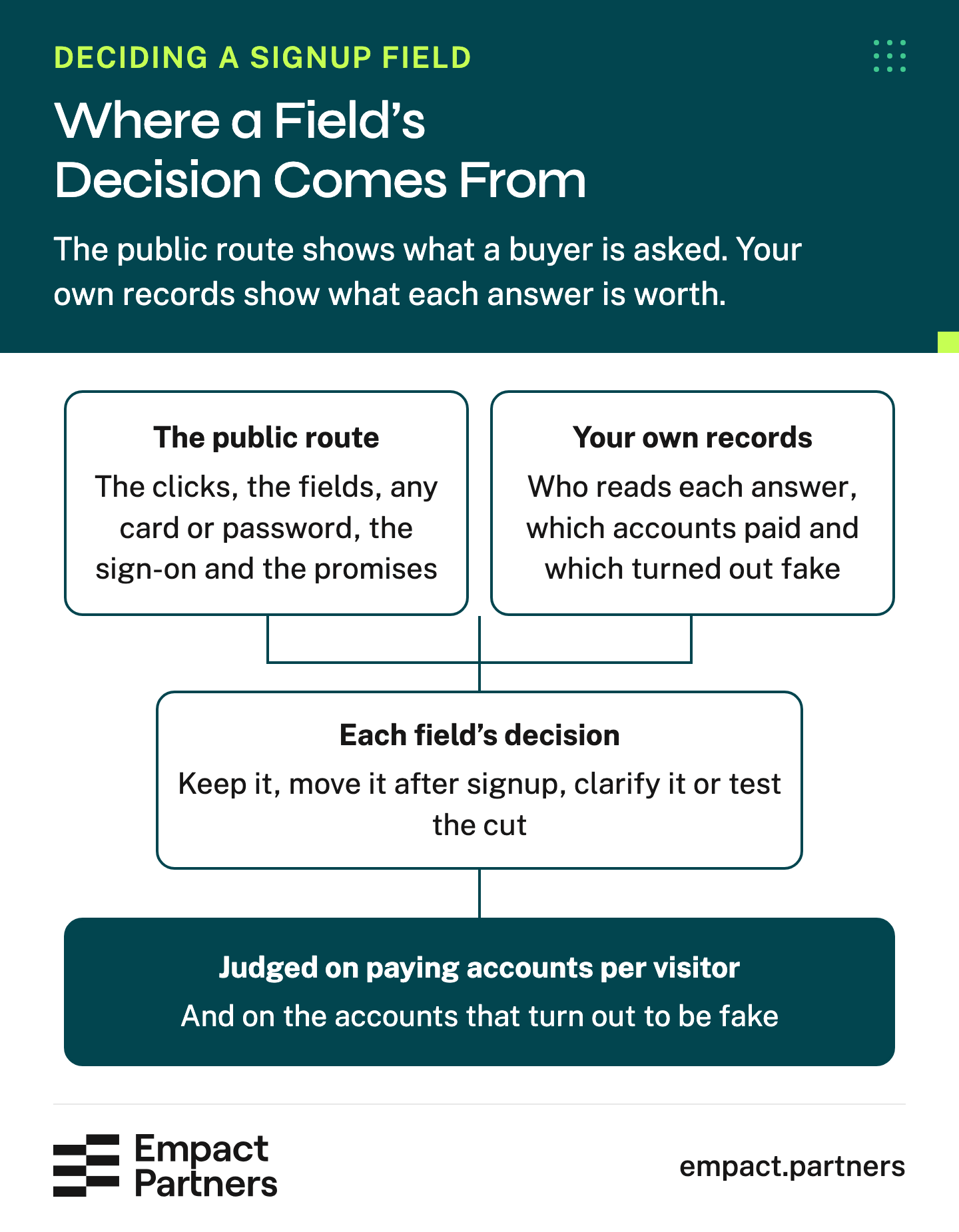
Step 1 collects the public half. The steps after it bring in your records, and a field earns its place only when both say it should.
Step 1: Walk from your homepage to the form, without submitting it
Open your homepage in a private window and click the way a new visitor would, the most prominent signup button first, then whatever it opens. Count the clicks. At the first form, write down each field, any password or card it asks for, the sign-on options and every promise near the button.
Then stop, without submitting. Everything up to here is what a buyer weighs before giving you anything, and Step 2 comes back to the steps after it.
We ran our Signup Friction Check on Pipedrive’s public site on 25 November 2026 3. Pipedrive sells a CRM to sales teams, its signup is self-serve, and everything below is what any visitor sees. This is what the walk recorded:
Scroll horizontally to see all columns when the table is wider than this page.
| What the walk records | What it found on Pipedrive |
|---|---|
| Clicks from the homepage | One. The hero’s Try it free button opens a signup window |
| Fields on the first form | One, “Enter your work email” |
| Password or card | Neither |
| Sign-on | Google, under the email field |
| Promises | “14-day free trial, no credit card required” on the homepage, and “100% access. No credit card required” above the field |
| Not read | Everything after the email step, because the walk never submits a form |
The window is the first form a buyer meets, and the whole of it fits on one screen:
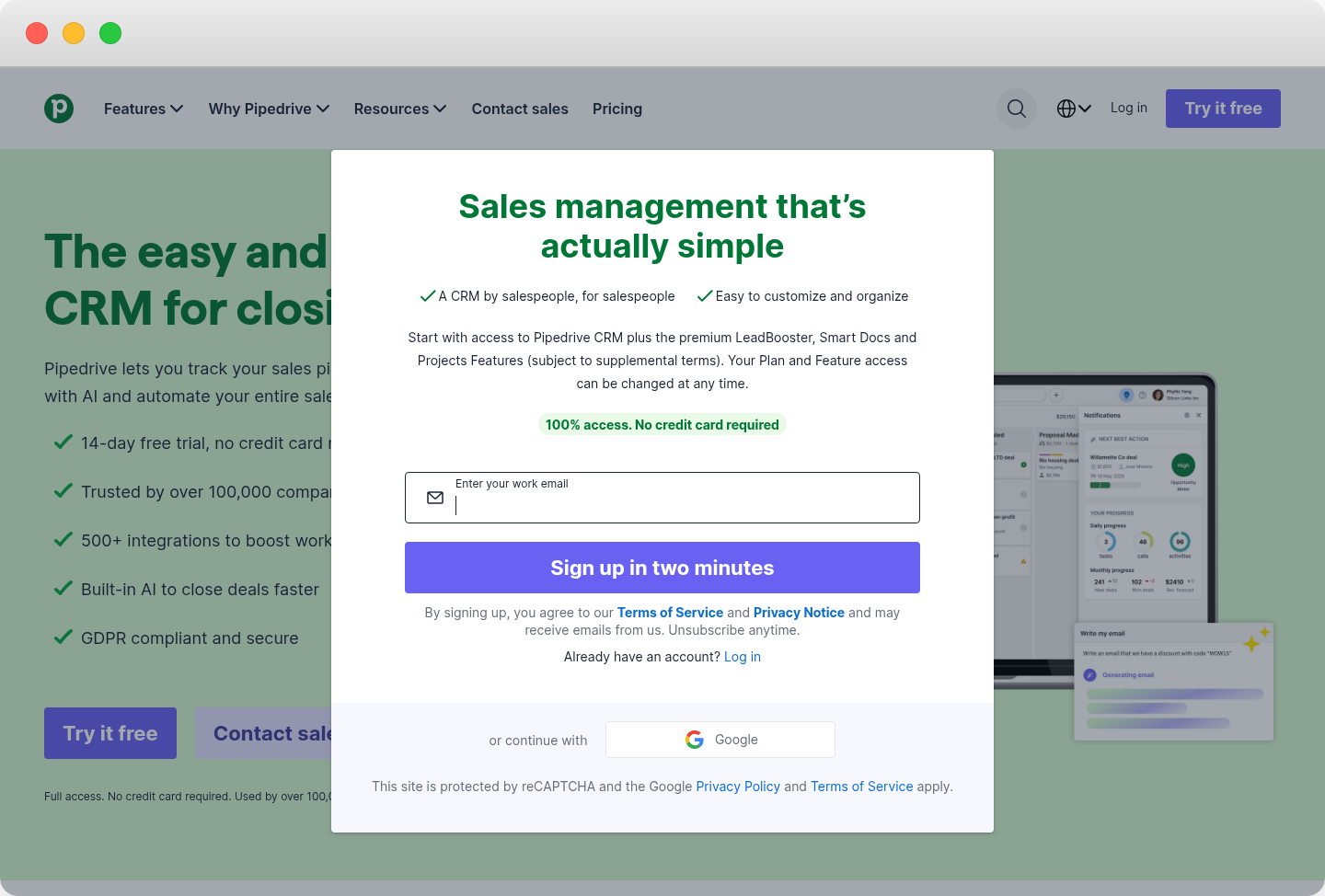
By the check’s own review rules, one click to the form passes, and five or more fields or a payment field on the first form would each be a fix. Pipedrive’s route passes both. What the walk can’t read is the rest of the form, and Step 2 comes back to it.
Look at the screens as well as the record. Pipedrive draws its window after the click, and our walk’s record missed the Google option the screen shows under the field.
You can run the same walk on your own site. The free check emails you the route it took, what the first form asks and five ranked fixes or checks. It is one run of the agent we run in full for partners:
Step 2: Write down who reads each answer
Give every field and step on the route its own row, and fill in who reads the answer and when. That column decides more than any count of fields. A field that sends a large account to sales at signup is part of how that account gets a call. A field nobody has opened this quarter costs buyers and buys you nothing.
Before anyone marks a field for cutting, I would look hardest at the one that seems to do nothing:
The field I worry about most is the one that looks useless and isn’t. A company-size question can be how sales spots the large account in a week of signups, and nobody notices the question is gone until that account never gets a call. So I want the sheet filled in before anyone deletes a thing.
 Samantha Spiro on LinkedInOpens in a new tab
Pipedrive’s first form is one field, and its label does the sorting: it asks for a work email, which a business buyer reads as meant for them. Whatever else Pipedrive asks comes after the email, where our walk did not go. On your own form, walk that part too with a test address, because that is where a short first form would put any sorting questions.
Copy this into a sheet, one row per field or step. The example rows are a typical B2B form, so replace them with yours, and leave the last two columns for Step 4:
Field or step,What it asks,Who reads the answer,When they read it,Needed before the account exists?,Decision,How the change is tested
Work email,Email address,Sales,At signup,Yes,,
Company size,One of five bands,Sales routing,At signup,Only if it routes large accounts to sales,,
How did you hear about us,Open text,Marketing,Monthly,No,,
Phone number,Phone,Nobody this quarter,,No,,
One question can nearly always move: “How did you hear about us?” Marketing reads it once a month to see which signups came from ChatGPT and Reddit and which from search. The account doesn’t need the answer to exist, so it belongs on the first screen after signup.
Decide What Each Field Is Worth
The sheet says who reads each field. It doesn’t say what the field costs you, and the drop at a field is easy to misread.
Step 3: Separate the people who left from the people who failed
From your product analytics, pull three counts for each field that worries you: people who reached it, people who tried it and people who tried and failed. A card field with many failed attempts has a payment problem. One that nobody even tries has a different problem, and cutting it may not fix it.
A founder in r/SaaS ran these counts on their own trial’s card screen, and one reply under the post is the argument every team has at this step:
Tips from Reddit
From a thread on a card screen nobody tried
Zero attempts is the interesting part. Nobody tried a card and got declined. They saw the form and left.
zero attempts doesn't mean the form scared them, it means nobody wanted a prospecting tool badly enough to type 16 digits.
Both readings fit the same counts, and the counts can’t say which is right. So the field’s future goes to a test in Step 5, and not to whoever argues best in the review.
Step 4: Mark each field keep, move, clarify or test
Now fill the Decision column. Four decisions cover every row, and each follows from what the sheet already says:
Scroll horizontally to see all columns when the table is wider than this page.
| Decision | When it fits | A common example |
|---|---|---|
| Keep | The account needs the answer to exist, the answer changes what happens at signup, or the field keeps fake accounts out for less than it costs honest buyers | A work email on a B2B form |
| Move | The answer is read only after the account exists | “How did you hear about us?”, or team size for the welcome emails |
| Clarify | The field stays, but a buyer can’t tell why it is there or what happens next | A card field with no line saying when, or whether, it is charged |
| Test the cut | Nobody can name who reads it, or it guards nothing | A phone number nobody calls |
Fields that guard against abuse need one more question. Resend’s handbook asks three things of every piece of friction 1. Does it hit every user or only abusers? Is this the right place for it? And how expensive is it for an abuser to get past? Switching the internet address a signup comes from is cheap, it notes, and registering a new domain is not.
An approval queue fails the first question, since every honest buyer waits so that a few abusers wait too. An email demanded before a one-off task, such as signing one PDF, asks for commitment before the buyer knows whether they want a second visit. Pipedrive’s window shows another kind of guard, a reCAPTCHA notice at its foot, and no field for the buyer to fill 3.
Treat what sits beside the form as part of the route too. A product screenshot too small to read takes the space a promise could fill, and Pipedrive gives that space to “No credit card required”, right above the field.
Test Each Cut on Paying Accounts
Every row marked test the cut now gets a written test. Completed forms come back in days and payments a trial later. A team that hasn’t agreed the rule in advance ends up reading the early number.
Step 5: Write the test before anything ships
Fill in this brief for each cut before your developers touch the form, and keep each brief to one change:
Change: [the one field or step you remove or move]
Who sees it: half of new visitors, picked at random, and a returning visitor keeps the version they saw first
Counted from: visitors who reach the first signup form, each person counted once
Paid measure: paying accounts per 100 visitors who reached the form
Read on: [the last signup day] + [your trial length] + 30 days
Abuse measure: accounts closed for abuse, chargebacks and spam complaints per 1,000 signups
Keep the change if: paying accounts per visitor rise by at least [the smallest rise worth acting on], and the abuse measure holds
Roll it back if: paying accounts per visitor stay flat or fall, or abuse rises past [your limit]
Owner: [the person who reads the result on the date above]
Three lines carry the test. Counting from everyone who reaches the form keeps both groups on the same footing. Extra people who never pay can’t hide behind a higher signup count. The read date gives the last account in its full trial and a month to pay. The abuse line catches the cut that wins on payments while fake accounts climb.
Completed forms stay in the report as an early read. They just don’t decide. Two replies in the same r/SaaS thread put the measure the way we do:
Tips from Reddit
On judging a card test
i’d compare how many paying customers you get per 100 people who reach the plan screen. and give each group enough time to finish the trial before comparing.
And for the no-card split, compare paid conversions at day 30, not trial starts, or the no-card side will always look like the winner.
Counting each person once, with the channel they came from, is the part of this that goes wrong before any test starts. My playbook covers it, along with following both groups to the first payment:
What to Do With the Result
When the read date comes, the decision is already written, so the only work is reading it honestly. A cut that raised completed forms and left paying accounts per visitor flat goes back, however good the signup chart looks.
A field that sorts buyers can cost you signups and still bring you more paying accounts.
So a field that cost you signups and raised paying accounts per visitor stays. A team is tempted to throw that result away, because in week one the field looked like a loss.
The route keeps changing as well. A redesign moves the signup button into a menu, a release adds a step nobody decided on, and last quarter’s sheet describes a form that no longer exists.
In our Product-Led Growth workstream, Empact Partners ranks the steps on a signup route by how many buyers each one loses and tests the top one on payments. We would start with the routes from your two biggest traffic sources, walking each on desktop and on a phone. A visitor from an ad on a phone can land on a different route than one from search on a laptop.
Your developers change only the top step, and it stays if more visitors go on to pay. We built the Signup Friction Check for this work. The agent behind it walks your route again after changes, and we send your developers the fix for any step that moved. The work covers:
Product-led growth work with Empact Partners
- An audit and a roadmap to start
- A named senior GTM consultant who owns the work
- Your routes walked from your two biggest traffic sources, on desktop and phone
- Each change judged on paying accounts per visitor, once the trial and its payment window close
- Your route walked again after changes, with the fix sent to your developers
Frequently Asked Questions
How many fields should a B2B SaaS signup form have?
No count settles it. Ask what each field is for. The first form holds only what someone reads before the account exists, and the rest waits for the first screen after it. Our Signup Friction Check marks five or more fields on the first form, or a payment field, as fixes. That rule tells us what to look at first. It is not an industry benchmark.
Can a field that lowers signups be worth keeping?
Yes, when the people it stops were not going to pay, or were fake. A required work email can mean fewer completed forms while paying accounts per visitor hold or rise, because it mostly stops people who were never buyers. The test in Step 5, read on payments, tells you whether that is what happened on your form.
Should we accept Gmail addresses or ask for a work email?
Ask for a work email if sales or routing reads the company domain. One word on the label sorts business buyers at almost no cost. Enforcing it is a separate decision, because rejecting personal addresses also turns away founders and freelancers who sign up from one. If they buy from you, test the block on paying accounts before it ships.
Should signup ask for company size or role?
Only if the answer changes what happens at signup, for example sending a large account to sales instead of the self-serve path. If it feeds welcome emails or a quarterly report, ask it on the first screen after signup instead. Either way, offer a handful of bands rather than a text box, so whoever reads it can act without cleaning the data first.
Does a Google sign-on button help B2B signups?
A Google button saves a new user typing a password, which can lift completed signups. Whether it lifts paying accounts is a test like any other. Check what it hands you as well. A Google sign-on gives you a confirmed address, and when it is a company account, the same domain sales would have asked for.
Should we remove the credit card from signup?
Only through a test read on payments. Taking the card away usually brings more completed forms, and only your billing data shows whether more people paid. Try the cheaper fix first, a line right beside the field saying when, or whether, the card is charged.
Where should “How did you hear about us?” go?
Move it to the first screen after signup and leave it open, so buyers answer in their own words. Nothing about the account depends on it, and marketing still has the replies when it reviews the month’s channels. A sales-led form works differently. Someone asking for a call has already committed, so the question can stay there.
How long before we can read a signup test?
Wait until the last person in each group has had a full trial and a month to pay. That is the last signup day, plus the trial length, plus 30 days. Completed forms arrive within days and are worth watching as an early read. A test called in week one is often called on one good day, and the payment numbers can say something else.
What if signups rise and paying accounts don’t?
Roll the change back. More signups with the same number of payers means the extra signups did not pay in the window you measured. They still cost you onboarding emails, support time and, if they are fake, cleanup. Keep the signup lift in the report, so the next test starts from what this one taught you.
How do we put a number on abuse?
Count, by signup week, the accounts you closed for abuse, the chargebacks and the spam or fraud complaints, and divide by that week’s signups. Your support or trust team usually keeps that record already. If your product sends email or messages for its users, add complaints from the people receiving them, because that is often where abuse shows first.
Compare both groups on that rate inside the same test as payments, because a cut that wins on payments still loses if the abuse rate passes the limit you wrote down.
Can we test a field with only a few dozen signups a week?
Yes, but a 50/50 split at that volume can take months to read. The alternative is to run the change for everyone for a set period and compare it with the same length of time before. The two periods also differ in season, campaigns and traffic mix, so treat the result as a direction rather than proof. Whichever you choose, write the read date and the rule down before the change ships.
Does the Signup Friction Check test our form?
No. It walks from your homepage to the first signup form the way a visitor would. It records the clicks, the fields, any password or card, the sign-on options and the promises. It never submits the form, so no test accounts land in your CRM. What happens after the account exists, and how many people pay, comes from your own records.
Sources (3)
- Resend, "What is our philosophy for anti-abuse" (2026)↩1↩2Resend handbook, updated August 2026.
- Resend, "Does Resend require production approval?" (2026)↩1Resend documentation, 2026.
- Empact Partners, "Signup Friction Check walk of pipedrive.com, 25 November 2026" (2026)Empact Partners' own data↩1↩2
Keep reading
Product-Led Growth How to Find Where New Users Stall in Your SaaS Onboarding
Many onboarding stalls show on the screen itself. Read your first-run flow screen by screen, then test the likely stalls with real users.

Product-Led Growth How a SaaS User’s First Session Decides Retention
Split recent signups by when each first got a result, and you’ll see whether your first session is where your retention is decided.

Product-Led Growth Interactive Demos: What to Let Buyers Try Before a Sales Call
Choose a buyer task, build a focused interactive demo, and test whether it leads to qualified sales conversations.