
What to Fix From a Technical SEO Audit Report and What to Ignore
An audit’s health score can’t say which warnings cost traffic. Fix the five faults that block search engines first, then what readers see.
 Eulene du PlessisWith
 Vlad Shvets
On this page
- Why the Health Score Can’t Tell You What to Fix First
- Two Questions That Sort Every Finding
- Five Faults That Can Keep Pages Out of Search
- Broken Images and Dead Links Go in the Next Sprint
- Core Web Vitals and Other Warnings That Can Wait
- The Four-Hour First Pass
- How a Twice-Monthly Check Keeps the Fixes in Place
- Frequently Asked Questions
Empact Newsletter
One email a month on what is working in AI search and SaaS go-to-market.
A technical SEO audit usually comes back as a score and a long export. The score sits somewhere in the sixties, the export shows a few hundred errors and warnings, and your developers can give you one sprint. Nothing in the report says which rows cost you traffic, so the sprint goes to whatever lifts the number fastest.
A sprint spent on the number is how a pricing page can stay out of Google while the score climbs. Five faults are worth fixing on any site, whatever the score says, and a few more cost readers before they cost rankings. Most of the rest can wait, and a check twice a month catches the fixed ones when they come back.
Empact Partners does SEO that gets SaaS pages found in search and AI answers, and we start by deciding which audit findings deserve a developer’s time. We judge each by what it costs readers and search engines, never by the score.
Why the Health Score Can’t Tell You What to Fix First
Every audit tool builds its score from its own checks, and the two best known build it differently. Ahrefs counts the share of crawled pages with no error at all, and its warnings don’t touch the score.1 One error type in a blog template can fail four hundred pages at once, while a robots.txt rule hiding your pricing page fails one.
Semrush weighs errors and warnings together, errors more heavily. Its own help page says the total number of issues can fall after a cleanup while the score falls too, when the same crawl finds one new heavy issue.2 Both scores count what the tool decided to flag, by rules the vendor set, and neither knows which of your pages earn traffic.
Google treats some of the same rows as harmless. Its help for the Page indexing report tells site owners not to expect every URL to be indexed. It calls a 404 on a page removed with no replacement not necessarily a problem, and says a duplicate that points to its indexed original needs nothing.3 An export can still count all three as errors.
Google says a 404 on a page removed without a replacement is not necessarily a problem. Your audit score may still count it against you.
Read the score as a direction between two runs of the same tool instead. A drop after a release means something changed and someone should look. Raising the score is never the goal, because a sprint spent on the number can leave every fault that costs traffic exactly where it was.
Two Questions That Sort Every Finding
Rank the rows by who a fault hurts, and ask two questions of each one, in order. The first is whether it could keep a page that should rank out of Google or Bing without anyone noticing. The second is whether it will stop a reader, the way a broken image, a link that leads nowhere or a form that won’t submit does.
Effort comes after both questions. It sets the order inside a group and never moves a row from one group to another.
A sitemap nobody submitted and a template that drops a whole section from the index both belong in the first group, because both can cost pages their place in search. The sitemap takes minutes, so it gets done first. Run every row through the two questions and it lands in one of three places:
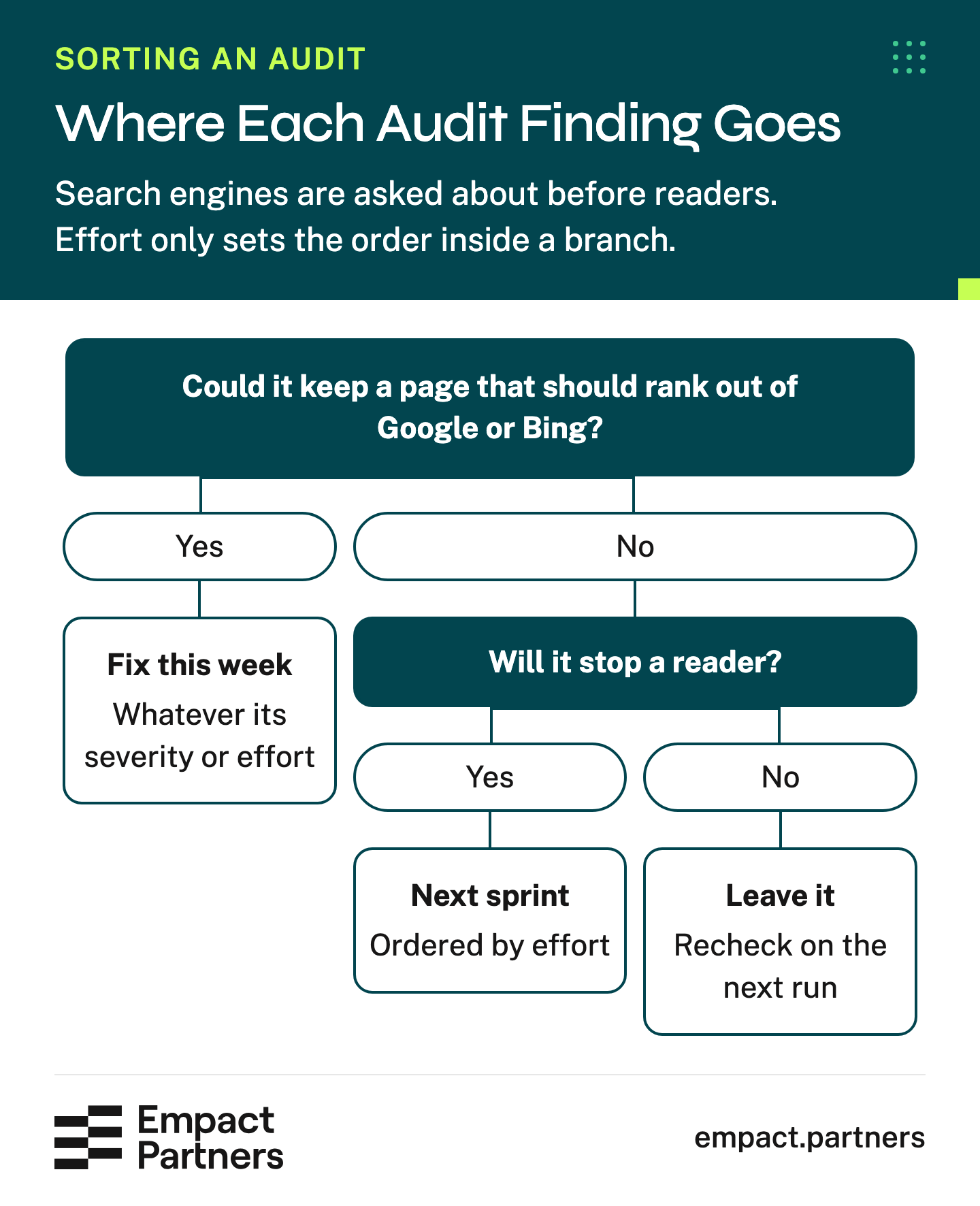
The first gate is narrow on purpose. Few faults keep a page out of search, and the ones that do are cheap to check, so the first group stays short. Here is where the findings most exports carry usually land:
Scroll horizontally to see all columns when the table is wider than this page.
| Finding in the export | Who it hurts | Effort | Where it goes |
|---|---|---|---|
| Sitemap on the server but never submitted, or submitted at an old address | Search engines | Minutes | This week |
| A group of pages that should rank, missing from Google’s index | Search engines | Hours to weeks, often one template | This week |
| A robots.txt rule blocking pages you want found | Search engines | Minutes | This week |
| Changed URLs with no permanent redirect | Search engines and readers | Hours | This week |
| Bing indexation never checked in Bing Webmaster Tools | Bing search and Copilot answers, with nobody watching | Minutes | This week |
| Broken images | Readers | Minutes to hours | Next sprint |
| Internal links to pages that no longer exist | Readers and crawlers | Hours | Next sprint |
| Images that carry information but have no alt text | Readers using screen readers | Hours | Next sprint |
| Core Web Vitals at “needs improvement” on content pages | Nobody stopped, some readers slowed | Days | Can wait |
| 404s on pages removed on purpose | Nobody | None | Leave |
| Duplicates that point to their indexed original | Nobody | None | Leave |
| Title and meta description length warnings | Rarely anyone | Hours | Leave |
Eulene du Plessis at Empact Partners puts the first question ahead of every severity in the export:
Ask one question of every row before you look at its severity: could it keep a page that should rank out of Google or Bing? Only a handful of faults can, and each takes minutes to check. Anything else that stops no reader can wait, and the next run will show whether it has grown.

Practitioners who sort audits for a living weigh the same things, what a fault costs against how many pages it touches, and the effort against the return:
Tips from Reddit
What practitioners on Reddit say about sorting an audit
if a contact page’s “submit” button is broken, it may have a 1 reach but 9 impact.
I’ve delivered tech audits in the past that are just a few pages long and only touch on 4-5 key issues.
Also spent weeks of manpower raising core vitals from a 40 -> 90. Benefits? Zero.
Five Faults That Can Keep Pages Out of Search
The first group is short, and all five are worth checking before you open anything else in the export. None of them shows up while your team browses the current site, so a site can look finished while search engines miss whole sections of it.
A sitemap that exists but was never submitted
A sitemap.xml file on the server is not the same as Google reading it. Google calls a submitted sitemap a hint, and submitting it in Search Console’s Sitemaps report shows you when Googlebot last read it and whether it hit errors.4
If it was submitted years ago, check the address it was submitted at, the date Google last read it and any errors. Then check that the file includes every page that should rank, and nothing you have retired.
If your site runs in more than one language, check one thing before you add pages that look missing:
Pages missing from the index because of how the site is built
Search Console’s Page indexing report shows how many of your URLs Google has indexed and why it left out the rest.3 Most of the reasons in it are routine. What deserves the first hours is a whole group of pages that should rank sitting under one reason, like every docs page marked as crawled but not indexed.
A pattern like that usually comes from how the site is built. A canonical tag in one template points at the wrong page, content only appears after scripts run, or filter pages multiply into thousands of thin URLs.
A routine coverage check on one partner’s site showed Google had left a large part of the site out of its index, and the cause was the site’s own architecture. A crawler sees only the pages it requested, and only Search Console shows which ones Google kept.
A robots file blocking what it should not
Robots.txt tells crawlers which pages they may fetch. Google says it is not a way to keep a page out of its results, and a blocked URL can still be indexed from links elsewhere, just without its content.5 The fault to look for is a rule that blocks pages you want found. We have seen one come from nothing more than a developer’s mistake.
Deliberate blocks are rarer than teams fear. Our own count of the Forbes Cloud 100’s marketing sites in October found none of 96 closing an AI answer crawler in robots.txt. A rule you find blocking pages that should rank is more likely a leftover than a decision. It takes a minute to spot, and it outranks everything else in the export.
Redirects missing after a URL change
Every changed URL needs a permanent redirect to its new address, whether or not the old page has backlinks. Google asks for server-side permanent redirects such as 301 or 308, kept generally for at least a year so its signals move to the new address, and chains of ideally no more than three hops, always fewer than five.6
Missing redirects usually come from a redesign, a move to a new content management system (CMS) or a slug somebody tidied. Links in other sites’ articles, in your old emails and in forum threads keep pointing at the old address for years. Each one that ends on a 404 loses a reader and the value of the link.
Bing indexation nobody checked
Most teams verify their site in Google Search Console and stop there. Bing Webmaster Tools has long reported indexing and crawl health for Bing. Since February 2026 its AI Performance report also shows how often Microsoft Copilot and Bing’s AI summaries cite your pages, and which ones.7
Bing access belongs on the first day of an audit for that reason. Pages Bing has left out of its index are unlikely to be cited there, and nothing in a Google report will tell you.
A crawl catches the robots rules, the redirects and what the sitemap includes. Whether Google and Bing read the sitemap and kept the pages, only their own reports show. The agent below checks up to 100 of your pages for redirect chains, sitemap conflicts, canonical tags and crawl directives. It is one free run of the agent we run for our SEO partners:
Broken Images and Dead Links Go in the Next Sprint
The second question picks up what stops readers before it bothers search engines. Think of a product screenshot that won’t load, a help article whose link ends on a 404, or an image with no alt text for someone using a screen reader. None of them keeps a page out of the index, and each one makes the page worse for the person reading it.
On one SaaS partner’s support center, the audit flagged broken images from a content delivery network and images with no alt text. We sorted them by what a reader would meet first and how long each fix would take, never by the score. Customers open help articles mid-problem, so a broken screenshot there costs more than one on an old blog post.
Dead internal links belong in the same sprint. Each one sends a reader to a dead end and makes a crawler waste a request, and most come from a few templates, a footer or a sidebar repeated on every page. Group the repeats before you count them, and the number of fixes usually shrinks to a handful.
Core Web Vitals and Other Warnings That Can Wait
Core Web Vitals are Google’s three measures of how a page feels to use. Largest Contentful Paint (LCP) is how fast the main content appears. Interaction to Next Paint (INP) is how fast the page responds to a tap or click. Cumulative Layout Shift (CLS) is how much the layout jumps while it loads.
Google counts a page as good when it meets three thresholds on three visits in four: the main content within 2.5 seconds, a response within 200 milliseconds and layout shift of 0.1 or less.8
Most of the web is not there yet. In the 2025 Web Almanac, which reads Chrome’s data from real visits, 48% of mobile websites passed all three. On loading alone, a quarter sat in the middle band:9
How Mobile Websites Score on Each Core Web Vital
Share of mobile websites in each band, Chrome field data, 2025 (HTTP Archive)
View the data
| Label | Good | Needs improvement | Poor |
|---|---|---|---|
| Loading (LCP) | 62% | 25% | 13% |
| Response (INP) | 77% | 21% | 3% |
| Layout (CLS) | 81% | 10% | 9% |
Leave content pages in the middle band. On a blog post or a help article, “needs improvement” slows some readers without stopping them, an acceptable resting state. Readers arrive on every kind of phone and connection, and no single sprint makes the slowest of them fast.
A “poor” reading is different on the pages buyers land on, such as pricing, a demo page or the product pages your ads point at. There it can stop a buyer, and it joins the second group.
Most of the long tail can wait too. Title and meta description length warnings, low word counts, 404s on pages you removed on purpose and duplicates that already point to their original can stay in the export. Google’s own help says neither of the last two is a problem in itself.3 Look again only if a page that matters starts to slip.
The Four-Hour First Pass
You can check the first group yourself in an afternoon, before anyone opens the full export. The fixes may take longer. The check takes four things, and only the last one involves your developers:
Then run the checks, quickest first, and note what you find for the developer:
Open robots.txt.
Make sure no rule blocks a page or folder you want found, and that nothing written for a staging site came along at launch.
Check the Sitemaps report.
In Search Console, confirm the sitemap is submitted at its current address, was read recently and shows no errors. Submit it if it isn’t, and check that it includes the pages that should rank.
Open Bing Webmaster Tools.
Verify the site if nobody has, submit the sitemap there as well, and compare what Bing has indexed with what Google has.
Test your old URLs.
Take addresses from before the last redesign or CMS move, and check that each one lands, through a single redirect, on the page that took its place.
Read the Page indexing report.
Look for a group of pages that should rank sitting under one reason, and note the template or section they share.
Sort what is left.
Put every remaining row through the second question, write down the reader-facing fixes for the next sprint and leave the rest where it is.
If the afternoon turns up more than one sprint can hold, the playbook below helps you choose the fixes for the first sprint and test each one:
The afternoon’s checks are yours to run. Keeping the fixes in place is a different job, because the next launch brings faults of its own.
How a Twice-Monthly Check Keeps the Fixes in Place
Technical faults come back with releases. A launch adds pages the sitemap doesn’t include. A redesign changes URLs. A rule added to robots.txt for a test stays after the test. None of it shows on the page, and without a fixed check the first person to notice is often a stakeholder asking why a page dropped out of search.
Empact Partners would start where this guide starts, with what Google and Bing report about your site. A warning becomes a task only once we can show the fault on one of your pages. From then on we check the site on a fixed cadence, roughly twice a month, whether or not anything shipped, so drift shows up before anyone asks. Technical SEO with us covers:
- A first pass built on your Search Console and Bing Webmaster Tools data
- Each warning shown on a real page, with what happens now and what should happen instead
- Fixes planned with your engineers, starting with the errors that hurt buyers and crawlers
- The audit rerun by our crawl agent after each release and compared with the last run
- A written fix for anything new, counted as done only when the same check passes on your live site
The goal is a site whose important pages stay indexed and readable through every launch. Checks run on a schedule are how you see one of them slip before a stakeholder does.
Frequently Asked Questions
Is a site health score of 70 bad?
Not on its own. In Ahrefs, 70 means 70% of crawled pages carry no error, and the tool rates anything from 31 to 70 as fair. Which pages make up the other 30% matters far more than the number.
If they are old blog posts sharing one template error, the score overstates the problem. If they include your pricing or product pages and the error keeps them out of the index, even a 90 would hide a fault worth fixing this week.
Do 404 errors in an audit hurt our rankings?
A 404 on a page you removed on purpose, with nothing to replace it, is normal, and Google’s help says it is not necessarily a problem. The 404s worth fixing are the ones your own internal links point to, and any URL you changed, which should redirect to its new address.
Fix internal links at their source, redirect every changed URL, and leave 404s on retired pages in the export.
What does “Crawled, currently not indexed” mean in Search Console?
Google crawled the page and did not index it. Its own help calls this a common message that doesn’t necessarily need attention, and on a handful of thin or near-duplicate pages it needs none.
A whole section that should rank sitting under that reason deserves attention. Pages grouped like that usually share a cause: a template, thin content repeated across them, or internal links that make them look unimportant. Run a few of them through the URL Inspection tool, fix the shared cause, and watch whether the section moves in the report.
Do we need Bing Webmaster Tools if Google already indexes us?
Yes, because Google’s index tells you nothing about Bing’s. Bing Webmaster Tools shows what Bing has indexed and any crawl problems. Its AI Performance report, in public preview since February 2026, shows how often Microsoft Copilot and Bing’s AI summaries cite your pages.
Verifying the site and submitting your sitemap there takes minutes. Pages Bing has left out of its index are unlikely to appear in those answers, however well they do on Google.
Does a submitted sitemap get every page indexed?
No. Google describes a sitemap as a hint about which pages exist, never a promise to crawl or index them. Submitting it in Search Console’s Sitemaps report is still worth doing, because it shows when Google last read the file and whether it hit errors.
Keep the sitemap to pages that should rank, with no redirects or retired pages in it, so the report tells you something about the pages you care about.
How long should redirects stay in place after we change URLs?
Google’s site-move guidance says to keep permanent redirects for at least a year, so its signals reach the new URLs, and to consider keeping them for good for the sake of visitors. Old links in other sites’ articles and in emails keep sending people to the old addresses long after that year.
Unless a redirect causes a problem, leave it in place, and point each old URL straight at its final page instead of through a chain.
Does robots.txt keep a page out of Google?
No. Robots.txt controls which pages crawlers may fetch, and Google says plainly that it is not a way to keep a page out of search. A blocked URL can still be indexed from links elsewhere, just without its content.
To keep a page out of results, let Google crawl it and add a noindex tag, or remove the page. Use robots.txt to keep crawlers away from things like internal search results that waste their visits.
Should we fix title and meta description length warnings?
Rarely as a sprint task. Length warnings flag titles and descriptions that may be cut off in results, which matters only on pages that already rank and get seen.
If a page that matters shows plenty of impressions and few clicks in Search Console, rewriting its title is worth an afternoon. Rewriting hundreds of titles to fit a character count clears rows in the export, and pages nobody sees in results gain nothing from it.
Who should own the twice-monthly check?
One named person, usually whoever owns the website or SEO on the marketing team, with a developer available for fixes. The check itself is short. Compare this run with the last, look at the indexing reports in Search Console and Bing, and turn anything new into a ticket with the page and the fix written on it.
A check nobody owns turns into an audit once a year, after something has already broken.
Should missing alt text be fixed on every image?
Fix it on every image that carries information: product screenshots, diagrams, charts and anything a reader needs to follow the page. Those descriptions are how someone using a screen reader gets the same content, and they tell search engines what the image shows.
Purely decorative images can carry an empty alt attribute instead, which tells screen readers to skip them. On a support center or docs site, start with the pages customers open most.
Sources (9)
- Ahrefs Help Center, "What is Health Score and how is it calculated in Ahrefs Site Audit?" (2026)↩1read 25 November 2026.
- Semrush Knowledge Base, "How is Site Health Score calculated in the Site Audit tool?" (2026)↩1read 25 November 2026.
- Google Search Console Help, "Page indexing report" (2026)↩1↩2↩3read 25 November 2026.
- Google Search Central, "Build and Submit a Sitemap" (2026)↩1read 25 November 2026.
- Google Search Central, "Robots.txt Introduction and Guide" (2026)↩1read 25 November 2026.
- Google Search Central, "Site Moves and Migrations" (2026)↩1read 25 November 2026.
- Microsoft Bing Blog, "Introducing AI Performance in Bing Webmaster Tools Public Preview" (2026)↩110 February 2026.
- web.dev, "Web Vitals" (2026)↩1read 25 November 2026.
- HTTP Archive, "Performance" (2025)↩1↩2The 2025 Web Almanac, 15 January 2026.
Keep reading
SEO Is a Free Technical SEO Audit Enough to Decide What to Fix?
A free technical SEO audit finds what’s broken in minutes. Ordering the fixes takes facts it can’t read: pipeline, past decisions, capacity.
SEO Should Your SaaS Hire an SEO or Outsource the Work?
One SEO generalist can’t run technical work, content, mentions, and Reddit. Name the owner of the roadmap and the pipeline number first.

SEO Who Should Own AI Search When You Already Run SEO
Already run SEO? Keep AI search under the same owner and report each AI engine apart. What 500 buyer questions show, and when to hire.